
Philo has quietly become the “why am I paying so much?” solution for viewers who just want to watch live TV without the massive cable bill. It doesn’t try to be everything. Instead, it picks a lane—entertainment—and stacks the experience with practical features that matter day to day. That focus is exactly why this platform keeps showing up in value conversations, especially for viewers who want familiar channels, easy playback, and far less bill shock at the end of the month.
The big question is simple: is this platform right for your household, your routine, and your viewing style? This breakdown looks at what the service actually offers, who it fits best, current costs, what is missing, and what to pick instead if it isn’t the right match.
Overview
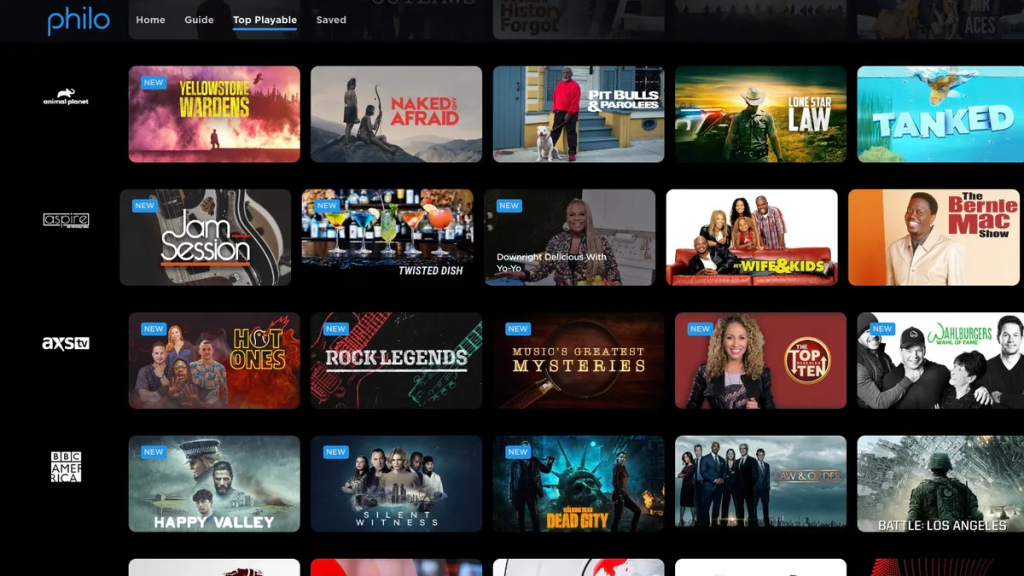
Philo is designed around entertainment rather than sports-heavy or local-news-heavy packages. Think lifestyle channels, family programming, comedy, drama reruns, and those easy-to-watch background networks. The service aims to replace traditional cable for people who mainly tune in for entertainment, without forcing them to pay the high fees associated with regional sports and local broadcast bundles.
What makes the platform stand out is its overall balance. It sits in a much lower monthly price range than the big bundles, and it pairs that with a very user-friendly app, a generous unlimited cloud DVR, and multi-device streaming that feels built for modern households.
This subscription is at its best when expectations are set correctly. It is not the service for weekend sports fanatics, and it isn’t built around local broadcast news. It is built strictly for entertainment-first viewing, bringing live networks together with massive on-demand convenience.
Features
The feature set is designed to remove the annoying parts of old-school television: rigid schedules, missed episodes, and fighting over the remote control.
Key features viewers actually feel:
- Live channel access heavily focused on entertainment categories.
- Unlimited cloud DVR recording for saving a good series to watch and building a massive watch-later library that lasts for a full year.
- Multiple user profiles so recommendations and watchlists do not get mixed up across the household.
- Multiple simultaneous streams so more than one person can watch at once.
- Mobile, TV, and web apps so viewing works on almost all common streaming devices and smart TVs.
- Optional add-ons for viewers who want premium networks without switching to a completely different interface.
How the best setup is built:
- Set up profiles immediately. The experience becomes much cleaner when each person has their own profile and personalized watchlist.
- Record series, not episodes. A “record the series” habit makes it feel like new episodes are always waiting in the library.
- Use the DVR as a personal channel lineup. After a week or two, your recorded items essentially become the main homepage.
- Add only what’s missing. If a household needs one specific premium network, attaching a small add-on is usually cheaper than moving to a bloated bundle.
The design philosophy here is simple: make television easy again, but keep the monthly bill tightly under control.
Pricing
Pricing is the biggest reason people consider this service. Recently, the platform streamlined its offers to stay highly competitive against the major sports-forward bundles while keeping the entry price exceptionally low.
A practical way to look at the current pricing model:
- Essential Plan ($25/month): This is the budget live tier, offering over 70 live channels plus the unlimited 1-year DVR.
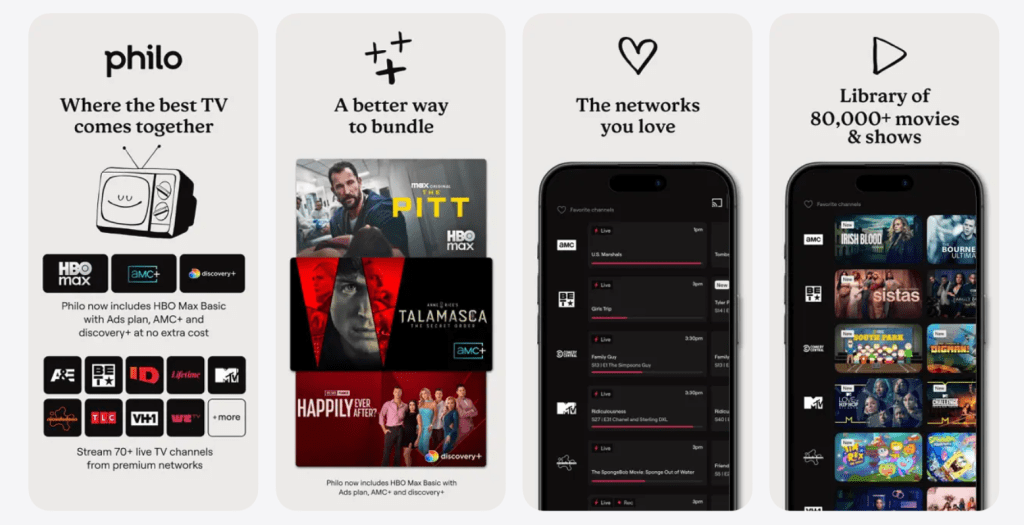
- Bundle+ Plan ($33/month): This upgraded tier includes everything in Essential, plus it bundles in AMC+, HBO Max Basic (with ads), and Discovery+. If you recently read a Discovery Plus Review and planned to subscribe to it anyway, this combined package offers incredible value.
- Free content options: Some users treat the app as a mix of paid networks plus the 100+ free ad-supported streaming channels it provides right in the guide.
Who gets the best value:
- Viewers who want live entertainment networks but skip the sports entirely.
- Households that previously used cable mainly for the best reality TV shows or home improvement programming.
- People who want the “set it and forget it” simplicity of one bill and one unified app.
If live sports are the priority, this package might look cheap initially but could become the wrong purchase, because replacing those missing games elsewhere will quickly erase the savings.
User Base
This platform tends to attract a very specific audience—and that is a good thing for its overall focus.
Most common viewer types:
- Cord-cutters who want network television without premium sports pricing attached.
- Families who need a mix of kids’ content, lifestyle programming, and movies to watch with family.
- Fans of True Crime TV Shows who follow multiple investigation networks and want live access to premieres.
- Viewers who like having background shows playing during work, cooking, or downtime.
- People who are tired of subscription stacking and want one simple hub for basic entertainment.
A quick user story: A household cancels cable, tries a few on-demand apps, then realizes they miss live channels for casual viewing. They don’t miss sports, and they don’t miss local news. They mostly miss the comfort networks and the classic “channel surfing” feeling. Philo becomes the perfect replacement because it brings that vibe back without rebuilding the old massive cable bill.
Advantages
The advantages are straightforward, and they hit the exact parts of streaming that frustrate people the most: pricing creep and complicated setups.
Top advantages:
- Significantly lower monthly cost compared with sports-heavy services.
- Entertainment-first channel focus, meaning you never pay for sports fees.
- Strong unlimited DVR convenience that supports real-life schedules.
- Household-friendly features like individual profiles and multiple simultaneous streams.
- A simple upgrade path with smart add-ons, instead of forcing a full expensive bundle right away.
- Highly intuitive app navigation.
The platform also wins psychologically. It feels like a smart, deliberate purchase. The user doesn’t feel punished financially for skipping sports.
Disadvantages
The weaknesses aren’t hidden—they are basically the direct flip side of the service’s budget strategy.
Main disadvantages:
- Not the right fit for sports fans, as live sports coverage is non-existent compared to major bundles.
- Local broadcast channels (like ABC, NBC, CBS, Fox) are not included in the way traditional cable viewers expect.
- News-first viewers will feel underserved depending on their must-have daily networks.
- Some households will still need a secondary service or an antenna if they want local broadcasts or very specific premium content.
A clear way to decide: if a household would sign up for a live package mainly to catch the local evening news or Sunday football, this is not the right pick. If a household simply wants entertainment channels with DVR convenience, it makes much more sense.
Safety
This is a legitimate, fully licensed service with standard account controls. The “risk” here isn’t usually about security—it’s about account hygiene and managing household settings.
Simple safety checklist:
- Use a strong password and do not reuse old ones from other accounts.
- Log out of devices that are no longer used or have been sold.
- Create separate profiles so kids do not land in mature content menus.
- Watch for billing overlaps, and make sure to cancel unused services if this platform replaces them.
- Avoid sketchy “free subscription” links online—those are often phishing attempts.
For families, the most useful safety move is utilizing profile management and paying attention to what is being watched on shared screens.
Alternatives
This service isn’t one-size-fits-all, so looking at the alternatives matters. The best replacement depends entirely on what the viewer feels is missing.
If sports is the priority:
A sports-forward service will always be a better fit than Philo. If you need a comprehensive package with local channels and major sports networks, reading a FuboTV Review is a smart next step, though it will cost considerably more.
If budget cable replacements are needed:
If you want to keep costs low but need at least some news or sports access, checking out a Sling TV review might reveal a better middle-ground package.
If free streaming is the priority:
Free ad-supported platforms can replace casual viewing for many people. While they usually won’t replicate a live cable-style lineup with brand new episodes, reading a Pluto TV review can show you how much free content is actually out there for casual channel surfing.
If on-demand originals matter more than live channels:
A premium on-demand service will likely deliver more value if you care more about big-budget exclusive series than having a live channel guide.
FAQ
1) What is Philo best known for?
Philo is best known for low-cost live TV streaming focused on entertainment channels, paired with DVR-style convenience.
2) Does Philo include sports?
It is not a sports-first service. It may have limited sports-related content, but it’s not built to replace a full sports lineup.
3) Does Philo have local channels?
This service is focused on cable entertainment, so local broadcast availability may not match what cable viewers expect.
4) Can multiple people watch at the same time?
Yes, simultaneous streaming is supported, which is a big reason it works well for households.
5) Does it have a DVR?
Yes. Unlimited DVR-style recording is a core feature that helps the experience feel flexible.
6) Is Philo good for reality TV fans?
Yes. It’s often a strong fit for reality TV and lifestyle viewing because that’s where the channel focus shines.
7) Is Philo cheaper than bigger live TV bundles?
In many cases, yes. The pricing advantage usually comes from avoiding sports-heavy costs.
8) Can it replace cable completely?
For entertainment-first households, yes. For sports or local-news-first households, a second service may still be needed.
9) Is it available on smart TVs and streaming devices?
It’s designed to work across common TV platforms and devices, so installation is typically straightforward.
10) Are premium add-ons available?
Yes. Add-ons are usually offered, which helps viewers expand content without switching services.
11) Is it worth it alongside Netflix or Prime Video?
It can be. Live channels and DVR convenience solve a different problem than on-demand libraries.
12) Who should avoid Philo?
Viewers who want live sports as a core feature or who require a full set of local broadcast channels should consider alternatives.
Final Verdict
Philo is a smart buy when the goal is simple: get live entertainment channels, keep the monthly bill sane, and make TV feel flexible again. It won’t satisfy every kind of viewer, and it doesn’t pretend to. But for the audience it’s built for—entertainment-first households that want live TV without paying for sports—Philo delivers a clean, practical experience that’s easy to keep.