Plex is the rare platform that can make a home feel like it has its own private streaming service, while also offering free, ad-supported entertainment in the same interface. That mix is why it gets recommended so often. It’s not just another Netflix-style app. It’s a media hub that can organize personal libraries, stream them to almost any device, and still give viewers a free catalog when they don’t feel like curating anything.
For many households, streaming services have created two problems at the same time: too many subscriptions and too much chaos. People have movies on laptops, shows on external drives, family videos scattered across phones, and then five different streaming apps on the TV. Plex is built to pull that mess into one clean home screen.
This review breaks down what Plex actually does, who it’s best for, which features matter most, how the free vs paid options typically work, where it wins, where it can frustrate people, how to use it safely and legally, and what alternatives make sense depending on viewing style.
What Plex Is Best For
Plex works best for viewers who want control without losing convenience. Some people love subscriptions because they’re easy. Others want to build a long-term library they actually own and can access anytime. Plex sits right in the middle.
It’s a strong fit for:
- Viewers who have personal media files, including movies, series, home videos, and want a clean library.
- Households that want one interface for TVs, phones, tablets, and laptops.
- People who like the idea of a home streaming server without building something complicated.
- Collectors who want poster art, metadata, episode tracking, and watch history for their own content.
- Anyone who wants free streaming as a bonus inside the same ecosystem.
- Families who want to share a library across devices with proper permissions.
It can be less ideal for:
- Viewers who only want mainstream subscriptions and never use personal media.
- People who don’t want any setup time and prefer one-click simplicity forever.
- Households with weak home internet or older hardware that struggles with streaming.
- Anyone expecting the free catalog to replace premium paid services entirely.
A simple way to decide: Plex is worth it when a household has personal media or wants one hub that reduces the “where is that file?” frustration.
How Plex Works
Plex is easiest to understand as two experiences that can live together:
- Personal Media Server
A computer, NAS, or dedicated device stores the media files. Plex indexes them, adds artwork and details, and streams them to TVs and devices like a personal Netflix. - Free Streaming Extras
Plex can also provide free, ad-supported content and live-style viewing options depending on what’s available in the viewer’s region and device.
The important distinction: the personal media side is about what the viewer owns or has access to, while the free side is about what Plex can provide without a subscription fee.
The Real-Life Setup Story
A practical household example:
- A viewer has a laptop with downloaded family videos, purchased digital files, and old DVDs ripped for personal archival where legal.
- They want to watch those on the living-room TV without plugging in cables.
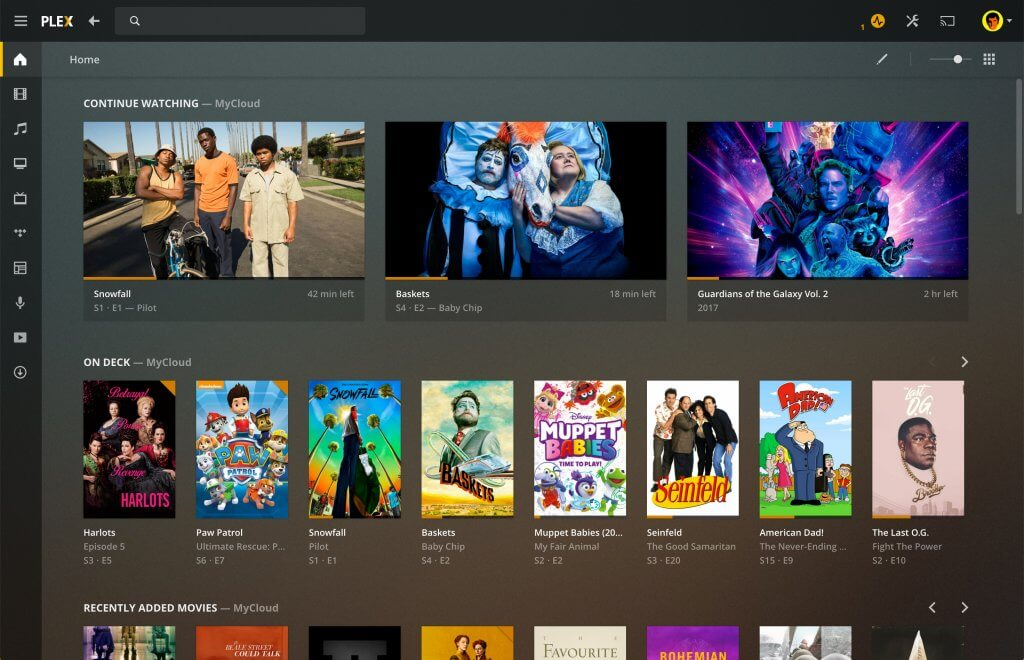
- Plex organizes it like a real streaming service: posters, seasons, episodes, and Continue Watching.
- The household keeps one clean hub rather than hunting files on different devices.
That’s the job Plex does best: turning scattered content into a real library experience. It can be especially useful when a household has old favorites, home videos, and movies to watch with family stored across different devices.
Personal Library and Movie Discovery
Plex becomes more powerful when the library is treated like a real collection, not just a folder dump. A clean Plex library can help viewers rediscover older films, forgotten favorites, and personal collections that would otherwise sit untouched on a hard drive.
That makes it useful for collectors who care about:
- Older favorites.
- cult classic movies.
- 2000s movies saved from older collections.
- black and white movies that need proper organization.
- International titles, subtitles, and best foreign movies inside a personal library.
This is where Plex feels different from a normal app. It does not only help viewers find what is trending. It helps them make their own library usable again.
Key Features That Matter
Plex has a lot going on, but only a few features truly change the daily experience.
Library Organization and Metadata
This is the wow factor for first-time users. Instead of messy filenames, Plex can display:
- Show posters and movie artwork.
- Season and episode organization.
- Descriptions, cast, runtime, and genre.
- Recently Added rows.
- Trending in your library.
- Continue Watching.
For personal collections, this transforms a folder of files into a streaming library.
Streaming to Almost Any Device
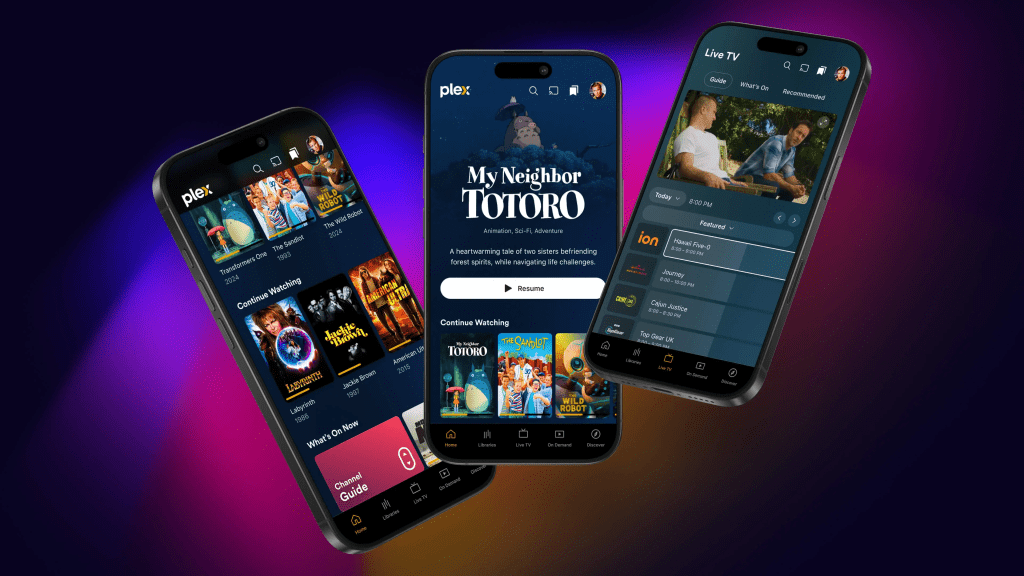
Plex is popular because it works across a wide range of devices. The value is simple: the library follows the viewer around the home.
That matters when the household wants to move between:
- Living-room TV.
- Bedroom TV.
- Phone.
- Tablet.
- Laptop.
- Travel setup, where supported.
A personal library becomes more valuable when it is not trapped on one computer.
User Profiles and Managed Access
Profiles help shared households keep watch history clean. Managed access matters for families, because not everyone should see everything.
This is useful for:
- Separating adult viewing from children’s viewing.
- Keeping recommendations cleaner.
- Letting different people track their own progress.
- Sharing parts of a library without sharing everything.
A Plex setup becomes much stronger when profiles are treated seriously from the beginning.
Remote Streaming
With the right setup, viewers can stream their library when away from home. This feature is powerful, but it’s also where good security habits become non-negotiable.
Remote streaming works best when:
- The home internet upload speed is strong.
- The server is stable.
- The account is secured properly.
- Remote access settings are not left careless.
- The household understands that quality may drop when the connection is weak.
Remote access can make Plex feel like a private streaming service, but it should be set up carefully.
Transcoding
Transcoding is the make-or-break feature. It lets a powerful server convert a file into a format that plays smoothly on a device.
If the home server is weak, transcoding can cause:
- Buffering.
- Lower quality.
- Playback errors.
- Heavy CPU usage.
- Frustration when multiple people stream at once.
If the server is strong, it feels effortless.
The cleanest setup is usually one where the files direct play whenever possible, because that reduces pressure on the server.
Watchlists, Discovery, and Free Content Options
For viewers who want variety without opening another app, Plex can be a useful what-should-we-watch tool, especially when personal content and free content live side by side.
This matters because Plex is not only for personal files. Depending on region and device, it can also support free streaming and live-style browsing, which gives the platform a more complete household role.
Free Live-Style Viewing
Plex can also work as a casual free-viewing option when the household does not want to dig through personal files.
That matters for viewers who still like the feeling of watch live TV without committing to cable or another paid live-TV package. It gives Plex a second role: personal library hub first, free entertainment option second.
Pricing and Plex Pass Value
Plex can be used for free, but there’s also a paid layer, often called Plex Pass, that adds extra features. Pricing changes over time, so the evergreen way to judge value is based on behavior, not a specific number.
Free Plex Experience
The free Plex experience typically makes sense when:
- The household mostly streams personal content inside the home.
- The setup is simple and does not need advanced features.
- Viewers want a clean library and basic streaming without extra costs.
- The platform is used occasionally rather than as the center of the whole entertainment setup.
For many people, free Plex is enough to understand whether the platform fits their household.
When Plex Pass Makes Sense
Plex Pass tends to make sense when:
- The household wants premium features that improve daily use.
- The server setup is central to entertainment, not just occasional use.
- The household needs specific upgrades like advanced controls, smoother mobile convenience, or better overall flexibility.
- Multiple people use the library regularly.
- Remote or mobile use becomes part of the routine.
A household should not pay just because the upgrade exists. It should pay when the missing features matter every week.
A Step-by-Step Way to Decide
This keeps the decision practical:
- Use Plex free for a week
Build one clean library and test it normally. - Stream on the TV and one mobile device
This shows whether the household actually uses it across screens. - Identify what’s missing
Is the problem convenience, control, offline access, better sharing, or performance? - Upgrade only if the missing features matter weekly
If Plex is mostly a sometimes tool, free may be enough.
This prevents paying for features a household does not truly use.
Performance and Quality in Real Homes
Most Plex complaints come from performance expectations, not the interface.
The biggest performance factors are:
- Server power: older laptops can struggle when multiple streams happen at once.
- File formats: some files direct play easily, while others trigger transcoding.
- Home network stability: Wi-Fi strength matters more than people think.
- Device compatibility: some TVs handle more formats than others.
- Remote upload speed: remote streaming depends heavily on the home connection.
The Practical No-Buffering Playbook
Use this setup logic before blaming Plex:
- Use ethernet for the server if possible because stability matters.
- If a TV struggles, use a better streaming device. It is often a bigger upgrade than buying a new TV.
- Favor direct play formats when possible to reduce server load.
- Limit simultaneous heavy streams if the server is modest.
- When remote streaming is used, expect it to depend heavily on upload speed at home.
Plex is best when a household treats it like a system: server, network, and playback device working together.
User Base and Who Enjoys Plex Long-Term
Plex has a very specific kind of long-term fan base: people who want a library they control.
Common long-term users:
- Collectors: keep a curated library and want it organized beautifully.
- Families: share content across rooms and devices with profiles and rules.
- Budget strategists: reduce subscription reliance by building a personal library.
- Tech-friendly households: enjoy setting things up once and then benefiting for years.
- Hybrid streamers: use personal media plus free content to keep entertainment flowing.
People who usually don’t stick with it:
- Those who want no setup ever and prefer everything pre-packaged.
- Viewers who don’t have personal media and don’t care about organizing it.
- Households that expect Plex to replace premium originals from major studios.
Family and Household Value
Plex can be especially useful in homes where different people want different things from the same TV setup.
A household might use Plex for:
- Personal movie collections.
- Family videos.
- Shared shows.
- Travel downloads, where supported.
- Free ad-supported viewing.
- kids movies stored in a controlled section of the library.
That last point matters because Plex can be safer and cleaner when parents organize the library intentionally instead of letting kids browse through everything.
Advantages
Plex is a strong platform because it solves real problems, not trendy ones.
- Turns Personal Files Into a Real Streaming Library
Posters, seasons, descriptions, and watch tracking make the experience feel premium. - Reduces Subscription Chaos
It can centralize entertainment so the TV isn’t just a pile of disconnected apps. - Cross-Device Convenience
The same library works across phones, tablets, and TVs, which makes personal content far more usable. - Great for Long-Term Ownership Mindset
A personal library does not leave the platform when licensing changes elsewhere. - Strong Household Sharing Options
Profiles and managed access can keep things organized and appropriate when used properly.
Disadvantages
Plex has tradeoffs that matter depending on the household.
- Setup Is Real
It is not hard, but it is not zero effort. People who hate setup may lose patience. - Performance Depends on Server and Network
If the server is weak or Wi-Fi is unstable, the experience can feel frustrating. - Remote Streaming Requires Good Internet and Good Security
It is powerful, but it is not plug-and-play for every household. - Free Content Is a Bonus, Not the Main Promise
The free catalog is useful, but it does not do the same job as premium subscription services. - Personal Media Must Be Obtained Legally
Plex is a tool. How the content is sourced matters. This is non-negotiable for safe, ethical use.
Safety, Privacy, and Legal Use
This section matters because Plex can involve remote access, accounts, and personal media.
Security Basics That Should Never Be Skipped
Use these habits from the start:
- Use a strong, unique password for the account.
- Turn on two-factor authentication if available in the account ecosystem.
- Keep the server device updated.
- Keep Plex updated.
- Be careful with remote access settings.
- Don’t expose more than needed.
- Use managed users or profiles for family members rather than sharing one login.
This matters more with Plex than with a simple streaming app because Plex can touch personal files, home networks, and remote access.
Legal Use and Why It Matters
Plex is designed for:
- Personal media files the viewer owns.
- Legally obtained content.
- Family videos and personal archives.
- Licensed streaming options inside the app.
It should not be used as a guide to piracy or illegal distribution. The smartest long-term approach is to treat Plex as a personal library organizer, not a shortcut around legal streaming.
Where Plex Fits in a Streaming Lineup
Plex works best when it has a clear role. It does not need to replace every paid app. It can sit beside them and reduce chaos.
A smart lineup might look like:
- Plex for personal media and free extras.
- One paid service for premium originals.
- One rotation service for trending seasons.
- One rental option for specific new movies.
- One free app for casual browsing.
That kind of setup works better than trying to make one app do everything. Plex is strongest when it organizes what the household already has and adds free viewing as a bonus.
Plex Alternatives
The best alternative depends on what the viewer wants Plex to do.
If the Goal Is a Personal Media Server
Common alternatives include:
- Jellyfin.
- Emby.
- Local NAS media tools.
- Device-specific media server options.
Jellyfin often appeals to people who want full control. Emby has a similar personal-media mindset. Plex is usually the more mainstream-friendly choice for households that want a polished interface and wide device support.
If the Goal Is Simple Local Playback
Local media players and casting options can be enough for small libraries.
This works best when:
- The library is small.
- The household only watches on one TV.
- Metadata and posters do not matter much.
- Remote access is not needed.
A full Plex setup is more useful when the library grows or multiple devices need access.
If the Goal Is Free Streaming Entertainment
Plex can offer free content, but some viewers may prefer dedicated free apps.
Useful alternatives include Pluto TV, Tubi, Freevee, and other free streaming apps available in the viewer’s region. Pluto TV can feel stronger for channel-style browsing, while Tubi often feels more direct for free on-demand movies.
If the Goal Is Premium Originals and Mainstream Libraries
Plex does not replace the big subscription platforms for originals and new series drops.
Viewers who want premium originals may still compare Netflix, Prime Video, Disney Plus, Max, Hulu, or Paramount Plus. Plex is better as a hub for owned media and personal collections than as a full replacement for premium catalogs.
If the Goal Is Finding Films Across Platforms
Plex helps organize a personal library, but viewers who are mainly trying to find films across platforms may still need movie streaming sites, rental stores, or where-to-watch tools.
The key takeaway: Plex is most valuable when the household wants ownership, organization, and a clean hub. It is not just another catalog. It is a way to make personal media feel like a real streaming service while keeping free entertainment nearby.
FAQ
1) What is Plex mainly used for?
It’s mainly used to organize and stream personal media libraries to TVs and devices, like a private streaming service.
2) Is Plex free to use?
Yes, a free version exists and can be enough for many households. Some users choose Plex Pass for advanced features.
3) Does Plex provide movies and shows for free?
It can include free, ad-supported content options, but the core identity is personal media streaming.
4) Does Plex require a server?
For personal media streaming, yes—a computer or NAS typically acts as the server. For free content viewing, a server may not be required.
5) Is Plex difficult to set up?
It’s usually straightforward, but it does require basic setup: installing the server, pointing it to media folders, and adding a playback app.
6) Can Plex stream outside the home?
Yes, remote streaming is possible with the right settings, but performance depends on home upload speed and secure configuration.
7) Why does Plex buffer sometimes?
Buffering often comes from a weak server, heavy transcoding, unstable Wi-Fi, or a playback device that struggles with file formats.
8) What is transcoding and why does it matter?
Transcoding converts video into a format the device can play. It’s helpful, but it can be demanding on hardware.
9) Is Plex safe to use?
Yes, when accounts are secured and servers are kept updated. Strong passwords and safe remote access settings matter.
10) Can Plex be used by a family?
Yes. Profiles and managed users help keep watch history clean and content appropriate.
11) Does Plex replace Netflix and other subscriptions?
Not directly. It can reduce reliance on subscriptions for personal libraries, but it won’t replace premium originals.
12) Is Plex legal?
Plex is legal software. Users should ensure the media they stream is legally obtained and used appropriately.
13) What devices can play Plex content?
Many popular smart TVs, streaming devices, phones, tablets, and computers can use it through apps or web playback.
14) Is Plex good for older TVs?
Yes, especially when paired with a capable streaming device that handles modern formats better than the TV’s built-in system.
15) Who should skip Plex?
Viewers who never use personal media and want zero setup may be happier sticking to standard subscription services.
Final Verdict
Plex is one of the smartest ways to turn personal media into a clean, Netflix-like home experience while still offering free streaming options as a bonus. It shines for households that want control, long-term ownership, and a single hub that reduces subscription chaos and file-hunting frustration. For anyone willing to do a little setup, Plex can become the most “permanent” piece of a streaming lineup—reliable, customizable, and built around content the household actually owns and uses.