YouTube Movies is the “watch it tonight” option for people who don’t want another monthly subscription just to see one film. Instead of acting like a single streaming catalog, it works like a storefront and library: viewers can rent or buy titles individually, and in some regions also find a rotating selection of movies that are free with ads.
It also gets misunderstood a lot. This is not YouTube TV, the live TV service. This is the Movies & TV experience inside YouTube (and the connected Google TV/Play Movies library), built for on-demand rentals, purchases, and occasional free-with-ads viewing rather than being one of the typical online streaming services people compare it to.
What YouTube Movies Actually Is
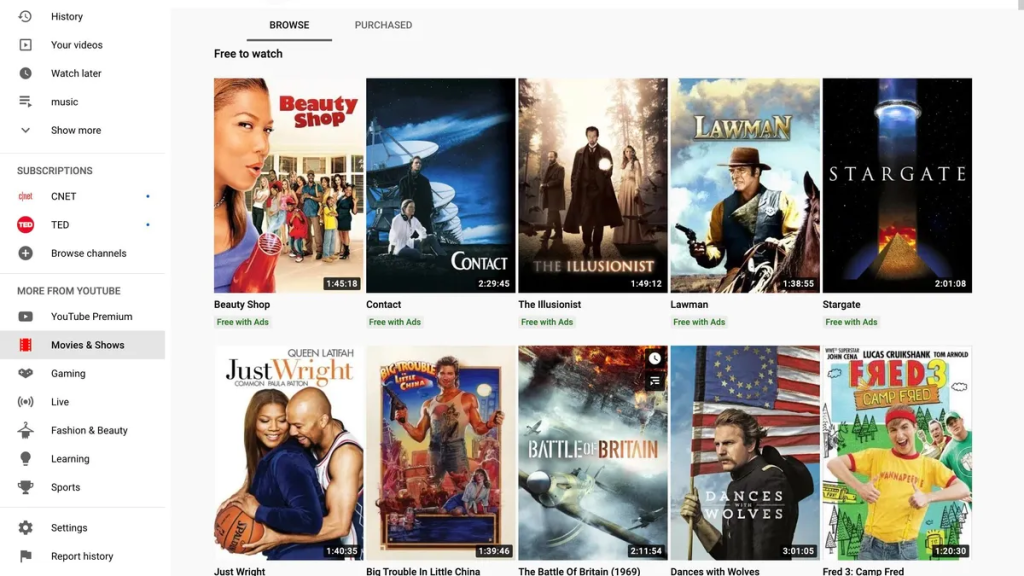
At its core, this platform is a digital store and personal library:
- Rent: Pay once to watch within a limited window.
- Buy: Pay once, keep it in the account library for rewatching (availability can still vary by region and licensing changes).
- Free with ads (where available): Watch select titles without paying, with ad breaks.
The “value” is convenience. Viewers can search a title, see if it’s rentable or buyable, and start watching fast without committing to a monthly plan.
How Rentals and Purchases Work in Real Life
This is where the experience feels practical.
Renting flow (typical):
- Viewer finds a title and selects Rent.
- Payment happens through the connected Google account.
- The rental becomes available in the viewer’s library.
- Playback works on supported devices, usually instantly.
Buying flow (typical):
- Viewer selects Buy (often with HD/4K options depending on the title/device).
- The title is stored in the account library.
- The viewer can rewatch later across supported devices, as long as the title remains available in that region.
The big catch: availability can differ by country and can change. A title that’s rentable today might be missing tomorrow in another region, or move behind a different provider’s window.
Content Library and Discovery
This isn’t built like a subscription catalog where the service is “known for” a fixed set of originals. Discovery tends to work in three ways:
- Search-first: Someone already knows what they want to watch and uses YouTube to find it.
- New releases & trending: Many viewers browse the storefront tabs for recent or popular titles.
- Free-with-ads browsing (where offered): Viewers treat it like a casual “channel surf” experience, but on-demand.
The catalog often leans on mainstream studio releases and popular TV seasons, but it also holds a surprising number of cult classic movies and older titles that have quietly dropped out of the big subscription libraries. That mix makes it a useful gap filler when a subscription catalog doesn’t have a specific film.
Features That Matter
A lot of the feature set is simple, but the simplicity is the point.
- One account library: Purchases and rentals live in the user’s library tied to the Google account.
- Cross-device watching: Start on one device, continue on another (experience varies by app/device).
- Quality options: Many titles support HD or higher resolutions depending on the title and device.
- Watchlist behavior: Some users rely on Google TV watchlists more than the YouTube storefront itself.
- Optional offline viewing (device-dependent): Some setups allow downloads for offline viewing on mobile, which is helpful for travel or unreliable connections.
Pricing and Value (Without Time Traps)
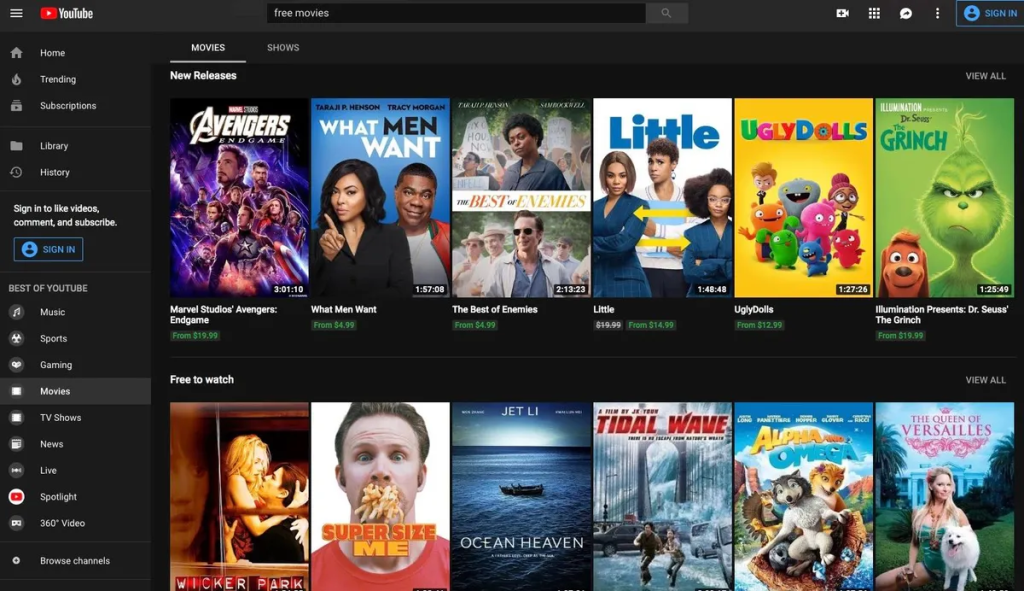
YouTube Movies isn’t priced like a monthly streaming subscription. The cost is generally per title, and it usually breaks into:
- Lower-cost rentals for quick, one-time viewing
- Higher-cost purchases for rewatching and long-term library building
- Free with ads for viewers who prioritize cost over uninterrupted playback (where this is available)
Value depends on the viewing habit. A household watching a few event movies a month without rewatching often comes out ahead renting rather than paying for a full subscription. A viewer who replays favorites repeatedly, on the other hand, can find that buying becomes cheaper over time than chasing the same title across multiple platforms.
User Experience and Devices
This is one of the strongest reasons to use it: YouTube is everywhere.
Viewers typically watch through:
- The YouTube app on phones, tablets, smart TVs, and streaming devices
- Web browsers on laptops and desktops
- The broader Google TV / Play Movies library ecosystem (depending on the device and region)
Because YouTube is already installed on many TVs, the barrier to entry is low. That’s a big deal for casual households that don’t want to manage yet another app login and interface.
Who Uses It Most
This tends to fit these viewer types:
- “One movie tonight” viewers who don’t want another subscription
- Households sharing a TV where YouTube is already the default app
- People who hate app-hopping and prefer a quick search-and-play flow
- Travelers who want a predictable rental/purchase experience on devices they already use
It’s less ideal for viewers who want a single monthly subscription delivering a steady stream of originals and bingeable series inside one contained catalog — that’s a different kind of movie streaming sites experience entirely.
Advantages
- No monthly commitment: Pay only when a specific title is wanted.
- Fast access: Easy to jump from search to playback.
- Massive device support: YouTube is available on almost everything.
- Works as a backup plan: Great when subscription services don’t carry a title.
- Free-with-ads option (where available): Adds a no-pay pathway for casual viewing.
Disadvantages
- Not a true subscription catalog: It’s a store/library model, not a subscription library experience.
- Region and licensing limitations: Availability can change and varies by country.
- Costs can add up: Frequent rentals can quietly become more expensive than one solid subscription.
- Ad breaks on free titles: The free route trades money for interruptions.
Safety and Account Controls
Most risks are basic account-management issues, not content risks.
Smart habits:
- Use a strong Google password and 2-step verification.
- Restrict purchases with PIN/approval controls if kids use the same TV.
- Avoid saving payment methods on shared devices if the household is large or loosely managed.
For families, purchase controls matter. One accidental rental on a living-room TV is all it takes for someone to get annoyed.
Best Alternatives
The best alternative depends on what the viewer is trying to replace.
For subscription libraries, Netflix review covers the steady-stream-of-originals experience YouTube Movies doesn’t try to offer, and Prime Video, Disney Plus, and HBO Max round out the same category depending on what a household already pays for.
For online free streaming, Pluto TV and Tubi fill a similar no-cost niche, and readers weighing the ad-supported route might find it useful to see how the free tier stacks up against movies to watch on Netflix as a paid comparison point.
For pure rentals and purchases, the closest match is the Apple TV storefront — same pay-per-title model, different ecosystem — while Amazon’s rental options serve viewers who are already anchored to a Prime account.
In a broader context, YouTube Movies fits best as the practical backup option — the place viewers turn when a title they want isn’t sitting in any of their existing subscriptions, and paying once is simpler than adding another monthly bill.
FAQs
- Is this the same as YouTube TV?
No. YouTube TV is live television. This is the movies-and-TV storefront/library experience for rentals, purchases, and some free-with-ads titles. - Do viewers need a monthly subscription?
No monthly plan is required for renting or buying titles. Costs are usually per movie or season. - Can movies be watched on a smart TV?
Yes, typically through the YouTube app on supported smart TVs and streaming devices. - Do rentals last forever?
No. Rentals usually have a limited viewing window and rules that depend on the region and title. - Do purchases guarantee permanent access?
Purchases are stored in the account library, but availability can still vary due to regional licensing changes. - Is there a free option?
In some regions, yes—select movies are available free with ads. - Do free titles include ads?
Yes. The free viewing model usually includes ad breaks. - Can kids accidentally rent or buy something?
It can happen on shared devices, so purchase restrictions and account controls are recommended. - Is offline viewing possible?
Some setups allow offline downloads on mobile, depending on device/app support and the title. - Does it support high-quality playback like HD or 4K?
Many titles do, but it depends on the title, device compatibility, and internet speed. - What’s the best way to use it without overspending?
Use it as a “targeted” option: rent only what isn’t available on existing subscriptions, and buy only true rewatch favorites. - Is it good for people who already use YouTube daily?
Yes—because the interface feels familiar and the app is already installed on many devices. - Can a viewer start on a phone and continue on TV?
Often yes, especially when the same account is signed in across devices. - Is it a good choice for households with multiple streaming subscriptions?
Yes. It works well as the backup plan when a title isn’t included elsewhere. - Who should skip it?
People who want one monthly subscription with a deep binge catalog and lots of originals may prefer a dedicated subscription service.
Final Verdict
YouTube Movies is best viewed as a flexible storefront and library, not a traditional subscription streaming service. It shines when a household wants one specific title tonight, doesn’t want to sign up for another monthly plan, and wants playback that works on almost any device without fuss. As part of the ForeverWatch streaming lineup, YouTube Movies makes sense as the practical “rent, buy, or watch free with ads” option—simple, familiar, and surprisingly useful when other services don’t have what viewers want.