Sling TV is built for people who still want live channels—sports, news, and that classic “something is on right now” feeling—without paying absolute full cable prices. It is definitely not an all-you-can-watch library like Netflix, bro. Among modern streaming services, Sling TV is closer to a highly flexible live-TV bundle that can stay incredibly lean, scale up for massive sports seasons, and shrink right back down when the hype dies off.
This review breaks down exactly how Sling TV works in real households, who it is best for, where it heavily annoys people, and how to get serious value out of it without turning it into a pricey cable monster.
Overview
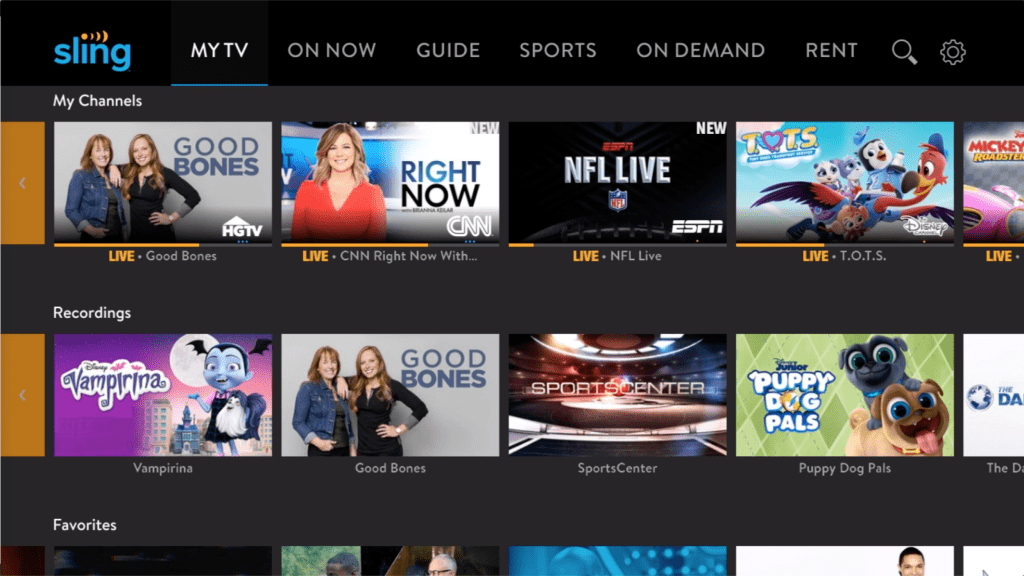
At its core, Sling TV is one of the pioneer platforms that allows you to watch live TV entirely over the internet. You pick a base plan and can add optional “extras” (sports, news, lifestyle, kids, etc.) only if your household actually needs them.
- What it does perfectly: Live channel browsing, satisfying traditional channel-guide viewing habits, and enforcing a “pay only for what matters” budget.
- What it doesn’t try to be: A single, magical subscription that miraculously includes every show, network, and live event on earth. It is not trying to compete with massive on-demand movie streaming sites.
- The best way to think about it: This is a traditional cable-style experience, but significantly lighter and massively customizable.
How It Works in a Real Home
In most homes, the service becomes the “open it first” option when someone specifically wants a live broadcast instead of jumping online to watch TV shows online on demand. The most common flow looks like this:
- Open the app.
- Scan the live channel guide.
- Jump directly into a broadcast.
- Record the important stuff to the cloud (if DVR is enabled).
- Add or remove “Extras” depending on what the household is actually watching this month.
It is a phenomenal fit for families who want quick, channel-based viewing again—without paying for a massive bundle filled with 80 channels that nobody ever touches.
Key Features That Actually Matter
Most viewers don’t care about fancy tech buzzwords. They care about the basics working smoothly.
- Live Guide & Channel Flipping: The channel guide is the absolute heartbeat of the platform. Because the guide is clean and easy to navigate, the whole experience feels “TV-like” again.
- Cloud DVR Options: Recording matters immensely for sports fans and busy households. Sling provides 50 hours of free cloud DVR out of the box.
- Add-ons (“Extras”): This is where the service can be incredibly powerful or a massive trap. Extras allow total customization, but blindly stacking too many is exactly how people accidentally rebuild an expensive cable bill.
Plans and Pricing: The Smart Way to Think About Cost
Sling TV constantly updates its pricing and package structures, so the winning strategy isn’t just memorizing numbers—it’s understanding exactly how costs stack up.
For 2026, the base plans generally look like this:
- Sling Select ($19.99/mo): A budget option that is best for news and lifestyle viewers, including only 1 simultaneous stream.
- Sling Orange ($45.99/mo): Geared heavily toward families and sports fans, packing networks like ESPN and Disney.
- Sling Blue ($45.99/mo): Best for news and entertainment, carrying networks like FOX News, MSNBC, and Bravo. (Note: Sling Blue may cost an additional $5-10 in some markets where local ABC, NBC, and Fox channels are provided)
- Sling Orange & Blue ($60.99/mo): Combines the two main packages to give you the most comprehensive coverage and bumps you up to 4 simultaneous streams.
A simple rule keeps things strictly under control: Only pay for extras that solve a real problem. If a channel pack doesn’t improve what the household watches weekly, it’s just pure noise on the bill. Treat extras as seasonal—add the Sports Extra pack to watch live football or the NBA playoffs, then immediately remove it.
Channels and Content: What to Expect
Channel value depends entirely on what the viewer wants and what’s available in their specific region. In practice, viewers usually fall into three categories:
- Sports-led households: They care about specific sports networks, live reliability, and recording games. If the chosen plan and extras perfectly match their leagues, it is a brilliantly strong deal.
- News-led households: They want live news channels, morning routines, and quick access. This is where live-TV streaming tends to feel most “worth it” without spending a massive premium.
- Mixed entertainment households: They want a healthy blend of the best reality TV shows, lifestyle programming, and gritty crime TV shows. This works well, but only if the household keeps the overall package highly intentional.
Streaming Quality and Reliability
Live TV is massively less forgiving than on-demand. If the internet is unstable, buffering shows up incredibly fast—especially during major live sporting events.
What improves stability fast:
- Using a newer, dedicated streaming stick (old, built-in TV hardware can often feel heavily sluggish).
- Reducing Wi-Fi congestion (too many devices streaming at once).
- Moving the streaming device closer to the router or plugging in an Ethernet cable.
When the setup is right, picture quality is typically solid and highly consistent for everyday viewing.
Who This Is Best For
This service isn’t for every viewer, bro. It is built for a very specific habit style.
The Best Fit:
- People who watch live sports or news regularly.
- Viewers who strongly prefer a traditional channel guide over endless algorithmic scrolling.
- Households that demand absolute control over what they pay for.
Not a Great Fit:
- People who exclusively watch on-demand originals or high-budget thriller movies.
- Viewers trying to figure out where to watch movies fresh out of theaters (Sling is fundamentally a TV platform).
- Fans who specifically want to watch anime online (you are much better off with a dedicated niche sub like Crunchyroll).
- Households that completely hate managing plans, extras, and settings.
Advantages and Disadvantages
Where It Wins:
- Flexible setup: The biggest win is absolute control. Viewers can build a custom package that matches their exact habits instead of paying for fluff.
- Live-TV feel without contracts: The guide and channel browsing perfectly scratches the cable itch without the brutal cable commitment.
Where It Misses:
- Easy to overspend with extras: This is the absolute #1 complaint style: the base feels affordable, but then the extras pile up and destroy the budget.
- Not a full replacement for on-demand libraries: Many households still find they need to keep at least one on-demand service for binge-watching.
Safety and Account Tips
Even mainstream streaming apps can cause severe headaches in shared households if the account isn’t managed carefully.
Review subscription add-ons occasionally to brutally avoid silent overspending.oosing an alternative is mostly about one question: does the household want live channels or on-demand libraries?
Use a strong, unique password (do not reuse old ones).
Keep payment methods heavily protected if multiple people or roommates use the main TV.
If kids use the TV, separate viewing habits where possible.
FAQ
1) What is this service mainly used for?
It’s mainly used for watching live channels like sports, news, and entertainment without traditional cable.
2) Is it the same thing as cable?
No. It streams over the internet and is usually more flexible than cable contracts.
3) Does it include local channels?
Sometimes, depending on location and plan options. Availability can vary.
4) Is it good for sports fans?
It can be a great fit if the chosen plan and add-ons match the leagues and networks the viewer actually watches.
5) Does it have a DVR?
Yes, cloud DVR options are available, and DVR upgrades can be worth it for people who record often.
6) Can it replace Netflix-style streaming?
Not fully. Live-channel services and on-demand libraries serve different habits, so many households keep both.
7) Is it easy for beginners?
It can be, but the best experience usually comes after trimming channels and avoiding unnecessary add-ons.
8) Why do people say it gets expensive?
Because extras stack. The bill grows when viewers add packs “just in case” and never remove them.
9) Is it good for families?
Yes—especially if the household agrees on what’s worth paying for and avoids random add-on creep.
10) Can it be used on multiple devices?
Yes. Most households use it on TVs, phones, tablets, and web browsers depending on their routine.
11) What’s the fastest way to improve the experience?
Use a modern streaming device, stabilize Wi-Fi (or use Ethernet), and keep the package lean.
12) Who should skip it?
Anyone who never watches live channels and only streams on-demand shows will likely get better value elsewhere.
13) Is it worth it for seasonal viewers?
Often, yes. Subscribing during sports seasons and canceling later can make the value feel much stronger.
14) What’s the biggest mistake people make?
Treating extras as permanent. Most packs should be temporary upgrades tied to real viewing habits.
Final verdict
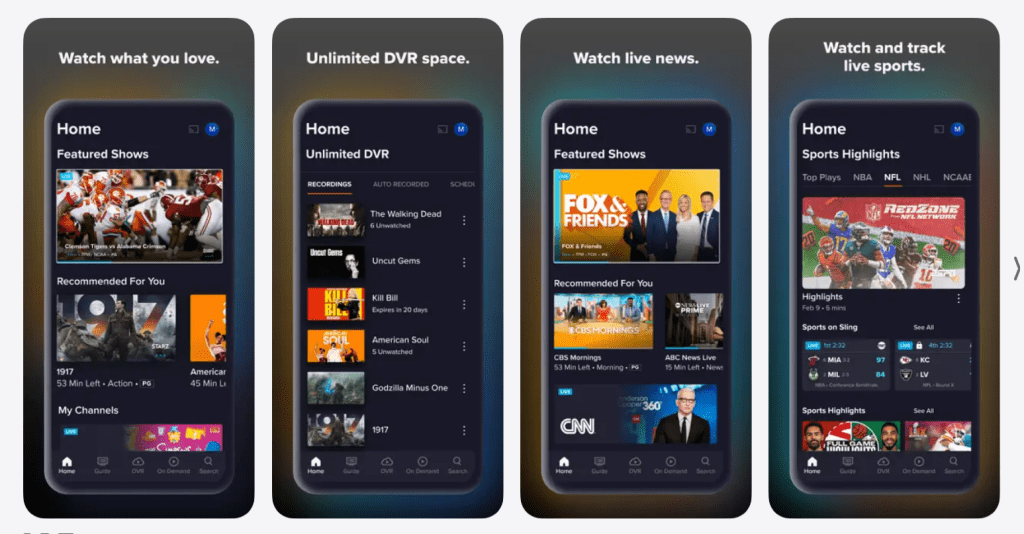
Sling TV works best when it’s treated like a customizable tool, not a forever-bundle. People who watch live sports, live news, or channel-based TV habits can get real value—especially if they keep extras controlled and set up DVR only when it genuinely helps.
If the household wants live channels without cable contracts, Sling TV can be a strong choice. If the household only wants on-demand binge watching, Sling TV will feel like an unnecessary layer.