Prime Video is a flexible platform inside the wider world of streaming services, blending an included library with optional rentals, purchases, and, in many regions, extra channel add-ons. That setup can feel like a cheat code for viewers who want choices in one place, especially when they are comparing the best movies to watch on Amazon Prime with paid rental options. It can also feel distracting for viewers who just want a clean subscription library with zero upsells.
So what’s the real question here? Not whether the service is “good.” The real question is whether it matches the way someone watches. Some people want one app that covers a bit of everything. Others want a simple, curated experience where every click leads straight to play.
This review breaks down how Prime Video works in real life: what to expect from the catalog, how to avoid annoying “pay extra” surprises, how pricing typically behaves, and how it stacks up against competitors when someone is choosing a streaming lineup.
How Prime Video Works
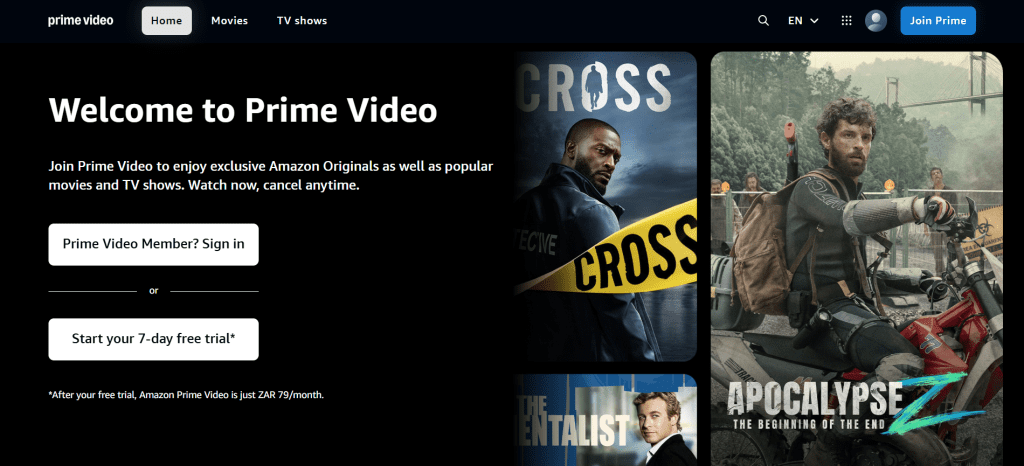
What Makes Prime Video Different
Most streaming services feel like one product. Prime Video usually feels like a platform made of layers. Understanding those layers is the fastest way to decide if it fits.
In many markets, the experience includes:
Included streaming titles
These are the shows and movies available as part of the base access.
Rent/Buy storefront titles
These are one-time purchases or rentals, often newer releases or specific catalog titles.
Channel add-ons, optional
In supported regions, viewers can subscribe to extra services inside the same interface.
This structure creates the main tradeoff:
Pro: One app can cover subscription streaming, rentals, and add-ons.
Con: Browsing can feel cluttered because not everything is included.
A viewer who understands this upfront usually enjoys Prime Video more. A viewer who expects a “pure subscription library” can get irritated quickly.
Content Library
Prime Video generally offers a wide mix, but the catalog can feel different depending on country and licensing. That’s normal in streaming, but it matters because expectations can break the experience.
The library typically includes:
- Original series and exclusive titles.
- Licensed movies and TV shows that rotate.
- Reality, docuseries, and unscripted content.
- Kids and family options, including movies to watch with kids.
- Region-specific titles that may not appear elsewhere.
Originals and Exclusives
Original content is the anchor. These titles tend to remain available longer, and they’re often what keeps subscribers from cancelling during slower months.
What viewers usually like about originals:
- They’re exclusive, so there’s less platform hopping to find them.
- They often feel like event-style releases.
- They’re designed to be binge-friendly.
But it’s important to be honest: quality varies. Some originals hit hard. Some are forgettable. The best way to judge value is whether the originals match the household’s taste, especially if viewers mostly care about the best TV shows on Amazon Prime rather than the full library.
Licensed Titles and Why They Rotate
Licensed content is where streaming becomes unpredictable. A movie can be available one month and gone the next because rights change. That doesn’t automatically mean the service is losing content. It means licensing windows move.
Practical takeaway:
- Subscribe for the overall experience and steady viewing habit.
- Don’t subscribe only for one licensed title unless it’s confirmed available.
Region Differences
Prime Video availability can change by location. Even when a title exists in multiple countries, it might differ in:
- Included vs rent/buy status.
- Audio/subtitle options.
- Quality formats.
- Release timing.
For ForeverWatch, it’s a good idea to frame the library as “varies by region” to keep the review evergreen and accurate.
Browsing Experience and Included vs Paid Confusion
Prime Video can be smooth or frustrating depending on one thing: how people browse.
The most common frustration looks like this:
- Viewer sees something interesting.
- Clicks play.
- Learns it’s not included.
- Feels like the platform is tricking them.
That reaction is emotional, not technical. And it’s why some people bounce off quickly.
How to Make Prime Video Feel Clean
If a viewer sets the service up properly, most frustration disappears. Here’s a step-by-step approach that actually works:
Filter for included titles first
This instantly removes most paid listings from the browsing flow.
Build an Included Only watchlist
This creates a clean queue that feels like a normal subscription service.
Treat rentals as intentional
Rentals feel fine when they’re chosen on purpose for movie night. They feel bad when they appear like surprise paywalls.
Ignore add-ons unless there’s a clear reason
Add-ons can be useful, but they’re also where cost creep happens.
Prime Video rewards intentional browsing. If someone scrolls randomly, it can feel messy. If someone browses with filters and watchlists, it becomes far more enjoyable.
Key Features
Prime Video has several features that genuinely improve the viewing experience, especially for households that want convenience and control.
X-Ray
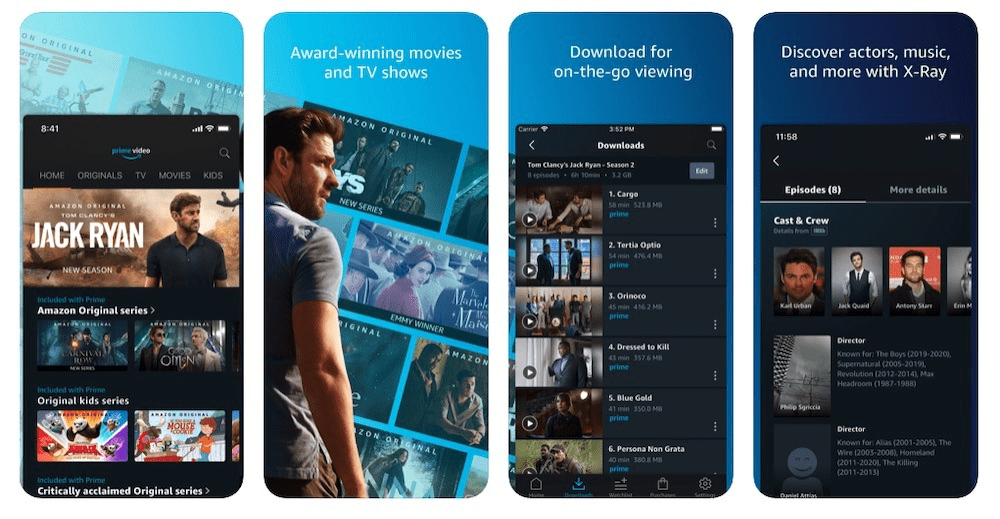
X-Ray is one of the standout features. It can show cast info and scene details while the show is playing. For viewers who constantly wonder “Where have I seen this actor?” it’s a surprisingly addictive advantage.
Watchlist and Discovery Tools
A watchlist matters more on this platform than on many competitors because it can be used to separate:
- Included picks for easy wins.
- Rentals for intentional choices.
When used properly, the watchlist reduces decision fatigue and keeps browsing simple.
Downloads
Offline downloads are a practical win for:
- Travel.
- Commuting.
- Unstable internet situations.
- Data-conscious users.
A viewer who uses downloads regularly often feels like Prime Video offers better day-to-day value than someone who only streams live.
Profiles and Household Organization
Profiles help keep recommendations and “Continue Watching” clean. Without profiles, one household can quickly mess up discovery for everyone.
Pricing and Value
Exact prices vary by country and change over time, so the evergreen way to understand Prime Video is to focus on how costs typically show up.
Most viewers experience costs through:
- Base access, either as a subscription or included with a broader bundle in some regions.
- Optional rentals and purchases as one-time payments.
- Optional add-ons as extra subscriptions inside the same interface.
A Simple Worth-It Test
A viewer can decide value quickly with these questions:
Does the household watch weekly?
Subscription value rises when usage is consistent.
Does the household care about renting new releases?
If yes, Prime Video’s store layer can be a major convenience advantage, especially for viewers trying to decide where to watch movies without checking ten different apps.
Will the household subscribe to multiple add-ons?
If yes, costs can quietly balloon.
Do the originals match the household’s taste?
If yes, people keep it. If not, it becomes a rotation service.
The biggest financial mistake is stacking add-ons without tracking them. The smartest approach is to treat add-ons as temporary, goal-based subscriptions.
Who Prime Video Is Best For
Prime Video typically fits these viewer types best:
The variety household
Different tastes under one roof: crime, reality, kids, docs, comedy.
The movie-night household
People who stream regularly but also like renting specific new releases sometimes.
The utility subscriber
Someone who likes one platform that can do subscription streaming, rentals, and optional add-ons.
The rotation strategist
Someone who rotates services but keeps this active as a baseline due to variety and rental convenience.
Who might not enjoy it:
- People who hate seeing paid listings while browsing.
- Viewers who want a purely curated subscription-only library.
- Users who never rent anything and find the store layer annoying.
Prime Video can be excellent, but it’s not one-size-fits-all. It’s a tool. And tools work best when they match the job.
Advantages
Here’s where Prime Video genuinely performs well:
- Flexibility
Streaming, rentals, and optional add-ons give viewers multiple ways to get what they want. - Convenience for specific titles
When viewers want a particular movie without searching across multiple movie streaming sites, the store layer is fast. - Strong feature set
X-Ray and downloads add real everyday value. - Broad variety
It often covers multiple moods and genres in one place. - Works well as a baseline service
It can stay active while other subscriptions rotate in and out.
Disadvantages
Prime Video’s weaknesses are mostly about clarity and cost discipline.
- Included vs paid confusion
If a viewer doesn’t filter properly, frustration builds. - Cost creep risk
Rentals and add-ons can slowly turn into a bigger monthly spend. - Browsing can feel less curated
Some competitors feel tighter and more premium in discovery and presentation. - Regional differences
The catalog and even what’s included can vary a lot by location.
None of these are dealbreakers for everyone. But they’re real. And they matter.
Safety and Account Security
Prime Video is mainstream, but account security still matters, especially when payment methods are tied to the account.
Common risks include:
- Weak or reused passwords.
- Shared logins across too many people.
- Phishing messages pretending to be billing issues.
- Unsecured email accounts, because password resets go through email.
Practical checklist:
- Use a strong, unique password.
- Secure the email attached to the account.
- Avoid clicking billing links. Log in directly instead.
- Review devices or account activity occasionally.
- Use profiles for privacy inside households.
Good security isn’t complicated. It’s consistent habit.bits.
Alternatives and When They Fit Better
Prime Video fits many households, but alternatives can beat it depending on viewing style.
- Netflix: Often better for a clean binge-first experience and strong recommendations
- Disney+: Strong for families and franchise-focused viewing
- SkyShowtime: streamlined, studio-backed hub for European viewers, replacing endless, cluttered catalogs with a curated selection of prestige dramas and major franchises.
- Max: Often feels more prestige-driven and curated
- Peacock / Paramount+: Useful if viewers want specific brand libraries
- Tubi / Pluto TV: Solid free options if viewers accept ads
- MUBI / Kanopy: Better for curated cinema and niche film discovery
Smart strategy for many households:
Keep one baseline service, then rotate others depending on what the household wants next.
FAQs
1) Is Prime Video worth keeping all year?
It depends on how often the household streams and whether they enjoy the originals. Many viewers keep it as a baseline and rotate others.
2) Why do some titles cost extra?
Because Prime Video combines an included library with a store and sometimes add-ons.
3) How can viewers avoid paid titles while browsing?
Use filters for included content and build an included-only watchlist.
4) Is Prime Video good for movie lovers?
Yes, especially for viewers who like renting specific releases without searching across platforms.
5) Does Prime Video support downloads?
In many cases, yes on supported mobile devices, which helps travel and unstable internet.
6) Is it good for families?
It can be, especially when profiles and controls are used properly.
7) What’s the biggest downside?
The “included vs paid” mix can feel cluttered unless browsing is filtered.
8) Can add-ons make it expensive?
Yes. Add-ons are the most common source of cost creep.
9) Is it better than Netflix?
Different strengths. Prime Video is flexible; Netflix is typically simpler and binge-first.
10) Why does availability vary by country?
Licensing rights differ by region, so catalogs change across locations.
11) Does it work on smart TVs?
In most cases, yes. It’s widely supported on mainstream devices.
12) Can Prime Video replace other services?
For some households, yes. For niche needs, rotation is usually smarter.
13) Is Prime Video safe to use?
Generally yes, but account security depends on passwords and phishing awareness.
14) Who shouldn’t choose Prime Video?
Viewers who want a pure subscription-only library with no store listings may prefer a simpler service.
15) What’s the fastest way to improve the experience?
Use filters, set up profiles, and build an included-only watchlist.
Final Verdict
Prime Video makes the most sense for viewers who want a flexible streaming hub: a broad library for everyday watching, the option to rent a specific movie when it matters, and (where available) the ability to add extra channels without juggling separate apps. It’s not the cleanest “subscription-only” interface by default, but it becomes much smoother when browsing is filtered and the watchlist is used intentionally.
For a modern streaming setup—especially one built around rotating services—Prime Video can play a strong baseline role because it covers variety, convenience, and on-demand access in one place.