Google TV is less a streaming service and more the control center that sits on top of streaming services, helping viewers search, browse, and decide what to watch without bouncing between apps all night. That positioning matters. People who expect one big content library might misunderstand it. People who want a smoother way to manage multiple subscriptions usually get the value immediately.
At its best, it reduces the two biggest streaming frustrations: decision fatigue and app hopping. Instead of checking five apps to figure out where to watch movies, it tries to surface the answer in one place. Instead of endless scrolling, it pushes recommendations, watchlists, and Keep Watching rows that make the TV feel organized.
This review breaks down what Google TV actually is, how it behaves in real households, what it costs in an evergreen way, which features matter most, where it wins, where it can annoy people, and what alternatives make sense if the fit isn’t right.
What Google TV Is
What Google TV Is
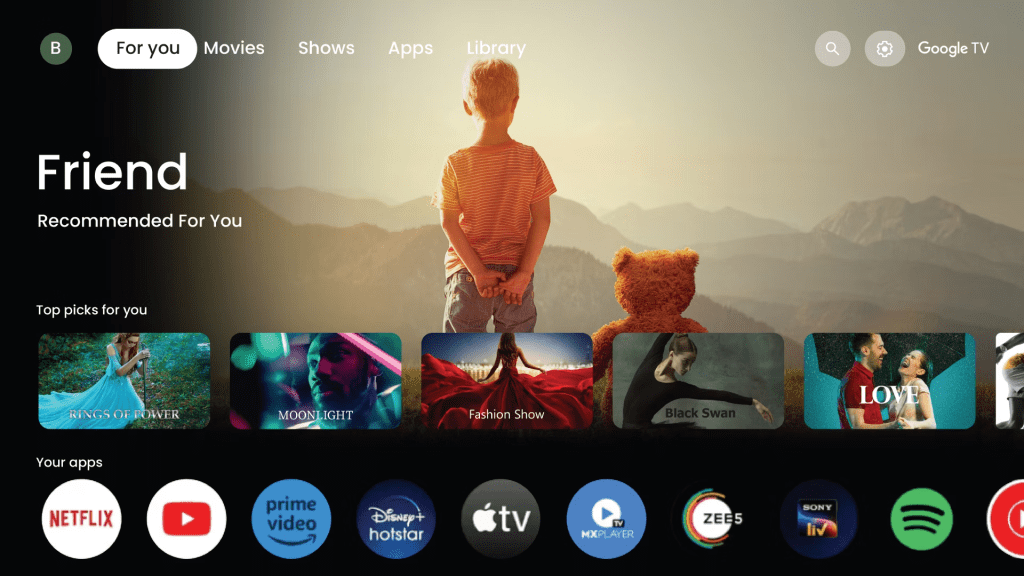
Google TV is a smart TV interface and content discovery layer that can appear in a few common ways:
- Built into a smart TV, where Google TV works as the operating system or interface.
- Built into a streaming device, such as a plug-in dongle or box that turns any TV into a Google TV experience.
- Available as a companion app experience for watchlists, discovery, and planning what to watch.
The key idea is simple: Google TV tries to be the home screen for streaming. Viewers browse titles first, then open the right app to play them.
That creates two important realities:
- Google TV is only as good as the apps available on it and the services a viewer subscribes to.
- The experience improves dramatically when viewers set up watchlists, profiles, and preferences.
Who Google TV Is Best For
Google TV usually works best for households that use more than one streaming service and want a calmer way to navigate.
It’s a strong fit for:
- Multi-subscription households using Netflix, Disney Plus, Prime Video, and other services.
- People who waste time choosing and want better discovery tools.
- Households that share a TV and need profiles, watchlists, and Keep Watching rows to stay clean.
- Viewers who like voice search for things like action movies under two hours.
- People who rent or buy movies sometimes and want a storefront option in the same ecosystem.
It can be less ideal for:
- Viewers who want a simple one-app-only setup and do not care about discovery.
- People who dislike heavy personalization and prefer manual browsing.
- Households that hate tinkering or never adjust settings, because the defaults can feel noisy.
- Anyone who is very privacy-sensitive and wants minimal account-based recommendations.
A good rule: if streaming feels like chaos on the living-room TV, Google TV is designed to make it feel structured again.
Interface and Everyday Experience
The best way to judge Google TV is to imagine a normal night: someone sits down, opens the TV, and says, “What should we watch?”
In a traditional setup, this happens:
- Open App A.
- Scroll.
- Nothing feels right.
- Back out.
- Open App B.
- Repeat until someone gives up or rewatches something familiar.
With Google TV, the goal is different:
- Browse a unified home screen.
- Use search or suggestions.
- Add to the watchlist if not watching now.
- Jump into the correct app when ready.
The experience feels best when it becomes a habit: browse on the Google TV home screen, then play in the service app.
What commonly improves the experience fast:
- Cleaning up recommendations by hiding what does not match taste.
- Using the watchlist as a real queue, not a junk drawer.
- Setting up profiles so the home screen reflects the right person.
- Using search instead of scrolling.
Key Features
Google TV’s value mostly comes from a set of features that reduce friction. None of them feel magical alone, but together they change the experience.
Unified Search
Search is where Google TV shines. Instead of guessing which app has a title, a viewer can search once and see where it is available, depending on region and installed services.
That is useful for movie nights, but it also helps people who want to watch TV shows online without opening every app one by one.
Watchlist
A watchlist works like a save-for-later queue across apps. This is one of the biggest quality-of-life upgrades because it stops the nightly cycle of “we saw that trailer last week… where was it again?”
The best way to use it:
- Add titles during the week.
- Keep the list short enough to be useful.
- Remove titles that no longer feel interesting.
- Treat it like a real viewing queue, not storage.
A clean watchlist makes the whole TV feel calmer.
Personalized Recommendations
Google TV typically learns from watch history and ratings, depending on what is linked and how apps share signals. For some viewers, this makes discovery dramatically easier. For others, it can feel repetitive until preferences are trained.
The key is to train the system on purpose:
- Watch content that reflects real taste.
- Skip or hide irrelevant recommendations.
- Avoid mixing kids viewing into adult profiles.
- Keep separate profiles for different people or moods.
Google TV becomes better when the household gives it cleaner signals.
Continue Watching
A clean Continue Watching row reduces friction in shared households, especially when multiple people start different series.
Without profiles, this row can become messy fast. With profiles, it becomes one of the easiest ways to resume shows without searching again.
Live and Linear-Style Browsing
Many people still like the channel-surfing feeling. Google TV can surface live-style options depending on region and installed services, which makes it useful for viewers who want something closer to watch live TV without fully going back to cable habits.
This matters for households that do not always want to pick a specific movie or show. Sometimes they just want the TV to feel active.
Google Assistant and Voice Control
Voice is genuinely useful for:
- Searching quickly.
- Launching apps.
- Controlling playback.
- Asking basic questions like “What’s this actor’s name?”
- Finding titles by mood, genre, actor, or runtime.
Voice control matters because typing on a TV remote is painful. A good voice search turns a slow browsing session into a quick command.
Casting and Ecosystem Benefits
If a household already uses Android phones, Google services, and casting, Google TV often feels like it fits naturally.
It can help with:
- Sending content from phone to TV.
- Managing watchlists.
- Keeping accounts synced.
- Moving between mobile discovery and living-room viewing.
This is not the main reason everyone should choose Google TV, but it can become a major convenience advantage for Google-heavy households.
Pricing and What It Actually Costs
Google TV is often misunderstood here, so the clean evergreen explanation is simple:
Google TV itself is generally not a paid subscription.
The costs come from the hardware if needed, the streaming services, and optional rentals or purchases.
Think of it like a shopping mall, not a single store.
Typical cost layers:
- Device cost, optional: If the TV does not already have Google TV built in, a streaming device may be needed.
- Subscription costs: Netflix, Disney Plus, Prime Video, and other services are separate subscriptions.
- Rent/buy costs, optional: Some users rent or buy movies directly when they do not want another subscription.
- Internet cost: The experience depends on connection stability, especially for 4K playback.
A practical way to decide if it is worth it:
- If a household already pays for multiple services, Google TV can increase satisfaction without increasing subscription costs.
- If the household only uses one service and never struggles to find content, the upgrade may feel less dramatic.
- If the household often compares apps, rentals, and movie streaming sites, Google TV can make that decision process feel less scattered.
Setup Tips That Improve the Experience Fast
Most frustration with Google TV comes from messy defaults, not the system itself. A quick setup turns it from noisy to smooth.
Step 1: Create Profiles
Shared TVs are where recommendations go to die. Profiles keep the home screen aligned with the right person.
This helps with:
- Watch history.
- Recommendations.
- Continue Watching.
- Kids viewing.
- Household privacy.
Step 2: Install Only the Apps the Household Actually Uses
Too many apps create clutter and irrelevant recommendations.
A better setup is simple:
- Keep the main services.
- Remove unused apps.
- Avoid installing every free app just because it exists.
- Add new apps only when there is a clear reason.
Google TV feels better when the home screen reflects real behavior.
Step 3: Use the Watchlist Intentionally
Add titles during the week, not only at the moment of watching. This makes Friday night decisions easier.
A smart watchlist should include:
- A few movies for movie night.
- A few shows to start next.
- One or two family-safe picks.
- One backup comfort option.
The goal is to reduce scrolling before the household is already tired.
Step 4: Train Recommendations
When suggestions are off, actively correct them:
- Skip what is irrelevant.
- Watch what matches taste.
- Avoid letting kids watch on adult profiles.
- Hide recommendations that keep missing the mark.
Google TV responds better when the household gives it cleaner signals.
Step 5: Clean Up the Home Screen
Reduce rows that do not help. The goal is less scrolling, not more.
A cleaner home screen should feel like:
- Useful recommendations.
- Fast access to active apps.
- A watchlist that matters.
- Continue Watching that actually reflects current viewing.
If the home screen feels crowded, the setup is not finished yet.
User Base and Who Enjoys It Long-Term
Google TV typically clicks with two kinds of users:
- “I hate choosing” users
These people do not want more content. They want fewer decisions. Google TV helps by making discovery more guided. - “I subscribe to everything” households
When a household has multiple services, Google TV becomes a map. The more services, the more useful the map becomes.
Users who struggle long-term usually fall into:
- Households that never set up profiles and then blame the recommendations.
- Viewers who expect one unified library and get annoyed by app boundaries.
- People who want absolute minimal account-based personalization.
The sweet spot is a household that wants convenience but is willing to do a one-time setup properly.
Advantages
Here’s where Google TV usually wins in real life:
- Better discovery across apps
Less app hopping. Less “where is it streaming?” frustration. - Strong search experience
Search is often faster than browsing, especially for movie nights. - Watchlist reduces decision fatigue
A good watchlist turns “nothing to watch” into “pick one from the queue.” - Great fit for households
Profiles and Continue Watching create a cleaner shared TV experience. - Voice control can be genuinely useful
Especially for households that hate typing on TV remotes.
Disadvantages
Google TV is not perfect, and the downsides are predictable.
- It can feel cluttered out of the box
If too many rows and recommendations appear, it can feel like noise until cleaned up. - Personalization takes time
Recommendations improve after the system learns taste. Early use can feel generic. - It is not a content subscription
Some viewers expect “Google TV has everything.” It does not. It organizes access to other services. - Privacy-sensitive users may dislike the account-driven feel
A personalized home screen relies on account signals and viewing history. - The experience depends on region and installed apps
Availability and where-it-is-streaming results can vary depending on location and app support.
Safety, Privacy, and Account Security
Google TV is safe to use, but the risk is less about hacking and more about account controls, purchases, and household privacy.
Common concerns:
- Kids opening content meant for adults.
- Unwanted rentals or purchases on a saved payment method.
- Guests using the TV and affecting recommendations.
- Voice assistant privacy preferences.
- Shared profiles mixing everyone’s viewing habits.
Practical safety checklist:
- Use profiles for adults and kids.
- Set purchase restrictions or PIN controls if the household uses rentals or purchases.
- Secure the main Google account with a strong password and two-step verification.
- Review connected devices if many people have access.
- Adjust microphone and voice settings based on household comfort.
- Keep kids away from adult profiles so recommendations and viewing access stay clean.
For most households, the biggest safety win is simply separating kids from adult profiles.
How Google TV Compares to Other Platforms
A lot of viewers choose a platform based on feel, not specs. Here’s the practical difference.
Google TV vs Roku
Roku tends to feel simple and lightweight. Google TV tends to feel smarter at discovery and search, especially for people deep in the Google ecosystem. If the household wants minimal fuss, Roku can feel cleaner. If the household wants stronger recommendations, unified search, and a better way to compare streaming services, Google TV often feels more powerful.
Google TV vs Apple TV
Apple TV can feel premium and smooth, especially for Apple households. Google TV tends to feel more flexible across a wider range of devices and services, especially for Android households. Viewers already comparing an Apple TV review against Google TV should focus less on specs and more on ecosystem fit.
Google TV vs Fire TV
Fire TV can be aggressive with its own ecosystem presentation. Google TV often feels more balanced as a cross-app organizer, especially for people who want a discovery-first home screen without feeling pushed into one store. Fire TV may still make sense for Amazon-heavy households, especially when Prime Video is already central to the setup.
Google TV vs Android TV
Google TV is essentially the newer, more discovery-focused layer on top of the broader Android TV world. For most viewers, the difference they notice is that Google TV feels more recommendations-and-watchlist oriented.
Android TV can still work well, but Google TV usually feels more modern for households that want help choosing what to watch next.
Alternatives to Google TV
If Google TV is not the right match, these alternatives are common choices:
- Roku: simple, lightweight, and easy for non-technical households.
- Apple TV device ecosystem: premium feel and strong performance for Apple users.
- Amazon Fire TV: popular, often budget-friendly, and strong for Amazon integration.
- Built-in smart TV platforms: sometimes good enough if the TV is fast and updated.
- Game consoles as streaming hubs: useful if the household already uses them regularly.
- Streaming services directly: better for people who only use one or two apps and do not need a discovery layer.
- Movie streaming sites and where to watch movies pages: useful when the main problem is finding films, not choosing a device.
- Watch live TV options: better when the household mainly wants channels, sports, news, or linear-style viewing.
The right alternative depends on what the household values most: simplicity, speed, ecosystem fit, or discovery. Google TV works best when the goal is to make a messy streaming setup feel organized, not when viewers expect it to replace every subscription by itself.ry.
FAQs
1) Is it a streaming service like Netflix?
No. It’s a platform/interface that helps viewers discover what to watch and then opens the correct streaming app.
2) Does it cost money every month?
Google TV itself typically isn’t a monthly subscription. Monthly costs come from streaming services the viewer subscribes to.
3) What’s the biggest benefit?
Unified discovery: search, recommendations, and a watchlist that reduce app hopping and decision fatigue.
4) Can it replace all other streaming apps?
No. It organizes access, but the content still lives inside the streaming services.
5) Is it good for families?
Yes, especially when profiles and parental controls are set up properly.
6) Can kids mess up recommendations?
Yes—very quickly. Kids should use a kids profile so adult recommendations stay accurate.
7) Is it better than Roku?
It depends. Google TV often wins on search and discovery. Roku often wins on simplicity and minimal clutter.
8) Does it support voice search?
Yes, and it’s one of the fastest ways to find content without typing on a remote.
9) Can viewers rent or buy movies on it?
Many users can, depending on region. It’s an optional layer—not required for the experience.
10) Does it work on any TV?
It can, either built into the TV or through an external streaming device.
11) Is it good for people with multiple subscriptions?
Yes. The more services a household uses, the more valuable unified discovery becomes.
12) Can it feel cluttered?
It can out of the box. Cleaning up the home screen and training recommendations usually improves it.
13) Is it safe to use with payment methods saved?
It can be, but purchase controls and PIN restrictions are recommended in shared households.
14) How can viewers get the best experience quickly?
Set up profiles, install only the apps you use, and build a watchlist that stays short and intentional.
15) Who should skip it?
People who only use one streaming app and never struggle to find content may not feel a major benefit.
Final Verdict
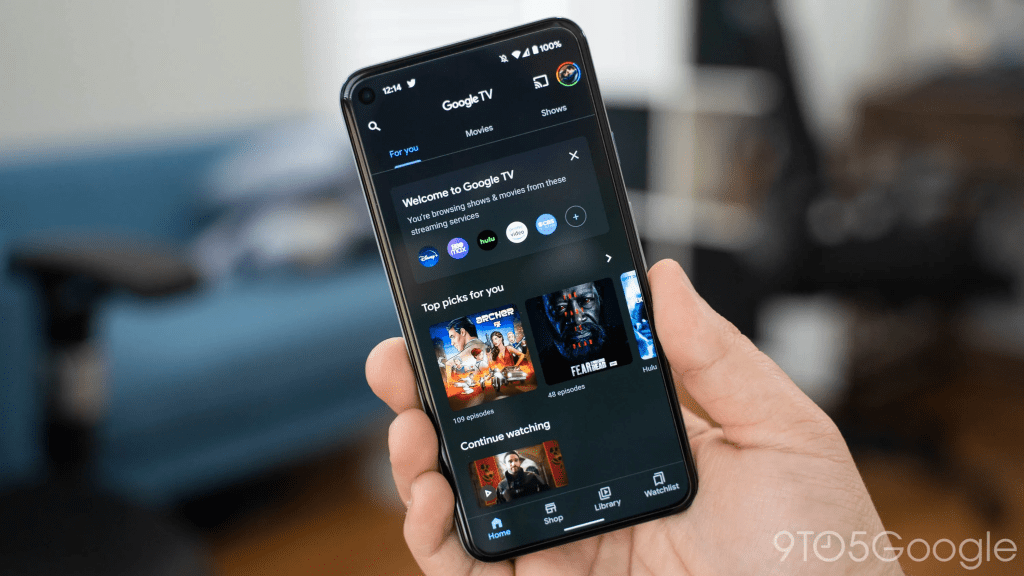
Google TV makes streaming feel organized again by acting as a discovery-first home screen that helps viewers search, browse, and plan what to watch across multiple apps. It’s not a replacement for Netflix, Disney Plus, or any other subscription—it’s the layer that reduces friction between them.
For households juggling multiple services, shared profiles, and endless scrolling, Google TV is often a smart upgrade because it saves time, reduces decision fatigue, and makes the living-room experience feel simpler.