
CBS Sports is the kind of sports platform people use when they don’t want to miss what’s happening right now. Unlike general streaming platforms, it is built around immediacy: live games where available, highlights, studio coverage, breaking news, scores, and the constant rhythm of leagues moving every day.
That makes it closer to the world of sports streaming sites than a normal entertainment app. Fans are not only opening CBS Sports to browse. They are checking what’s live, what just happened, what starts next, and which storylines are changing before the next game even begins.
For many viewers, CBS Sports also supports the habit of watch live TV style sports coverage, especially when access lines up through the right subscription or provider. This review breaks down what CBS Sports offers, who it fits, how it behaves in real-life sports routines, what features matter, how pricing works in an evergreen way, pros and cons, safety, alternatives, and the best way to decide if it’s worth using regularly.
Overview
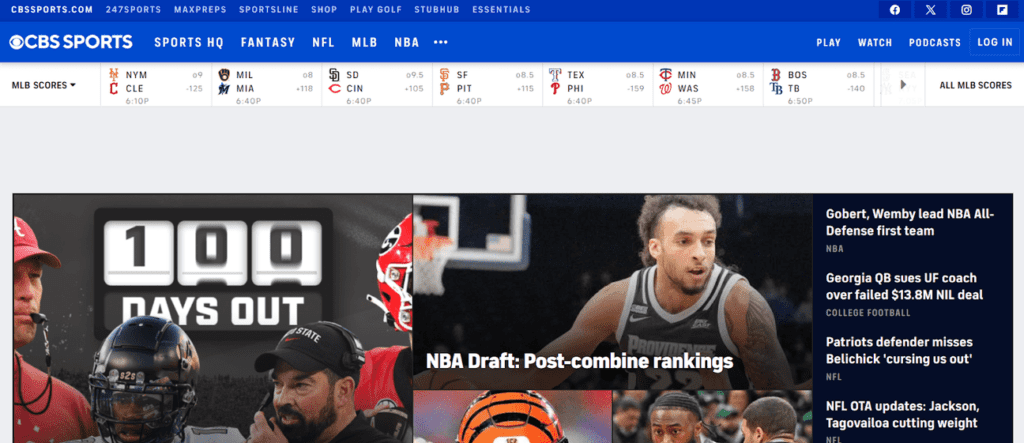
CBS Sports is best understood as a sports ecosystem, not a single-purpose streaming service.
It generally focuses on three things:
- Coverage: analysis, studio shows, commentary, and sports news.
- Highlights and clips: quick access to what matters when time is limited.
- Live viewing access: depending on region and the viewer’s subscriptions.
So the right question isn’t only “Is CBS Sports good?”
The better questions are:
- Does the viewer want sports news and live coverage in one place?
- Do they follow leagues or events that CBS Sports covers heavily?
- Are they set up to access live streams where required?
- Do they need full games, highlights, scores, or all three?
- Will they use it daily or only when one big game is on?
For many fans, CBS Sports becomes the daily sports hub, even when they watch full games elsewhere, because it keeps them informed and on time.
What Viewers Actually Use CBS Sports For
A lot of people assume sports platforms are only about watching. In reality, most fans split their sports life into three layers.
Layer 1: Checking What’s Happening
This is the quick-use layer.
Viewers open the app for:
- Live scores.
- Fixtures.
- Injuries.
- Breaking news.
- Lineups.
- Standings.
- Odds discussion.
- Game status.
- Short updates.
This is often where CBS Sports becomes a daily habit. A fan may not have time to watch a full game, but they still want to know what is happening.
Layer 2: Watching the Big Moments
Most sports fans can’t watch everything. Highlights help them stay in the loop without giving up their whole day.
This layer includes:
- Game-changing plays.
- Post-game breakdowns.
- Short clips.
- Studio reaction.
- Player moments.
- Controversial calls.
- Match recaps.
- Quick analysis.
A viewer may use CBS Sports after work, during lunch, or between errands just to catch up fast.
Layer 3: Watching Full Games Live
Full-game viewing is the highest-value layer, but it depends on access.
Some viewers can use CBS Sports or connected services for live games, depending on rights, subscriptions, region, and device setup. Others may mainly use it for coverage and then watch the game somewhere else.
That is why CBS Sports is best judged as a sports home base, not always as the only place someone watches everything.
Content Experience
CBS Sports blends several kinds of sports viewing into one ecosystem.
Live Sports Where Accessible
Some fans use CBS Sports primarily for live games and broadcasts they can access through proper subscriptions or partner services.
This is where the CBS Sports live stream experience matters most. A fan who opens the app on game day wants the live event to be easy to find, quick to load, and stable once it starts.
Live sports are unforgiving. A movie can buffer and still recover. A game-winning drive, buzzer-beater, knockout, or late goal cannot be replayed emotionally the same way if the stream fails at the wrong moment.
Studio Coverage and Analysis
Studio coverage is where a sports platform can become habit-forming.
Sports fans love context:
- Why a team is struggling.
- How tactics are changing.
- What an injury means.
- Who’s trending up or down.
- What the next matchup could look like.
- Which coach, player, or team is under pressure.
- What the result means for the season.
This is where CBS Sports can overlap with sports TV shows, especially when viewers want more than raw highlights. The game is only one part of the experience. The conversation around the game keeps fans engaged between events.
Highlights and Short-Form Content
Most fans don’t have time to watch every minute of every league.
Clips are how people stay current.
Good highlight coverage should help viewers:
- Catch the decisive moments.
- Understand the result quickly.
- See the best plays.
- Follow injuries and controversies.
- Join sports conversations without watching the full broadcast.
That matters because modern sports habits are fragmented. A fan may watch one full game, follow two others through scores, and catch highlights from three more before bed.
A Constant Stream of Sports News
For many viewers, sports moves like finance or politics. The news changes daily, sometimes hourly.
A reliable feed matters because fans want updates before they see them in a group chat.
That can include:
- Trades.
- Injuries.
- Suspensions.
- Lineup changes.
- Press conferences.
- Coaching news.
- Schedule changes.
- Playoff scenarios.
- Transfer or roster talk.
Even if a viewer watches games on another service, a strong sports hub can still be worth using because it reduces the “where do I even look?” friction.
League and Event Habits
CBS Sports can serve different fans in different ways depending on what they follow.
Football and NFL Coverage
For American football fans, the value often comes from game-day urgency and weekly storylines.
A fan may check:
- Scores.
- Injury updates.
- Playoff scenarios.
- Team news.
- Quarterback debates.
- Matchup analysis.
- Post-game reaction.
That makes CBS Sports NFL coverage useful for viewers who want the bigger league picture, not only one broadcast. A fan may watch a game somewhere else but still use CBS Sports to track everything around it.
Basketball and NBA Updates
Basketball fans often follow movement every day because the league changes quickly.
They may want:
- Scores.
- Injury reports.
- Trade talk.
- Standings.
- Player form.
- Post-game clips.
- Playoff implications.
- Matchup previews.
This is where CBS Sports NBA coverage can fit naturally for viewers who want a hub for basketball news, analysis, and quick updates.
Soccer and Global Competition Interest
Some viewers use sports platforms because they follow global competitions, not just domestic leagues.
For soccer fans, the key question is always access. A viewer might need to know which service covers a specific tournament, league, or match window before committing.
That is where a guide like where to watch UEFA Champions League can help more than a generic sports-app comparison, because soccer rights can be split and region-specific.
Big Game and Event Planning
Sports platforms become more valuable when fans plan their week around matchups.
A viewer might check:
- What starts tonight.
- What is live now.
- What game matters most.
- Which event overlaps with another.
- Whether highlights will be available.
- Whether the full game can be streamed.
- Which device will be used.
This planning behavior is why CBS Sports can become part of a weekly routine even before the actual event begins.
Features That Matter
Sports platforms don’t win with fancy menus. They win with speed and clarity.
Score Tracking and Fast Updates
The best experience is when a viewer can open the app and instantly see:
- Live scores.
- What is happening now.
- What is starting soon.
- What matters today.
- Which games are close.
- Which stories are moving.
Fast updates are the heartbeat of a sports platform.
A slow sports app feels worse than a slow movie app because timing is the whole point.
Clean Highlight Access
Highlights should be easy to find, quick to load, and organized by game, team, league, and event.
A strong highlight setup helps:
- Busy fans.
- Casual followers.
- Multi-league viewers.
- People who missed the game.
- Viewers avoiding long broadcasts.
- Fans who want to catch up before the next matchup.
The less digging required, the more useful the platform feels.
Real-Time Sports News
For fans, the value is not just news. It’s timing.
People want to know:
- Who is out.
- Who is starting.
- What changed.
- Why the odds moved.
- Which coach said what.
- Which team is under pressure.
- What just happened during a live event.
A sports hub earns trust when it consistently tells viewers what matters before they go searching elsewhere.
Streaming Support Where Available
When live streaming is part of the experience, viewers want the basics done well.
That means:
- Stable playback.
- Clear navigation to live content.
- Easy switching between games.
- Obvious sign-in instructions.
- Minimal app confusion.
- No surprises right before the event starts.
A sports stream does not need to feel fancy. It needs to feel dependable.
Multi-Device Coverage
Sports isn’t only watched on TV.
Many people consume sports on:
- Phones during commutes.
- Tablets in bed.
- Laptops at work.
- Living-room TVs.
- Second screens during another game.
- Shared household devices.
CBS Sports fits that multi-device lifestyle well when the viewer uses it as a sports hub. A fan may check scores on a phone, watch highlights on a tablet, and then move to the TV for the main event.
Pricing and Value
CBS Sports can be confusing because the name can mean different things depending on how the viewer uses it.
It may involve:
- Free news and highlights.
- Live broadcasts through certain access paths.
- Premium streams that require additional subscriptions.
- Provider logins.
- Partner-platform access.
- Regional availability differences.
So the best way to evaluate cost is to separate free use from paid access.
Step 1: Decide What the Viewer Wants
The viewer should ask:
- Do I only need scores, news, and highlights?
- Do I need live games too?
- Which leagues and events matter most?
- Do I already have the right subscription?
- Am I trying to replace another sports app or just support it?
That first step matters because someone who only needs news and highlights may not need to pay for anything extra.
Step 2: Identify What Actually Costs Money
Some parts of the CBS Sports experience may be free or partially free.
Live streaming often depends on the viewer’s subscription setup, region, provider, and rights.
This is why sports pricing should never be judged from the app name alone. The key is what the viewer can actually access.
Step 3: Compare Cost Against Routine
Sports subscriptions are only worth it when the viewer uses them regularly.
A simple test:
- Will the viewer use it at least three or four times per week for updates or highlights?
- Are there live events the viewer truly won’t miss?
- Does it reduce the need to check multiple apps?
- Does it help the viewer follow more than one sport?
- Does it support game-day habits?
If yes, it becomes a strong daily sports tool. If no, it may be better as an occasional check-in platform.
User Base and Who It Fits Best
CBS Sports tends to fit four groups especially well.
The Daily Sports Follower
This viewer wants constant updates and a hub they can trust.
They check scores, injuries, stories, league movement, and upcoming games throughout the day.
For them, CBS Sports can become part of the routine the same way weather, finance, or news apps become part of someone’s morning.
The Busy Fan
This viewer can’t watch everything.
They rely on:
- Highlights.
- Quick analysis.
- Recaps.
- Push alerts.
- Short clips.
- Game summaries.
- Standings updates.
CBS Sports works well for this person because it helps them stay informed without demanding a full broadcast every time.
The Matchup Planner
This viewer plans the week around certain games.
They want:
- Schedules.
- Reminders.
- Preview coverage.
- Injury updates.
- Betting conversation, where relevant.
- Studio analysis.
- Kickoff or tip-off clarity.
For this viewer, CBS Sports is less about browsing and more about preparation.
The Multi-League Viewer
Some fans follow more than one sport.
They might track football, basketball, soccer, golf, college sports, combat sports, or other leagues depending on season.
That viewer benefits from one hub that keeps the calendar organized.
If someone is also checking where to watch NFL or where to watch NBA during the season, CBS Sports can support the discovery and update side of that routine.
Who May Not Need It
CBS Sports can feel less necessary for:
- Viewers who only care about one narrow competition and already have the perfect provider.
- People who want one service that carries every game without exceptions.
- Casual sports viewers who only check scores during playoffs.
- Fans who prefer official league apps for everything.
- Viewers who do not care about analysis, alerts, or news.
The platform is most useful when sports is a habit, not an occasional event.
Advantages
CBS Sports has several clear strengths.
Strong All-in-One Sports Hub
News, highlights, analysis, score tracking, and live viewing access where available can all sit inside one ecosystem.
That makes it useful even when the viewer’s full-game access sits somewhere else.
Great for Staying Current
CBS Sports can be valuable even when a viewer watches full games elsewhere, because it keeps them informed.
A fan may use one service for the live event and CBS Sports for everything around it.
Fits Modern Consumption Habits
Most fans don’t watch every minute.
They track, sample, react, and tune in for the big moments.
CBS Sports supports that modern pattern by making quick updates and highlights part of the experience.
Helps Reduce Sports App Hopping
A single hub reduces the friction of checking multiple sources.
That matters for fans who follow several leagues. Jumping between official apps, news sites, highlight channels, and provider apps can get messy.
Pairs Well With Other Sports Access
CBS Sports works nicely alongside a dedicated live-sports subscription because it fills the gaps with updates, clips, schedules, and analysis.
A viewer may use ESPN+, league apps, Paramount+, cable login access, or regional sports services for certain events while still using CBS Sports as the daily tracking hub.
Disadvantages
CBS Sports also has real limits.
Live Access Can Depend on Subscriptions and Region
Some viewers expect full live coverage of everything, then feel disappointed when rights and access rules apply.
Sports rights are fragmented. A platform can be useful without being complete.
Not a Single Everything-Sports Solution
No one app carries everything.
A fan who wants every league, every match, every event, and every replay will usually need multiple services, provider access, or league-specific options.
Can Feel Overwhelming to Casual Viewers
If someone only watches sports occasionally, the constant news flow can feel like noise.
A daily sports follower may love that pace. A casual viewer may ignore most of it.
Value Depends on Routine
This works best when it becomes a habit.
If a viewer is not checking scores, watching clips, reading updates, or using live access weekly, CBS Sports may not feel essential.
Safety, Privacy, and Account Security
CBS Sports is generally safe to use, but sports fans should still follow basic digital habits, especially because sports fans often end up clicking links during live events.
Best practices:
- Use strong passwords for any paid accounts.
- Avoid free-stream websites and pop-up-heavy links.
- Keep devices and apps updated.
- Don’t save payment methods on shared devices unless protected with a PIN.
- Use official app stores and official platforms only.
- Log out on shared or public devices.
- Be careful with fake links during major games.
Practical sports tip: most account theft around sports happens when people chase free streams during big matches. Staying official avoids almost all of that risk.
Alternatives
The best alternative depends on what the viewer needs: live games, highlights, news, one-league focus, or broad sports bundles.
CBS Sports vs ESPN
ESPN is one of the most obvious comparisons because many viewers use it for scores, news, highlights, analysis, and live sports access depending on subscriptions.
CBS Sports can work well as a competing or companion sports hub. ESPN may feel broader for some sports fans, while CBS Sports may be stronger when the viewer follows leagues, events, or coverage areas where CBS has a stronger presence.
A viewer comparing both should ask which one they check more often during a normal sports week.
CBS Sports vs ESPN Plus
ESPN Plus is more relevant when the viewer specifically wants streaming access to certain live sports, original shows, documentaries, and event coverage.
CBS Sports is often more of a sports hub, while ESPN+ is more clearly a paid streaming layer.
A fan considering ESPN+ live sports should compare the actual event calendar, not just the brand name.
CBS Sports vs Fox Sports
Fox Sports can be a strong alternative for viewers who follow competitions, leagues, or broadcasts where Fox has strong rights.
A fan may compare the Fox Sports live stream experience with CBS Sports depending on which network carries the games they care about.
This comparison is about access, sports rights, app experience, and how often the viewer uses each platform.
CBS Sports vs League-Specific Apps
League-specific apps often provide the cleanest experience for fans who obsess over one league.
That might include:
- Official league schedules.
- Team pages.
- League highlights.
- Standings.
- Player stats.
- Alerts.
- Full-game access where available.
- Condensed games or replays, depending on the league.
CBS Sports is better for multi-sport tracking. League apps are better when the viewer’s interest is narrow and intense.
CBS Sports vs Live-TV Bundles
A live-TV bundle can be better when the household wants channels, games, news, and broader entertainment in one package.
This makes sense when several people in the home watch different live channels.
CBS Sports is better as a sports information and access hub. A live-TV bundle is better when the household wants a cable-like replacement.
CBS Sports vs Sports News Apps
A lighter sports news app may be enough for viewers who only want scores and headlines.
CBS Sports becomes more useful when the viewer wants a fuller mix: scores, clips, articles, analysis, video, and live access where available.
Alternatives by Viewing Need
If the viewer mainly wants live sports coverage, compare:
- CBS Sports access paths.
- ESPN+.
- Fox Sports.
- Regional sports networks.
- Live-TV bundles.
- Official league services.
If the viewer mainly wants scores, highlights, and quick updates, compare:
- CBS Sports.
- ESPN.
- Official league apps.
- Team apps.
- Sports news apps.
- Official YouTube highlight channels.
If the viewer follows one league obsessively, compare:
- Official league apps.
- Team platforms.
- League streaming services.
- Regional broadcasters.
- CBS Sports as a supporting hub.
If the viewer wants the broadest sports footprint possible, compare:
- Live-TV bundles.
- Multi-sport streaming services.
- Regional sports packages.
- League-specific subscriptions.
- Sports add-ons through existing TV providers.
CBS Sports usually works best as the hub that ties the sports routine together: scores, news, highlights, analysis, and live access where the viewer’s setup allows it.ogether.
FAQs
- What is CBS Sports?
CBS Sports is a sports platform that combines news, highlights, analysis, and access to live sports coverage depending on region and subscriptions. - Is CBS Sports a streaming service like Netflix?
Not exactly. It’s more of a sports ecosystem. Some content may stream live, but a lot of the value comes from coverage and highlights. - Does CBS Sports cost money?
Some parts may be free, while live streaming access often depends on additional subscription setup. It varies by what the viewer wants. - Who should use CBS Sports every day?
Fans who follow sports closely and want a reliable hub for scores, news, and highlights. - Is CBS Sports good for casual sports fans?
It can be, but casual fans may only use it around big events rather than daily. - Can CBS Sports replace all other sports apps?
For some viewers, it can replace multiple apps for news and highlights. For live coverage, most people still need other services depending on rights. - What’s the biggest benefit of CBS Sports?
A single place to stay updated and quickly catch the moments that matter without watching everything live. - What’s the biggest downside?
Sports rights and live access can be confusing. Some viewers expect full live coverage of everything and find it’s more complicated. - Is CBS Sports good for watching on mobile?
Yes. Many fans use it primarily on mobile for quick updates, highlights, and coverage. - How can viewers get the best experience quickly?
Follow the leagues teams they care about, set notifications carefully, and rely on highlights during busy weeks. - Can notifications become annoying?
Yes. Sports apps can spam alerts if settings aren’t tightened. Turning on only “major” alerts helps. - Is CBS Sports safe to use?
Yes, especially when using official apps and avoiding sketchy external links. - Who should skip CBS Sports?
People who only watch one league occasionally and don’t care about daily sports news may not need it. - Is CBS Sports better than a league-specific app?
It depends. CBS Sports is broader and good for multi-sport viewing. League apps can be better for deep, single-league coverage. - How should viewers decide if it’s worth using?
If a viewer checks scores and sports news multiple times per week, it’s worth using. If not, it’s optional.
Final Verdict
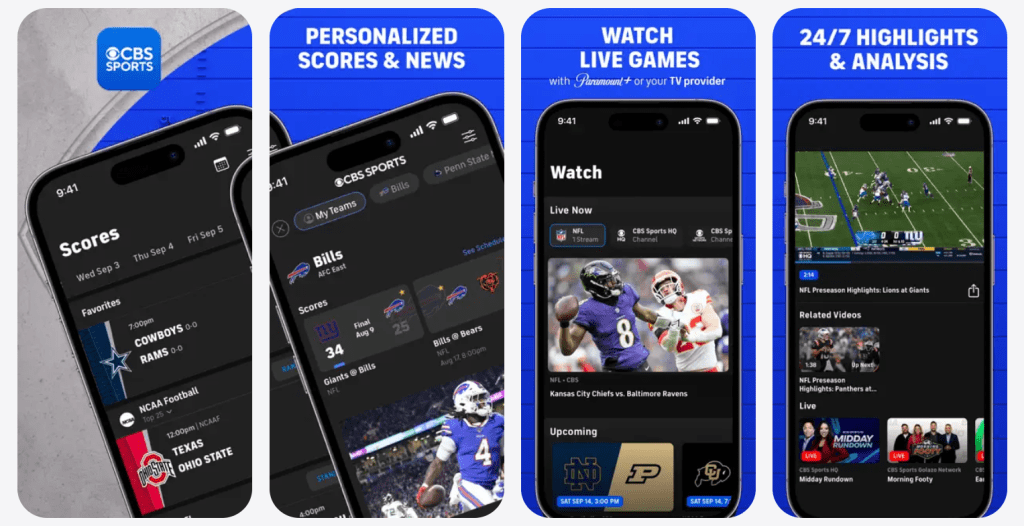
CBS Sports works best as a high-utility sports hub: fast updates, highlights, analysis, and live access where available — all designed for fans who want to stay current without turning sports into a full-time job. It’s not always a perfect “watch everything live” solution, but it’s excellent for the modern sports routine: track the day, follow the storylines, catch the big moments, and tune in live when it truly matters. For a ForeverWatch lineup, CBS Sports fits as the reliable “sports control center” that keeps viewers informed and ready for the next big game.