

Acorn TV can feel like a breath of fresh air in a streaming world that’s loud, crowded, and built around hype. Instead of trying to be everything to everyone, this service plays a different game: it narrows the menu, tightens the curation, and leans hard into British drama, mysteries, and a steady stream of quality international picks. That narrow focus is exactly why some households love it… and why others cancel it within a week.
This review breaks down what Acorn TV offers in real life: the type of shows it leans into, the features that matter, the kind of viewer who gets maximum value, and what to consider if the library isn’t a match. It also shares practical tips—how to set it up, how to avoid subscription clutter, and how to decide if Acorn TV deserves a permanent spot next to the big-name services.
Overview: What it really is
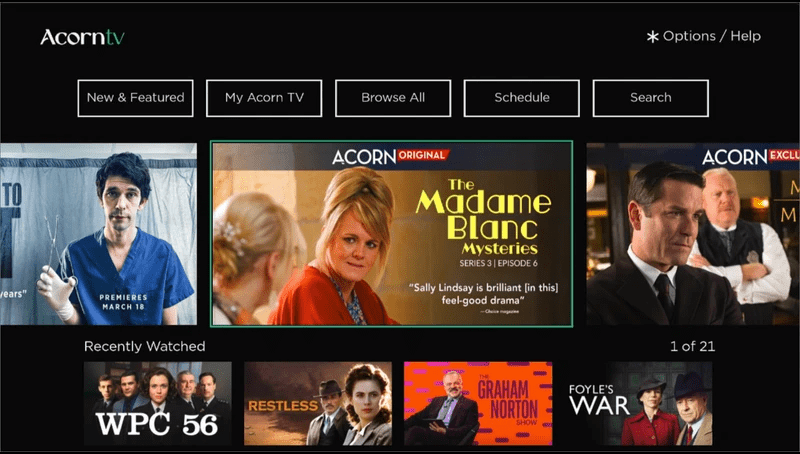
Acorn TV is best understood as a “specialist” subscription. While mainstream platforms chase blockbuster releases and massive catalogs, Acorn TV wins by being calm and curated. The typical experience is simple: open the app, find a high-quality series fast, and get into an episode without feeling like the home screen is yelling at you.
That positioning matters because expectations shape satisfaction. If someone signs up hoping Acorn TV will replace a giant all-in-one streamer, disappointment is likely. If someone signs up because they want British detective dramas, cozy mysteries, crime thrillers, or smart international television, Acorn TV tends to land exactly where it should.
A quick way to judge fit:
- If “what should we watch?” arguments happen nightly, Acorn TV can reduce decision fatigue.
- If a household is tired of paying for huge libraries they barely touch, Acorn TV can feel efficient.
- If the goal is brand-new blockbuster films every weekend, Acorn TV probably won’t be the top choice.
Content library: The real reason people subscribe
The library is the main selling point, and it’s also the biggest filter. Acorn TV is built for viewers who enjoy character-driven stories, strong writing, and slower-burn pacing. The platform is known for British series, but it also mixes in Australian, Irish, Canadian, and European content that fits the same “grown-up TV” vibe.
The most common content buckets look like this:
- British mysteries and detective shows
- Crime dramas and procedural series
- Period dramas and historical series
- Light, cozy, comfort-watch mysteries
- Selected international series with subtitles (depending on region and licensing)
What does that feel like in a real household? Imagine a couple that’s burnt out on superhero franchises and loud reality TV. They want shows where the plot is the star. For that couple, it becomes the “weekday comfort” app. They don’t open it for hype. They open it because it reliably gives them something watchable.
On the other hand, a household that only watches big U.S. network hits might open Acorn TV and feel like it’s “missing” everything—because the appeal is curated niche, not maximum breadth.
Discovery and navigation: Calm, not chaotic
Acorn TV’s user experience tends to be straightforward. Most viewers will notice that Acorn TV doesn’t try to overwhelm them with twenty rails of content. The browsing flow is typically built around genres, collections, featured picks, and “what’s new.”
The best part of a calmer interface is speed. With Acorn TV, many users spend less time browsing and more time watching. That’s not magic—it’s simply fewer choices presented in a cleaner way.
Actionable tip: To avoid wasted time, treat the library like a curated shelf.
- Choose one flagship series to start with.
- Add a second “backup” series for when the mood changes.
- Finish at least a full season before judging the value.
That small discipline improves satisfaction because the value is felt through consistent use, not random sampling.
Streaming quality and performance: What to expect
Most people judge a service on reliability: does it play smoothly, resume correctly, and keep the audio stable? Acorn TV generally aims for a stable, no-drama experience rather than flashy experimentation.
In day-to-day use, a good streaming experience looks like:
- Fast loading and consistent playback on average connections
- Reliable “continue watching” behavior
- Minimal buffering once the stream is steady
A realistic expectation is that performance depends on the device and the local connection. If a smart TV is slow, Acorn TV will feel slower there too. If a household uses a modern streaming stick or a newer TV OS, Acorn TV tends to feel cleaner.
Actionable tip: If playback is ever choppy, test Acorn TV on a different device before blaming the service. Many “app problems” are actually device-memory problems.
Features: Small set, but the right ones
Acorn TV isn’t a feature arms race platform. The core features are about comfort and control rather than novelty. For most viewers, the essentials matter more than experimental extras.
Practical features that usually matter most:
- Watchlist/favorites (so good shows don’t get lost)
- Continue watching (so it resumes correctly)
- Search (to quickly find specific series)
- Multiple devices (to start on TV and continue elsewhere)
Some households will care a lot about profiles and personalization. If a platform doesn’t separate viewing habits, recommendations can get messy. The safest strategy is to keep watch habits organized manually: use the watchlist, finish one series at a time, and avoid letting kids browse in the same account if recommendations matter.
Pricing: How to think about cost without getting trapped
Acorn TV usually positions itself as a budget-friendly add-on compared to bigger, more expensive streaming bundles. But the smartest way to evaluate price isn’t “cheap vs expensive.” It’s value per hour watched.
A simple decision method:
- Estimate how many hours per month the household will watch it.
- Compare that to the monthly cost and any free-trial period.
- Decide whether the subscription replaces another service or adds on top.
If Acorn TV becomes the default weeknight option, it often pays for itself. If it becomes a “once a month” option, it’s better treated as a seasonal subscription—join, binge, pause, and come back later.
Actionable tip: Keep a “subscription scoreboard.” If Acorn TV isn’t used for two weeks, rotate it out. The best streaming setup isn’t the biggest one—it’s the one that gets watched.
Devices and availability: Where it fits
Acorn TV is meant to be easy to access across common streaming devices. Most modern households will use it in one of three ways:
- Smart TV app (built-in platform)
- Streaming stick/box (often smoother for older TVs)
- Mobile and tablet apps (good for bedtime viewing and travel)
A helpful rule: if the household relies on an older smart TV, a dedicated streaming device usually makes Acorn TV feel faster and more consistent.
User base: Who is actually happiest here?
Acorn TV shines when the viewer knows what they like. The best-fit audience usually looks like this:
- Fans of British mysteries, crime dramas, and character-driven storytelling
- Viewers who enjoy slower pacing and strong dialogue
- People who want curation over volume
- Households that want a calmer home screen and fewer “noise” recommendations
Acorn TV is a weaker fit for:
- Viewers who mainly want the newest blockbuster movies
- Households that rarely watch series and prefer short viral content
- People who want a single subscription to cover every genre
A quick persona example:
- “Weekend mystery fan”: watches two episodes Friday night, three episodes Sunday. For them, Acorn TV feels like a premium channel.
- “Background TV user”: keeps something on while multitasking. The catalog can work, but it may feel too “serious” as background noise.
- “Kids-first household”: Acorn TV may not be the best anchor subscription.
Advantages: Where it wins
Acorn TV’s advantages come from focus. Instead of trying to beat the giants at their own game, Acorn TV creates a strong lane.
1) Curation that respects time
Acorn TV often reduces the “browse spiral.” The catalog is smaller, but it’s shaped for consistency.
2) Strong niche identity
People subscribe for a clear reason. That clarity makes it easier to justify month after month.
3) Great for mystery and drama comfort-watching
If a viewer loves “one more episode” detective series, Acorn TV can become habit-forming in a good way.
4) Subscription flexibility
Acorn TV is easy to rotate. A household can binge, pause, and return without losing the thread.
Actionable takeaway: The best way to maximize it is to pick a signature genre (mystery, crime, period drama) and treat the app as the “home base” for that genre.
Disadvantages: Where it can frustrate viewers
No service is perfect, and Acorn TV has trade-offs that are easier to accept when they’re understood upfront.
1) Not built for blockbuster seekers
Acorn TV’s appeal is television storytelling, not huge new movie drops.
2) A narrower catalog
Curation is a win, but it can also feel limiting if the household wants variety every night.
3) Discovery can feel “same-ish”
Because the brand is consistent, recommendations can cluster around similar tones. That’s great for fans, but repetitive for casual viewers.
4) Device experience can vary
On older smart TVs, Acorn TV can feel slower. The fix is usually a better streaming device, not a different subscription.
Actionable takeaway: If a household wants “one service for everything,” Acorn TV is better as a side subscription, not the centerpiece.
Safety, privacy, and legitimacy: What viewers should know
Acorn TV is a legitimate subscription platform, and the safety conversation here is mostly about account hygiene rather than sketchy sources. The biggest risks aren’t “is it safe?” but “is the account protected?” and “are purchases controlled?”
Practical safety habits:
- Use a strong password (unique to Acorn TV)
- Avoid sharing credentials widely
- Use device-level purchase controls if the account is on shared TVs
- Cancel through the correct billing channel if you subscribed through an app store
Actionable tip: If Acorn TV is set up on a family TV, keep account settings tidy and check the billing method once. Most subscription issues come from confusion about where the subscription was started.
Alternatives: What to try if this isn’t a fit
If someone likes the general idea of Acorn TV—curated quality, calmer browsing—but wants different flavors, alternatives should be chosen based on taste:
- For prestige drama and big originals: a premium general streamer may fit better.
- For UK-focused variety: a UK-first service may feel broader.
- For international cinema and art-house: a film-focused service may be the upgrade.
- For free streaming with ads: a FAST service can work, but with less curation.
- For live sports: a sports-first service is the better lane.
Actionable tip: Don’t replace Acorn TV with “more of everything.” Replace it with “more of what the viewer actually watches.”
FAQ
1) What is Acorn TV best known for?
Acorn TV is best known for British mysteries, crime dramas, and curated international television with a mature, story-first tone.
2) Is it a replacement for the big streaming platforms?
Usually, it works best as a complement. It fills a specific niche rather than covering every genre.
3) Does it have movies too?
It can include films, but most subscribers join for series. The service shines strongest with episodic storytelling.
4) Can it be used on a smart TV?
In many cases, yes. It’s commonly used via smart TV apps or through a streaming device.
5) Is it worth it if someone only watches occasionally?
If viewing is rare, it is often better as a rotation subscription: join, binge a few series, then pause.
6) How does it compare to BritBox?
Both target British TV fans. One leans heavily into mysteries and drama; the other may feel broader depending on preference.
7) Is it good for families?
It can work in adult households. For young kids, it usually isn’t the primary family option.
8) Does it support offline downloads?
This can depend on device and app version. If offline viewing matters, test it on the exact device before committing long-term.
9) Can viewers share an account?
Households often share within reason, but viewers should follow terms and keep login sharing minimal for security.
10) What’s the easiest way to get value fast?
Start with one “headline” series, then add a second backup. Stick with it for a full season before judging.
11) Why does it feel less overwhelming than other apps?
The library is curated. Fewer choices and calmer presentation reduce decision fatigue.
12) Is it available outside the U.S.?
Availability varies by region. The safest move is to check local app stores or the official signup page.
13) What should viewers do if playback feels slow?
Try it on a different device, update the app, and consider a modern streaming stick for older TVs.
14) Who should skip it?
People who only want blockbuster movies, kids content, or maximum genre variety will likely prefer a broader service.
15) Can it be canceled easily?
It is typically easy to cancel, but the steps depend on where the subscription was started (website vs app store).
Final verdict: Should people subscribe?
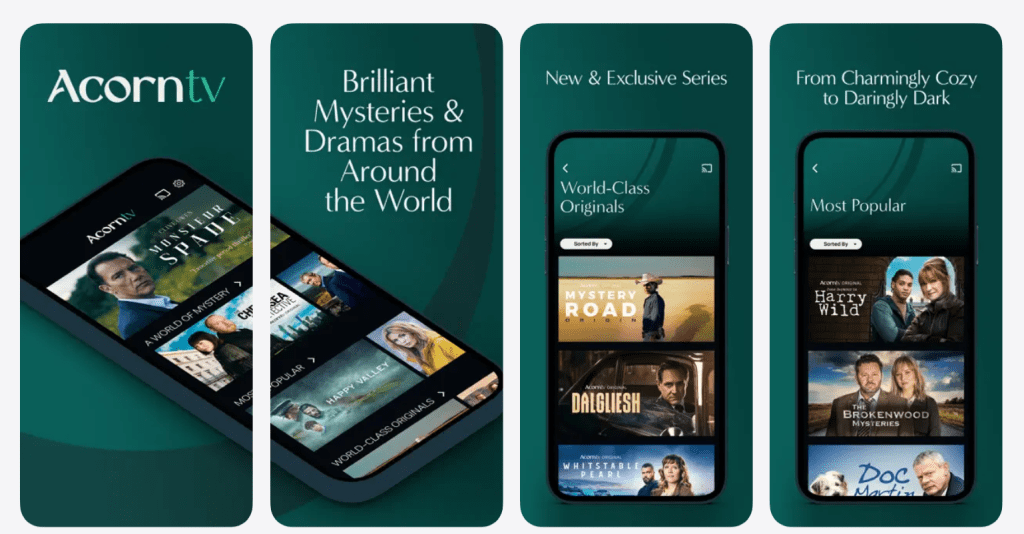
Acorn TV is not trying to be the loudest service in the room, and that’s the point. For fans of British mysteries, crime series, and carefully chosen drama, Acorn TV can become the “default” app that actually gets opened night after night. It removes noise, reduces scrolling, and delivers consistent quality.
For everyone else, Acorn TV still has value—just in shorter seasons. Join when the mood is right, binge a few standout series, then rotate it out. Used that way, Acorn TV stays enjoyable, affordable, and surprisingly satisfying.