

FuboTV is built for people who still watch television in real time. Games, breaking news, live events, and “turn it on and watch” evenings. That focus is why FuboTV can feel like the perfect cable replacement for one household—and a waste of money for another.
Overview
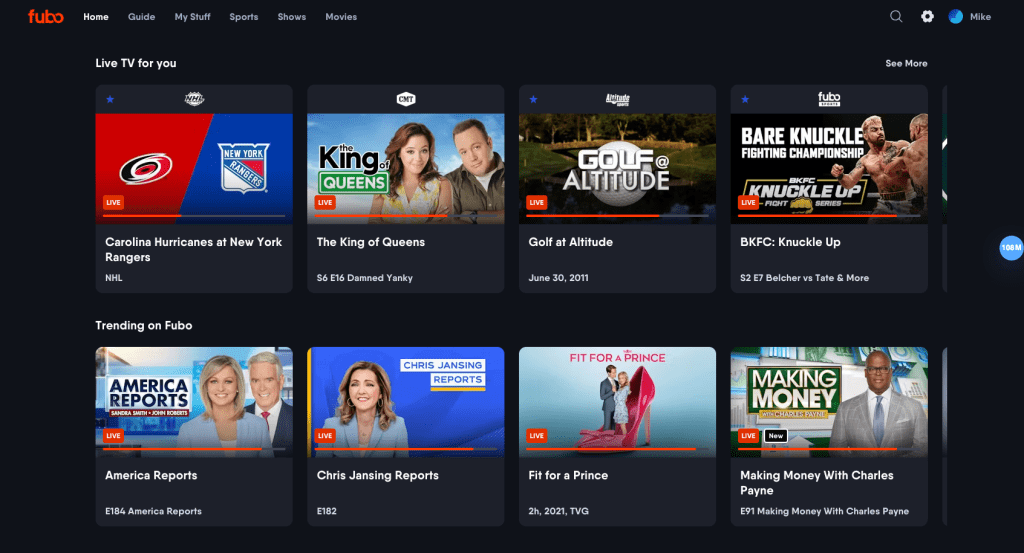
FuboTV delivers a traditional channel guide through an app. Instead of a cable box, viewers stream live channels over the internet on a smart TV, streaming stick, phone, tablet, or web browser. A cloud DVR option helps record live content for later, so schedules don’t control the household.
A useful way to judge FuboTV is to separate two ideas:
- It is a live channel platform first.
- It is a sports-forward platform by design.
That combination shapes everything—from navigation to how “value” is judged compared to on-demand subscriptions.
Best-fit users
FuboTV fits best when live viewing is a weekly habit, not an occasional thing. Sports fans are the obvious audience, but the “live TV” crowd is wider than that.
It tends to suit:
- Sports households that want a single hub for live games, highlights, and replays
- Viewers who want local broadcast channels for major events and primetime
- People who keep a news channel on in the background
- Families that stream on multiple devices at once
If the household mostly binge-watches series and rarely opens a guide, FuboTV can feel like paying for features that never get used.
Channels and content
The experience on FuboTV is channel-led, so the lineup matters more than a static movie library. It is closer to “what’s on right now” than “what should be started next.”
Most lineups follow a familiar structure:
- Local broadcast networks (availability depends on the viewer’s market)
- Sports channels (national, and sometimes regional)
- Entertainment networks (general TV, lifestyle, reality, comedy, etc.)
- News and business channels
- Optional add-ons (premium channels, international packs, and niche sports bundles)
Because channels can vary by location and plan tier, a smart move is to verify must-have networks during signup before paying for a month. This is especially important for sports viewers, since the “one channel that matters most” is often the one that decides whether the service is worth the monthly cost.
Sports coverage
Sports is where FuboTV tries to feel purpose-built rather than “sports, plus everything else.” The interface is generally designed to make it quicker to find live games, see what’s next, and move between events.
This matters in three moments:
- Discovery: getting to the match without digging through unrelated tiles.
- Control: pausing, rewinding, and recording live events so nothing is missed.
- Multitasking: keeping up with multiple games in one sitting.
A realistic use case: two games overlap. One stream runs on the main TV, another runs on a tablet, and someone else checks a different channel on mobile. If the household lives like that on weekends, FuboTV starts to make sense quickly. Who wants to miss the turning point because the guide is slow?
Interface and navigation
A live TV service lives or dies by how fast it gets viewers into the stream. The “content” might be strong, but if the guide is clunky, it will feel like work.
What typically separates a good live experience from an annoying one:
- A guide that loads quickly and scrolls smoothly
- Clear “now playing” information that matches what is actually on
- Search that finds channels, programs, and upcoming events—not just on-demand titles
- Shortcuts for favorite channels so the household doesn’t re-learn the guide every time
FuboTV usually leans into a live-first layout. That is a benefit for viewers who open the app to watch something immediately. It can feel less exciting to people who want a Netflix-style “browse a huge library” vibe.
Core features that shape daily use
The day-to-day value is less about one headline feature and more about how the basics behave. That’s where FuboTV has to feel smooth.
Features most viewers notice:
- A cable-style guide that is easy to skim
- Cloud DVR to record live shows and live sports
- Playback controls for live TV (where supported)
- Profiles in some setups, which can keep watch history and recordings cleaner in a household
- A “pick up and keep watching” feel across devices (start on TV, continue on phone)
People usually stay subscribed when the service reduces friction: fewer clicks to the right channel, fewer missed games, fewer “who recorded this?” arguments.
Cloud DVR: what to know
Cloud DVR is a major reason cord-cutters consider FuboTV over free, ad-supported apps. The concept is simple: record now, watch later, from anywhere.
Practical details to keep in mind:
- Recordings are stored online, not on the TV device.
- Storage size and DVR rules vary by plan tier.
- Recordings can have a retention window; in many cases, recordings may expire after a period of time.
For sports fans, DVR is more than a backup plan. It is how early games get watched later, how analysis shows get saved, and how key moments get revisited without hunting around.
A useful workflow is to set up recordings in layers:
- Record the match (obvious).
- Record the pre-game and post-game shows for context.
- Record the recurring studio show so highlights and breakdowns are always available.
That approach makes the DVR feel like a personal sports library rather than a random pile of episodes.
Device support and streaming quality
FuboTV runs on most mainstream devices people already own. That includes popular streaming platforms, many smart TV systems, mobile apps, and web browsers.
Common device categories include:
- Roku, Amazon Fire TV, Apple TV, and Android TV / Google TV devices
- Select smart TVs (major brands and operating systems)
- iPhone, iPad, and Android phones/tablets
- Web browsers
- Xbox consoles in many setups
Streaming quality varies by channel and connection. For the most consistent experience, a dedicated streaming device and a stable home connection usually beat an older smart TV app.
Simultaneous streams
Multi-screen streaming is a big decision point for families. FuboTV supports simultaneous viewing, but the exact limits depend on the plan type and home-network rules.
A practical way to interpret the limits:
- At home, some plan setups allow up to 10 devices streaming at the same time on the home network.
- Out of home, streams are typically more limited.
- Some rules restrict TV streaming to one location at a time, which is meant to reduce constant household-to-household sharing.
The household-friendly method is to map FuboTV to real life: one TV stream, one tablet stream, and one mobile stream outside the home. If three people regularly watch at the same time, the plan choice matters more than a long list of extra channels no one watches.
Pricing and plans
FuboTV pricing is best understood as “base tier + optional upgrades.” Plan names and prices can change, but the structure usually stays the same: a core live TV tier, higher tiers with more channels and feature boosts, and add-ons for premium networks or niche packages.
A sensible way to budget for FuboTV:
- List must-have channels (especially sports networks).
- Choose the cheapest plan that includes them.
- Add only the one add-on that will genuinely get used.
- Recheck the first invoice so the total cost is predictable.
In the U.S. market, FuboTV is generally priced in the premium range for live TV streaming. That can feel expensive next to on-demand subscriptions, but it is closer to a cable replacement than a giant movie library. The key question is not “Is it cheaper than Netflix?” The question is “Does it replace cable for this household?”
Add-ons, extras, and “hidden” costs
Many viewers underestimate how much the “extras” can change the monthly total.
Common add-on categories include:
- Premium entertainment channels
- International packs (language or region-based)
- Extra sports bundles
- Feature upgrades tied to streams or DVR size (depending on plan options)
To avoid bill creep, a simple rule helps: add one upgrade at a time, use it for two weeks, then decide if it earned a permanent spot. If the household adds three extras on day one, it becomes impossible to tell which one actually delivered value.
Getting started: a practical setup checklist
Subscription services are easy to sign up for, but a good first week usually comes from a deliberate setup.
A clean first-week checklist:
- Confirm the must-have channels (especially sports).
- Install the app on the main TV device and at least one mobile device.
- Create favorites in the guide so everyday channels are one click away.
- Set up a handful of DVR recordings (one live event, one recurring show, one news show).
- Test simultaneous streams at home to make sure the plan fits the household.
- Turn off add-ons the household does not plan to use long term.
That checklist turns FuboTV into a system quickly, rather than something that gets forgotten after the first weekend.
User base: who tends to stick with it?
FuboTV usually attracts two groups.
Sports-first households are the first group. They are watching enough live events that DVR and multi-screen matter weekly. For them, FuboTV feels like a sports dashboard, not just a channel list.
Cable-replacement households are the second group. They want local channels, live news, and “put something on” convenience. They are willing to pay more if the platform behaves like a modern version of cable.
In both cases, the subscriber stays when the service becomes part of routine, not when it is treated like a backup option.
Advantages
When it fits, FuboTV has clear strengths.
- Sports-forward navigation and live-first discovery
- Cloud DVR that makes schedules flexible
- Broad device compatibility for TV, mobile, and browser viewing
- Multi-screen support that can work well for families
- A familiar guide-based experience that reduces the learning curve
For many viewers, the biggest advantage is simplicity: fewer services to juggle, fewer missed games, fewer compromises around live viewing—exactly what FuboTV is trying to deliver.
Disadvantages
The downsides are mostly about cost and fit, not about basic functionality.
Common drawbacks:
- Monthly pricing can be higher than many competitors, especially compared to on-demand-only services
- Channel availability varies by location and tier, so some must-have networks may require a pricier plan
- If live TV is not a habit, the subscription can feel like overkill
- Viewers who want deep originals catalogs may feel underwhelmed by a guide-first product
A good test is simple: if the household would not open a channel guide at least a few times a week, it may not earn its price.
Safety and account privacy
As a mainstream subscription platform, the biggest risks are account-based rather than “shady site” risks.
Best practices that keep an account secure:
- Use a unique, strong password
- Avoid sharing credentials outside the household
- Review account devices and sign out of hardware that is no longer used
- Watch add-ons and upgrades so the bill stays predictable
For families, profiles and device discipline do more for “safety” than anything else. The goal is fewer surprises, fewer accidental purchases, and fewer random devices still logged in.
Alternatives to compare
The right comparison depends on what the viewer wants.
If the goal is live TV with a different channel mix, other live TV services can be better fits for certain markets. If the goal is “sports only,” league passes or sports bundles can be cheaper, but they rarely replace local channels and live news. And if the goal is mostly movies and series, on-demand services will usually win on price-to-library value.
A practical way to compare alternatives is to look at three buckets:
- Must-have channels: does the alternative carry them?
- Must-have features: does it offer enough DVR and streams?
- Must-have behavior: does it match how the household watches?
If the alternative fails any bucket, it will feel cheaper at checkout but more expensive in frustration.
Customer support and troubleshooting tips
Even a strong live TV service can feel “bad” if the first week is full of buffering and login issues. Most problems are not unique to one provider, but the fixes are predictable.
A practical troubleshooting ladder:
- Restart the streaming device and router (quick wins happen here).
- If possible, try Ethernet on the main TV device to stabilize the connection.
- Test a second device (if it works elsewhere, the issue is likely the original device or its Wi-Fi).
- Clear app cache or reinstall the app on the problem device.
- Check for OS updates on the TV/streaming stick and update the app.
For billing questions, add-ons, or stream limits, FuboTV support articles and account settings usually answer the fastest. When something feels off—missing channels, stream errors, or DVR not saving—double-check the plan details first, then confirm whether the issue is specific to one channel or across the entire service.
FAQ
Is the service available everywhere?
Availability depends on the country and market. FuboTV is best known for its U.S. offering, with availability and plans varying by region.
Are local channels included?
Many users can access local broadcast channels on FuboTV, but availability depends on location and plan.
Can this replace cable?
For households that want live channels, local networks, and sports, FuboTV can function as a cable replacement. The channel lineup should be checked first.
How does recording work?
FuboTV uses cloud DVR. Recordings are stored online and can be played back later on supported devices. Storage size and recording rules can differ by plan.
Do recordings expire?
Some recordings may expire after a set period, depending on plan rules and content policies.
How many devices can stream at once?
FuboTV simultaneous streaming depends on the plan. Many setups support multiple home streams with tighter limits for out-of-home viewing.
Is 4K available?
Some events may be offered in 4K, typically requiring a compatible device and the right content availability.
Does it work on Roku and Fire TV?
Yes, it commonly supports popular streaming devices and platforms, plus mobile and web viewing.
Can it be watched on a phone while traveling?
Mobile streaming is usually supported, but out-of-home rules can apply.
Is it good for non-sports viewers?
It can work well for people who watch live news and local channels. If on-demand binge-watching is the priority, another service may fit better.
Are premium channels included?
Premium networks are often offered as add-ons rather than included by default.
Can the subscription be cancelled easily?
Most users can cancel through account settings, but it is important to verify the billing cycle and confirm add-ons are removed.
Does it include user profiles?
Many live TV services support profiles or household personalization in some form. If separate watch histories matter, it is worth setting up profiles early.
Can live TV be paused and rewound?
Live playback controls often exist for supported channels, but behavior can vary by content and device. It is worth testing this during the first week.
Does FuboTV have ads?
Live channels include the usual TV ads. Some on-demand content may also include ads, depending on the network and rights.
Final verdict
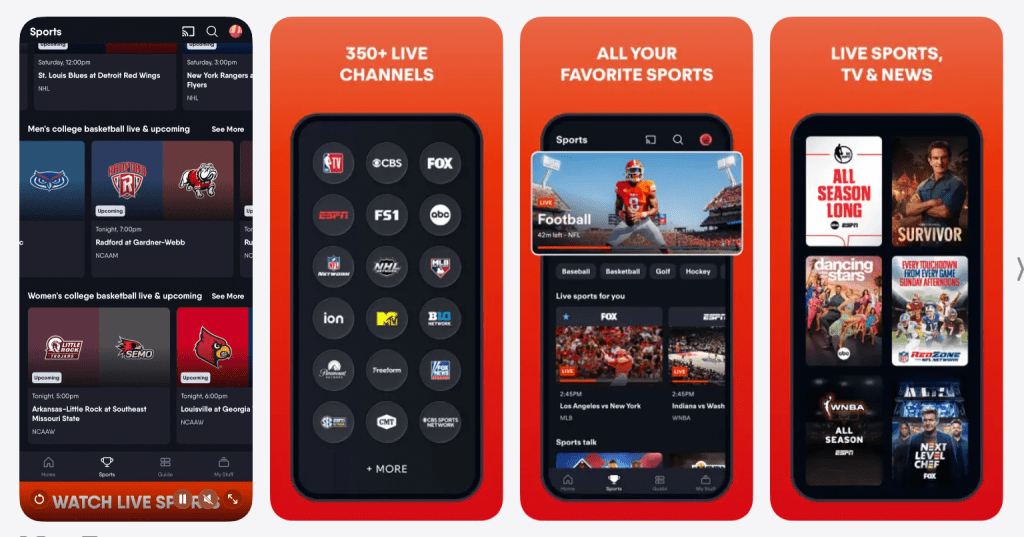
FuboTV makes the strongest case for households that value live sports and live channels enough to use them every week. When live events, DVR, and multi-screen viewing are part of the routine, FuboTV can feel like a modern cable replacement with better flexibility.
If the household rarely watches live channels, the subscription will feel expensive no matter how good the guide is. But for the right viewer—especially the sports-forward viewer—FuboTV can be a satisfying, all-in-one live TV solution.