Kanopy is the streaming service that flips the usual model on its head: instead of paying with a subscription or paying with ads, viewers typically “pay” with library access. That’s why it feels so different from the rest of the streaming world. It’s often ad-free, it leans educational and thoughtful, and it’s powered through public libraries and universities rather than direct monthly plans.
This is also why people get confused. Some expect a normal signup flow with a credit card. Others expect a giant catalog of new mainstream releases. Kanopy usually isn’t that. It’s more like a digital extension of a library’s mission—films and series that feel curated, useful, or culturally valuable, delivered through a clean streaming interface.
This review breaks down what Kanopy actually is, how it works in real households, how the “monthly credits” system typically behaves, what features matter most, where it shines, where it can frustrate viewers, how to use it safely, and which alternatives make sense if access isn’t available.
How Kanopy Works
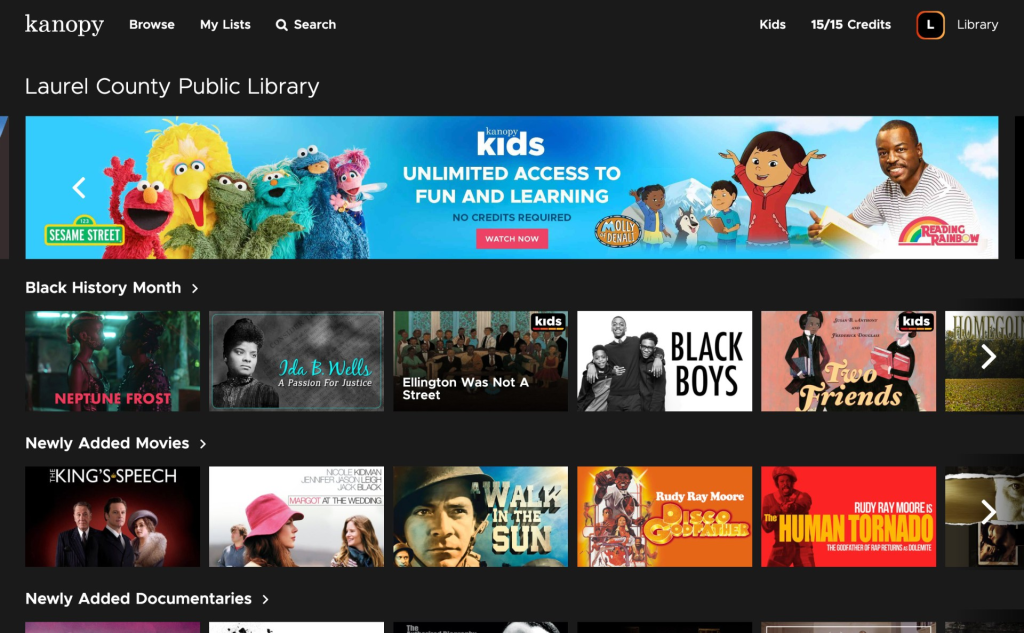
Kanopy usually works through one of two access routes:
- Public library access: viewers connect with a library card (and sometimes a PIN).
- University access: students/staff log in through their institution.
There’s one key reality that shapes everything: availability depends on whether a library or university participates. If the institution doesn’t offer it, there’s often no simple way to “just subscribe” like a normal service.
The monthly credits idea (simple explanation)
Many libraries use a ticket/credit system. Instead of unlimited streaming, viewers receive a set number of credits per month, and a movie might cost one or more credits when playback starts. The exact number of credits varies by institution, and credits commonly reset monthly.
That’s not a weakness. It’s a design choice tied to how libraries fund access. Kanopy can feel “premium” and ad-free because the institution covers usage costs, and the credit system helps control budget.
What this feels like at home
A household uses Kanopy best when it treats it like a “film night” platform:
- Choose intentionally
- Use credits on titles that feel worth it
- Keep it as a zero-ad, high-quality option in the streaming lineup
Content Library and Catalog Expectations
Kanopy tends to lean toward:
- Documentaries
- Classic cinema
- Independent film
- International movies
- Educational series
- Thoughtful, award-oriented picks
For some viewers, that’s perfect. For others, it feels “too serious.” But that’s the point—Kanopy often fills the gap that mainstream services don’t prioritize.
A practical expectation to set: this platform is rarely about day-one blockbusters. It’s about depth, discovery, and quality titles that libraries actually want to provide.
Key Features That Matter
Kanopy doesn’t need a hundred flashy features to be valuable. The features that matter are the ones that make the service easy, family-friendly, and worth using within the monthly credit limits.
1) Ad-free viewing (for most library setups)
This is the emotional hook. No ad breaks. No “free tier” interruptions. Just press play and watch.
2) Credits/tickets dashboard clarity
A good user experience shows how many credits remain and when they reset. That single detail changes how people plan viewing.
3) Kanopy Kids (often unlimited or credit-friendly)
Kanopy Kids is a standout feature for families, especially because it typically acts like a protected area with age-appropriate content. In many setups, kids content doesn’t drain monthly credits the same way regular titles do—making it a real value multiplier for households with children.
4) Parental controls with a PIN
Parents can lock the experience so kids stay inside the kids collection unless an adult enters a PIN. That’s the difference between “kid-safe in theory” and “kid-safe in real life.”
5) Multi-device support
Kanopy is built to be used on TVs, phones, tablets, and web browsers. That matters because library streaming is only valuable if it’s convenient.
Pricing and Access
Kanopy is typically free to the viewer when their library or university provides it. That is the entire advantage. But “free” comes with structure.
Here’s the evergreen way to understand the cost model:
- Viewers generally don’t pay a monthly subscription fee.
- Institutions cover costs.
- Many libraries limit monthly viewing through credits/tickets.
How to judge value quickly
A simple step-by-step test:
- Check whether the local library or university offers access.
- See how many monthly credits are included.
- Browse the catalog for 10 minutes.
- If the library has multiple titles a viewer genuinely wants to watch this month, it’s instantly worth installing.
- If the catalog doesn’t match the household’s taste, it may still be useful as a documentary/classic film backup, but not a “main service.”
Who Uses Kanopy Most
Kanopy tends to attract viewers who care about “good picks” more than “endless picks.”
Common long-term users:
- Students and researchers (documentaries, educational series, film studies)
- Parents (kids content + PIN controls)
- Film lovers (classics, indie films, world cinema)
- Budget-focused viewers (zero monthly cost beats subscription stacking)
- People tired of ads who still want free streaming
Viewers who often don’t stick with it:
- Households that only want mainstream franchise entertainment
- People who dislike any kind of monthly limit
- Viewers who want one service that covers everything (sports + new releases + originals)
A quick summary: Kanopy is a “quality-first” service, not a “quantity-first” service.
Advantages
1) It can be genuinely free for viewers
In a world where every app wants another monthly payment, Kanopy feels refreshing.
2) Often ad-free
That single feature makes it feel premium even though it’s library-backed.
3) Strong educational and documentary catalog
For many viewers, it becomes the best place to find serious documentaries without paying extra.
4) Great for families who want controlled kids viewing
Kanopy Kids plus a PIN is simple, but powerful.
5) Encourages intentional watching
Credits create a natural filter. People stop “doom-scrolling” and start choosing more carefully.
Disadvantages
1) Availability isn’t guaranteed
If a library or university doesn’t participate, access may not exist for that viewer.
2) Monthly credits can feel limiting
Some viewers dislike any “ticket” system. They want unlimited.
3) Not built for trending mainstream entertainment
If a household’s taste is mostly blockbuster franchises, it may feel underpowered.
4) The catalog can feel niche depending on the region
Library collections and licensing vary. Some institutions have stronger selections than others.
5) Not ideal as the only service for most households
It’s often best as a powerful second or third service: the ad-free, thoughtful option.
Safety and Best Practices
Kanopy is generally safe when used the normal way—through official apps and legitimate institution access. The main safety risks are the same ones as any streaming account.
Practical safety checklist:
- Use strong passwords for streaming accounts and email accounts
- Avoid sharing logins widely (especially with strangers)
- Keep devices updated (TV OS, phone OS, app updates)
- Use the built-in parental controls if kids share the TV
- Only install from official app stores or the official website
A note on “workarounds”
If a title is unavailable due to institution access or regional licensing, the safest route is to use legitimate options: other free services, rentals, or subscriptions. That keeps the experience clean and avoids account issues.
Best Alternatives to Kanopy
The best alternatives depend on what the viewer wants from Kanopy.
If the goal is free streaming:
- Tubi (big free catalog)
- Pluto TV (live-channel feel + on-demand)
- Plex (free streaming extras plus personal media options)
If the goal is classic/curated cinema:
- MUBI (curated film club vibe)
- Criterion-focused options (where available)
If the goal is educational documentaries:
- Library and university digital resources (often underrated)
- Documentary sections within mainstream services (less curated, but still useful)
A smart approach: keep a small “free stack” installed so there’s always a fallback option when subscriptions feel stale.
FAQs
- What is Kanopy?
Kanopy is a streaming service typically offered through public libraries and universities, often providing ad-free movies, documentaries, and educational content. - Is Kanopy free to use?
Kanopy is usually free for viewers if their library or university provides access. - Why does Kanopy require a library card or university login?
Because participating institutions sponsor access. The service is often funded through libraries and universities rather than direct subscriptions. - Does Kanopy have ads?
Many library-backed setups are ad-free, which is one of the biggest reasons people love it. - What are credits or tickets on Kanopy?
Many libraries give users a set number of monthly credits. Playing a title may use one or more credits depending on the library’s rules. - Do credits roll over to the next month?
In many cases, monthly credits reset and unused credits don’t carry over. The exact rules depend on the institution. - What is Kanopy Kids?
Kanopy Kids is a kid-friendly section with age-appropriate titles and strong parental control options. - Can parents lock Kanopy Kids?
Yes. Parental controls commonly allow a PIN so children can’t exit the kids section without permission. - Can Kanopy replace Netflix or Prime Video?
Usually not. It’s better as a complement—especially for documentaries, classics, and thoughtful films. - Is Kanopy available worldwide?
Availability depends on institution participation and licensing. Some regions have strong access through universities, while others may have limited options. - Can viewers download titles for offline watching?
Offline features depend on device and service rules. Many viewers primarily stream rather than download. - Is Kanopy good for students?
Yes. It often includes educational series and documentaries that fit academic viewing, research, and film studies. - What should viewers do if their library doesn’t offer access?
Check nearby library systems, university access (if applicable), or use alternatives like Tubi, Pluto TV, or rentals for specific titles. - Is Kanopy safe for families?
Yes, especially when parental controls and PIN settings are enabled and kids use the kids section. - Who should skip Kanopy?
Viewers who want unlimited mainstream blockbusters or dislike any monthly viewing limits may prefer traditional subscription platforms.
Final Verdict
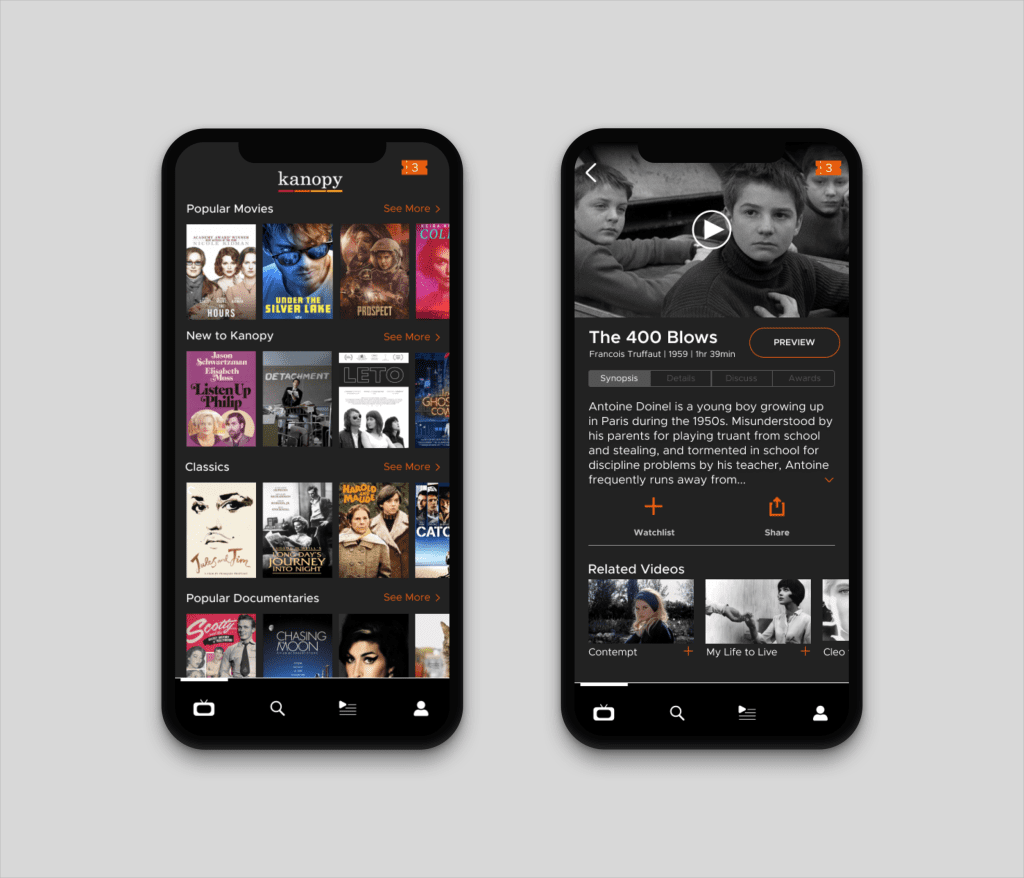
Kanopy is one of the smartest “free” streaming options because it often delivers ad-free, high-quality films through the credibility of libraries and universities, not through aggressive upsells. It won’t replace mainstream subscription platforms for blockbuster entertainment, but it can easily become the most valuable supporting app in a household lineup—especially for documentaries, classics, family-safe kids viewing, and intentional film nights. For ForeverWatch readers who want more depth without more monthly payments, Kanopy is a strong, low-risk install that can quietly become a favorite.