
NBC Sports has become less of a single “channel” and more of an ecosystem—live events on NBC and cable partners, streaming through Peacock, and extra coverage through apps and always-on channels. That shift is the new normal in sports media, and it changes how viewers should judge value. The smart question is no longer “Is it good?” It’s “How do people actually watch it without paying twice, missing big games, or fighting with logins at kickoff?”
This review breaks NBC Sports down the practical way: what it is, what it includes, how access works, what it costs (in real-world terms), where it can feel frustrating, and which alternatives make sense depending on the sport.
Overview
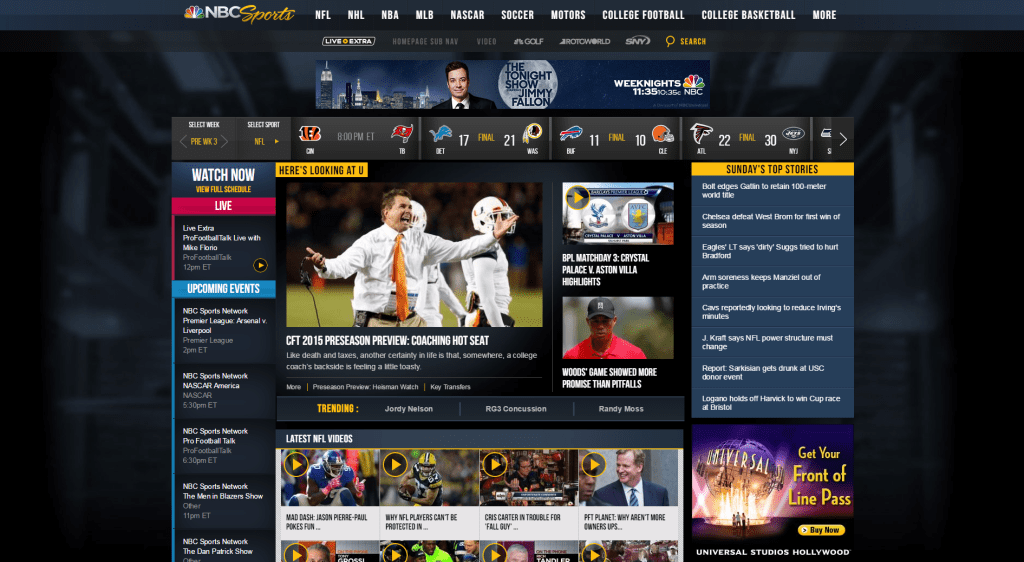
NBC Sports is the sports programming arm tied to NBCUniversal’s sports rights and production. In plain terms, it’s the umbrella that covers:
- Big-event broadcasts on NBC (the main broadcast network)
- Sports coverage on cable partners in the same family (availability depends on package/provider)
- Streaming via Peacock for live games, replays, highlights, and shoulder programming
- Digital coverage through NBC Sports platforms (apps, web, and free streaming channels)
The key is that NBC Sports isn’t one “product.” It’s a collection of access routes that change by sport and by rights agreement. For a viewer, that means the best setup depends on one simple variable:
Which sport is the priority—and how often does the viewer watch live?
A football-only viewer has different needs from an “all-sports” viewer. A household that watches on a living-room TV needs different device support than a commuter who watches on a phone. This is why NBC Sports can feel easy for one person and confusing for another.
Features
NBC Sports wins when it behaves like a well-connected system. It loses when it feels like three different systems pretending to be one. These are the features that matter in everyday use.
Live event coverage across multiple platforms
The strongest feature is reach. NBC Sports typically distributes major events across:
- Broadcast TV
- Cable channels (when applicable)
- Peacock streaming
That multi-platform approach is useful because it creates multiple ways to watch, but it also creates the biggest point of confusion: some events are on NBC, some are on a cable channel, and some are streaming-only.
For viewers, the feature is not just “live sports.” The feature is options—as long as the viewer understands the rules.
Peacock integration for streaming-first viewers
For viewers who want streaming without a traditional TV package, Peacock is often the center of the experience. The platform is positioned as the streaming home for a meaningful slice of the sports portfolio, including:
- Live matches (often with some exclusives)
- Highlights and studio coverage
- Replays and curated sports programming
This is where NBC Sports can feel modern: a single login, a predictable monthly fee, and watching on almost any device.
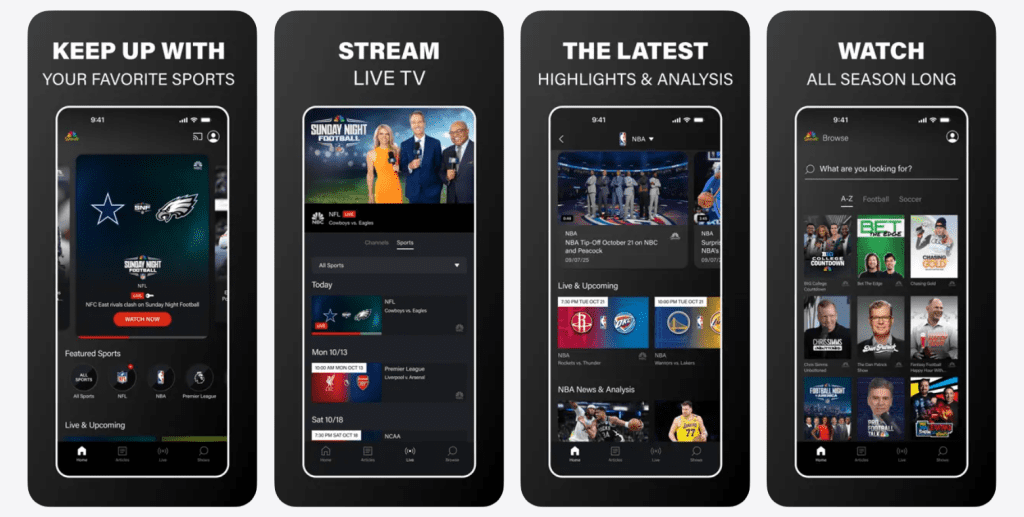
NBC Sports app experience
The NBC Sports app is typically designed as a companion platform:
- It can offer access to certain live events and clips
- It often requires TV provider authentication for locked content
- It can serve as a quick way to launch a stream if a viewer already pays for a qualifying TV package
This matters because many people assume the app is a standalone “subscription.” For most viewers, the NBC Sports app is best understood as a gate that opens only if a qualifying provider subscription already exists.
Free always-on sports channels and FAST distribution
A modern sports ecosystem often includes free channels that run 24/7 with sports talk, highlights, and rotating content. NBC’s ecosystem includes a free sports channel approach that can be accessed through multiple “free TV” platforms depending on device.
This is not a replacement for paid live-event access. It’s more like an entry point:
- Great for discovery
- Useful for daily updates
- Helpful for casual viewing
- Not enough for die-hard fans who need specific live matches
Device support and “watch anywhere” behavior
Sports fans don’t watch like movie fans. They bounce between screens.
A practical NBC Sports setup should support:
- A primary living-room screen (smart TV or streaming device)
- A secondary device for quick access (phone/tablet)
- A backup path when one app struggles (web browser, alternate device, or TV channel)
The best streaming setups are the ones that assume problems happen and still keep the match watchable.
Pricing
Pricing is where NBC Sports becomes highly personal. There isn’t one price because there isn’t one product. The most useful way to evaluate cost is to compare the main access paths.
Path 1: Peacock subscription
Peacock is commonly positioned as the most direct way to pay for streaming access to a large slice of the sports offering. In general, Peacock pricing is tiered:
- An ad-supported plan
- A higher tier with fewer ads and extra perks (market rules apply)
What matters is not the headline price. It’s the sports value per month based on viewing habits.
Best for:
- Viewers who prefer streaming over cable
- Fans who watch select leagues regularly
- People who want replays/highlights in addition to live games
Weak for:
- Viewers who need a specific cable-only event
- Fans who want every match from every league on one service
Path 2: Traditional TV package (cable/satellite)
This path is simplest for households already paying for TV:
- NBC is typically included via local broadcast access
- Cable sports programming depends on the package
Best for:
- Households with traditional TV habits
- People who want a channel guide experience
- Fans who watch a wide range of channels beyond sports
Weak for:
- Value hunters who only want one sport
- Cord-cutters who don’t want long contracts or equipment fees
Path 3: Live TV streaming bundles (cord-cutting bundles)
This is the “modern cable” approach:
- Monthly subscription
- App-based viewing
- Often includes local channels and cable channels depending on plan and region
Best for:
- Fans who want NBC + cable sports channels in one app
- Households that watch many live channels
- Viewers who want DVR-like functionality
Weak for:
- People who only want a narrow sports slice
- Anyone who hates rising bundle pricing
Path 4: Mix-and-match (the most common reality)
Many sports fans end up here:
- Peacock for streaming
- A smaller bundle or antenna for NBC
- Occasional add-ons during peak seasons
This is the “sports subscription stack.” It’s not elegant, but it can be cost-efficient when managed intentionally.
How to avoid paying twice
A simple rule saves money:
Pick the core sport first, then pick the cheapest legal path that reliably includes it.
A few practical examples:
- If most must-watch games are on Peacock, avoid a large bundle “just in case.”
- If a household already pays for a live TV bundle that includes the needed channels, Peacock might be optional rather than automatic.
- If only NBC broadcast events matter, a basic antenna can cover a surprising amount of major sports without a monthly bill.
User base
NBC Sports tends to serve distinct viewer types, and the experience is different for each.
The “event watcher”
This person only shows up for big matches, major tournaments, and marquee games. They don’t want a complicated setup.
What they need:
- The simplest path to NBC broadcast events
- A clean streaming option when a big event shifts to streaming-only
The “league follower”
This person watches weekly. They know match times. They care about replays and studio coverage.
What they need:
- A reliable streaming backbone (often Peacock)
- A clear understanding of which games are exclusive to which platform
The “all-sports household”
This is a family or household with multiple sports interests: one person watches football, another watches racing, another wants general entertainment too.
What they need:
- A bundle approach or a carefully planned stack
- Device flexibility
- Multiple profiles and stable streaming performance
The “casual mobile viewer”
This person watches clips, highlights, and occasional live streams on mobile. They may not care about full match access.
What they need:
- Free sports channels and highlight programming
- Minimal login friction
Advantages
NBC Sports has real strengths, and when the setup matches the viewer, it can feel surprisingly smooth.
Strong production and presentation
NBC’s sports coverage typically emphasizes high production value: clean broadcasts, experienced commentary teams, and a presentation style that feels “big event” when it needs to.
That matters because sports are emotional. The broadcast doesn’t just show the game. It shapes the experience.
Multiple legal ways to watch
NBC Sports is often accessible through:
- Broadcast TV
- Cable
- Live TV streaming bundles
- Peacock
This diversity creates options at different price points and lets viewers build a setup around their budget.
Peacock makes replays and highlights easier
A streaming hub changes the game for time zones and busy schedules. Many viewers can’t watch every event live. Replays and highlights help people keep up without turning sports into a second job.
Free channel strategy helps casual fans
A free 24/7 sports channel approach gives casual viewers a low-friction way to stay connected to sports coverage without committing to a paid plan immediately.
Disadvantages
The weaknesses are not about effort or quality. They’re about fragmentation and expectations.
It can be confusing to know “where the game is”
A viewer can hear “it’s on NBC Sports” and still have to figure out:
- Is it on NBC broadcast?
- Is it on a cable channel?
- Is it on Peacock?
- Is it on a free channel but not the live match?
The brand umbrella creates the perception of one destination, but the rights reality creates multiple destinations.
Provider authentication can feel outdated
If a viewer relies on the NBC Sports app for certain streams, authentication can become the pain point:
- Forgotten passwords
- Provider not supported on the device
- Account access tied to someone else in the household
- “Locked content” confusion
Nothing kills sports joy faster than troubleshooting five minutes before kickoff.
Bundle pricing can rise faster than expected
Live TV streaming bundles can be convenient, but they can drift upward in price over time, especially for sports-heavy plans. The viewer can start with “a good deal” and end up with a bill that feels like traditional cable all over again.
Exclusives can frustrate casual viewers
Streaming exclusives can be great for subscribers, but they can frustrate casual viewers who expected “NBC” access to mean everything important would be on regular TV.
Safety
Sports streaming has two risk zones: account security and scam avoidance.
Safer ways to watch
The safest approach is always:
- Official apps (Peacock, NBC apps, authorized TV providers)
- Trusted app stores on smart TVs and streaming devices
- Known live TV streaming platforms with established billing
Common risks to avoid
- “Free live match” sites that ask for logins, downloads, or unusual permissions
- Social media links promising “full HD streams” with pop-ups and redirect loops
- Unofficial IPTV sellers offering “every channel” for a suspiciously low price
Even when those options “work,” they often come with:
- Malware risk
- Payment theft risk
- Unstable streams that drop during peak moments
Account hygiene tips that actually help
- Use a unique password for Peacock and primary email
- Turn on multi-factor authentication where available
- Avoid sharing logins across too many devices
- Check billing emails so renewals don’t surprise anyone
Alternatives
The best alternative depends on what a viewer wants from NBC Sports in the first place.
ESPN and ESPN+
ESPN is a strong alternative when a viewer wants:
- A broad sports range
- Strong studio programming
- Deep coverage of multiple leagues
ESPN+ can be great value, but it is not automatically a replacement for “big network” games that still live on traditional ESPN channels.
Fox Sports ecosystem
Fox’s sports coverage is strong for viewers whose priorities align with Fox-owned rights and broadcast windows. For some households, Fox + NBC + one streamer covers a surprising amount of marquee sports.
CBS Sports and Paramount+
This setup can work well when a viewer’s must-watch list includes sports covered across CBS and its streaming arm. It’s often a clean alternative when a viewer prefers fewer apps and a clearer streaming plan.
Amazon Prime Video sports windows
Prime Video has become part of the modern sports mix in certain regions and sports categories. It can be a strong add-on for households already paying for Prime, but it’s rarely a full replacement for a network ecosystem.
Apple TV sports packages
Apple’s sports strategy can be compelling when a viewer follows the specific leagues and packages Apple carries. For everyone else, it’s a niche add-on rather than a primary sports home.
DAZN and other specialist sports streamers
DAZN and similar services can be great for specific sports in certain regions. The caution is always the same: rights vary by country, so value depends on local availability.
Actionable takeaways
This is the fastest way to build a setup that makes sense.
- Write down the top 3 sports a viewer watches most.
If it’s only one sport, don’t buy a bundle designed for five sports. - Decide whether live viewing is essential.
If replays are fine, Peacock and on-demand access become more valuable. - Choose one “home base” app.
For many, that’s Peacock. For others, it’s a live TV bundle. - Add only what fills a real gap.
If something is watched once a month, it shouldn’t cost “big subscription” money all year. - Re-check the setup once a season.
Sports rights move. The best setup is the one that stays updated.
Hypothetical user stories
These scenarios show how NBC Sports can fit different lifestyles.
The Premier League-focused viewer
A fan watches matches weekly and wants replays. They don’t care about a huge channel lineup.
Best setup:
- Peacock as the primary subscription
- A simple way to access NBC broadcast windows (antenna or a minimal live TV plan)
Why it works:
- Streaming-first habits match Peacock’s strengths
- The setup avoids bundle pricing
The “Sunday night big-game” household
They watch major NFL windows and special events but don’t watch daily sports.
Best setup:
- NBC broadcast access (antenna or basic TV plan)
- Peacock only if it includes events they truly watch
Why it works:
- Minimal monthly cost
- High-value coverage for major events
The all-sports family
Someone wants football, someone wants racing, someone wants general entertainment.
Best setup:
- Live TV streaming bundle that covers major channels
- Peacock as the streaming add-on when it genuinely fills content gaps
Why it works:
- One main app reduces friction
- Peacock adds replays and streaming-only events
FAQ
What is NBC Sports, exactly?
NBC Sports is the umbrella brand for NBCUniversal’s sports coverage across broadcast TV, cable partners, streaming (notably Peacock), and digital platforms.
Is NBC Sports a standalone streaming service?
Not as a single universal product. NBC Sports content is typically accessed through Peacock, a live TV provider, or a combination of both depending on the event.
Does Peacock include NBC Sports live events?
Peacock often includes live sports and related programming, but availability depends on the sport, rights, and the specific event.
Is the NBC Sports app free?
The app itself can be free to download, but many live streams and full events may require TV provider authentication or an eligible subscription.
Can viewers watch NBC Sports without cable?
In many cases, yes—especially through Peacock or live TV streaming bundles that replace cable. Some content is also available through free sports channels, though live event access may be limited.
Why do some games show as “locked”?
Locked streams typically mean the event requires a TV provider login or a specific subscription tier.
Is NBC broadcast coverage enough for most fans?
It depends. NBC broadcast windows can cover major events, but many sports schedules spread across multiple platforms, which is why some fans add Peacock or a bundle.
Does NBC Sports offer replays?
Replays and highlights are often available through streaming and digital platforms, but the exact catalog depends on rights and the event.
Can the same account be used on multiple devices?
Usually yes, but simultaneous streaming limits vary by platform and subscription type.
Is NBC Sports available outside the United States?
The NBC Sports brand is primarily tied to the U.S. ecosystem. Outside the U.S., sports rights are usually held by different broadcasters and streaming services, so availability changes by country.
What’s the cheapest way to watch NBC Sports content?
The cheapest path depends on what a viewer wants to watch. For some, broadcast TV plus Peacock is enough. For others, a live TV streaming bundle is the simplest way to include everything needed.
Is it safe to use unofficial streams?
Unofficial streams are risky. They can expose viewers to malware, scams, unstable playback, and payment theft. Official apps and authorized providers are the safest route.
Which alternative is best if Peacock doesn’t have the sport a viewer wants?
If the priority sport isn’t consistently available through Peacock, the best alternatives are usually a live TV streaming bundle or a specialist streamer tied to that sport—depending on local rights.
Does NBC Sports work well for casual viewers?
Yes, if casual viewers are satisfied with highlights, studio coverage, and occasional live events. Die-hard fans should confirm that must-watch games are included in the chosen subscription path.
Final verdict
NBC Sports delivers its best value when it’s treated like an ecosystem rather than a single destination: NBC for major broadcast moments, Peacock for streaming-first coverage and replays, and a live TV provider only when it fills a real rights gap. The platform choice should be driven by the viewer’s must-watch sports, live-vs-replay habits, and tolerance for bundle pricing. When those pieces align, NBC Sports can feel simple, modern, and worth paying for—because the setup matches the way sports are actually watched today.