
Plex is the rare platform that can make a home feel like it has its own private streaming service—while also offering free, ad-supported entertainment in the same interface. That mix is why it gets recommended so often. It’s not “just another Netflix-style app.” It’s a media hub that can organize personal libraries, stream them to almost any device, and still give viewers a free catalog when they don’t feel like curating anything.
For many households, streaming has created two problems at the same time: too many subscriptions and too much chaos. People have movies on laptops, shows on external drives, family videos scattered across phones, and then five different streaming apps on the TV. Plex is built to pull that mess into one clean home screen.
This review breaks down what Plex actually does, who it’s best for, which features matter most, how the free vs paid options typically work, where it wins, where it can frustrate people, how to use it safely and legally, and what alternatives make sense depending on viewing style.
What Plex Is Best For
Plex works best for viewers who want control without losing convenience. Some people love subscriptions because they’re easy. Others want to build a long-term library they actually own and can access anytime. Plex sits right in the middle.
It’s a strong fit for:
- Viewers who have personal media files (movies, series, home videos) and want a clean library
- Households that want one interface for TV, phones, tablets, and laptops
- People who like the idea of a “home streaming server” without building something complicated
- Collectors who want poster art, metadata, episode tracking, and watch history for their own content
- Anyone who wants free streaming as a bonus inside the same ecosystem
- Families who want to share a library across devices (with proper permissions)
It can be less ideal for:
- Viewers who only want mainstream subscriptions and never use personal media
- People who don’t want any setup time and prefer one-click simplicity forever
- Households with weak home internet or older hardware that struggles with streaming
- Anyone expecting the free catalog to replace premium paid services entirely
A simple way to decide: Plex is worth it when a household has personal media or wants one hub that reduces the “where is that file?” frustration.
How Plex Works
Plex is easiest to understand as two experiences that can live together:
1) Personal Media Server (the core identity)
A computer, NAS, or dedicated device stores the media files. Plex indexes them, adds artwork and details, and streams them to TVs and devices like a personal Netflix.
2) Free Streaming Extras (the bonus)
Plex can also provide free, ad-supported content and live-style viewing options depending on what’s available in the viewer’s region and device.
The important distinction: the personal media side is about what the viewer owns/has access to, while the free side is about what Plex can provide without a subscription fee.
The “real-life” setup story
A practical household example:
- A viewer has a laptop with downloaded family videos, purchased digital files, and old DVDs ripped for personal archival (where legal).
- They want to watch those on the living-room TV without plugging in cables.
- Plex organizes it like a real streaming service: posters, seasons, episodes, “continue watching.”
- The household keeps one clean hub rather than hunting files on different devices.
That’s the job Plex does best: turning scattered content into a real library experience.
Key Features That Matter
Plex has a lot going on, but only a few features truly change the daily experience.
Library organization and metadata
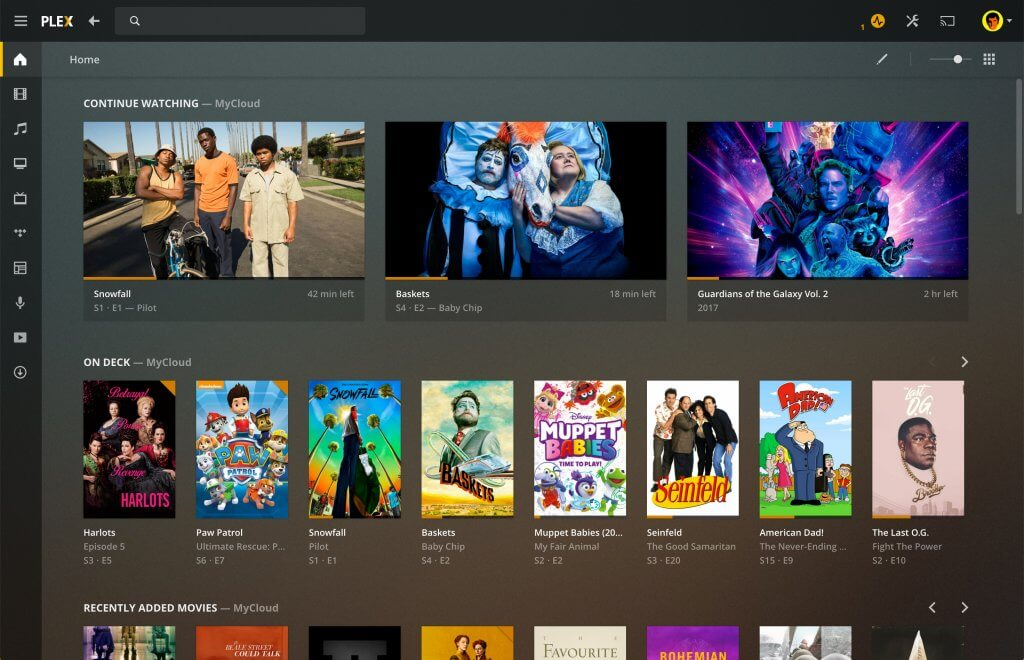
This is the “wow” factor for first-time users. Instead of messy filenames, Plex can display:
- Show posters and movie artwork
- Season and episode organization
- Descriptions, cast, runtime, and genre
- Recently added, trending in your library, and continue watching
For personal collections, this transforms “a folder of files” into “a streaming library.”
Streaming to almost any device
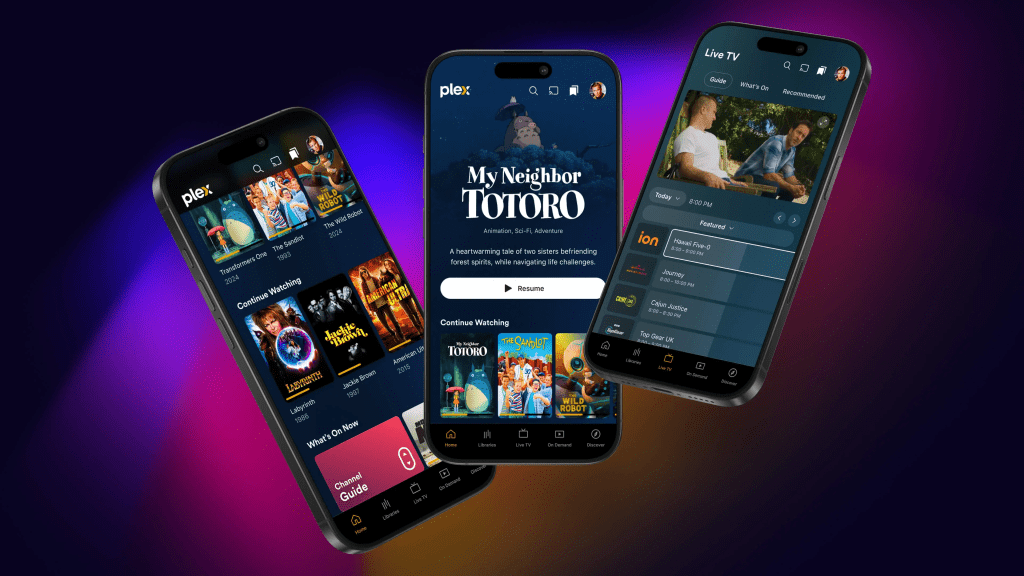
Plex is popular because it works across a wide range of devices. The value is simple: the library follows the viewer around the home.
User profiles and managed access
Profiles help shared households keep watch history clean. Managed access matters for families, because not everyone should see everything.
Remote streaming (optional)
With the right setup, viewers can stream their library when away from home. This feature is powerful, but it’s also where good security habits become non-negotiable.
Transcoding (the make-or-break feature)
Transcoding is what lets a powerful server convert a file into a format that plays smoothly on a device. If the home server is weak, transcoding can cause buffering or reduced quality. If the server is strong, it feels effortless.
Watchlists, discovery, and free content options
For viewers who want variety without opening another app, Plex can be a surprisingly useful “what should we watch?” tool—especially when personal content and free content live side by side.
Pricing and Plex Pass Value
Plex can be used for free, but there’s also a paid layer (often called Plex Pass) that adds extra features. Pricing changes over time, so the evergreen way to judge value is based on behavior, not a specific number.
Here’s the most practical way to think about it:
Free Plex experience typically makes sense when:
- The household mostly streams personal content inside the home
- The setup is simple and doesn’t need advanced features
- Viewers want a clean library and basic streaming without extra costs
Plex Pass tends to make sense when:
- The household wants premium features that improve daily use
- The server setup is central to entertainment (not just occasional use)
- The household needs specific upgrades like advanced controls, smoother mobile convenience, or better overall flexibility
A step-by-step way to decide (no guesswork)
- Use Plex free for a week. Build one clean library.
- Stream on the TV and one mobile device.
- Identify what’s missing: convenience, control, offline access, better sharing, better performance.
- If those missing pieces matter weekly, Plex Pass becomes easier to justify.
- If Plex is mostly “sometimes,” free may be enough.
This prevents paying for features a household doesn’t truly use.
Performance and Quality in Real Homes
Most Plex complaints come from performance expectations, not the interface.
The biggest performance factors are:
- Server power: older laptops can struggle when multiple streams happen at once
- File formats: some files direct play easily; others trigger transcoding
- Home network stability: Wi-Fi strength matters more than people think
- Device compatibility: some TVs handle more formats than others
The practical “no-buffering” playbook
- Use ethernet for the server if possible (stability matters).
- If a TV struggles, use a better streaming device (it’s often a bigger upgrade than buying a new TV).
- Favor “direct play” formats when possible to reduce server load.
- Limit simultaneous heavy streams if the server is modest.
- When remote streaming is used, expect it to depend heavily on upload speed at home.
Plex is best when a household treats it like a system: server + network + playback device working together.
User Base and Who Enjoys Plex Long-Term
Plex has a very specific kind of long-term fan base: people who want a library they control.
Common long-term users:
- Collectors: keep a curated library and want it organized beautifully
- Families: share content across rooms and devices with profiles and rules
- Budget strategists: reduce subscription reliance by building a personal library
- Tech-friendly households: enjoy setting things up once and then benefiting for years
- Hybrid streamers: use personal media plus free content to keep entertainment flowing
People who usually don’t stick with it:
- Those who want “no setup ever” and prefer everything pre-packaged
- Viewers who don’t have personal media and don’t care about organizing it
- Households that expect Plex to replace premium originals from major studios
Advantages
Plex is a strong platform because it solves real problems, not trendy ones.
1) Turns personal files into a real streaming library
Posters, seasons, descriptions, and watch tracking make the experience feel premium.
2) Reduces subscription chaos
It can centralize entertainment so the TV isn’t just a pile of disconnected apps.
3) Cross-device convenience
The same library works across phones, tablets, and TVs, which makes personal content far more usable.
4) Great for long-term ownership mindset
A personal library doesn’t “leave the platform” when licensing changes elsewhere.
5) Strong household sharing options (when used properly)
Profiles and managed access can keep things organized and appropriate.
Disadvantages
Plex has tradeoffs that matter depending on the household.
1) Setup is real
It isn’t hard, but it isn’t zero effort. People who hate setup may lose patience.
2) Performance depends on server + network
If the server is weak or Wi-Fi is unstable, the experience can feel frustrating.
3) Remote streaming requires good internet and good security
It’s powerful, but it’s not plug-and-play for every household.
4) Free content is a bonus, not the main promise
The free catalog is useful, but it’s not the same job as premium subscription services.
5) Personal media must be obtained legally
Plex is a tool. How the content is sourced matters. This is non-negotiable for safe, ethical use.
Safety, Privacy, and Legal Use
This section matters because Plex can involve remote access, accounts, and personal media.
Security basics that should never be skipped
- Use a strong, unique password for the account.
- Turn on two-factor authentication if available in the account ecosystem.
- Keep the server device updated (OS updates + Plex updates).
- Be careful with remote access settings; don’t expose more than needed.
- Use managed users/profiles for family members rather than sharing one login.
Legal use and why it matters
Plex is designed for:
- Personal media files the viewer owns
- Legally obtained content
- Family videos and personal archives
- Licensed streaming options inside the app
It should not be used as a guide to piracy or illegal distribution. The smartest long-term approach is to treat Plex as a “personal library organizer,” not a shortcut around legal streaming.
Plex Alternatives
The best alternative depends on what the viewer wants Plex to do.
If the goal is a personal media server:
- Jellyfin: strong self-hosted option for people who want full control
- Emby: popular personal media solution with a similar mindset
If the goal is simple local playback without building a server:
- Local media players and casting options can be enough for small libraries
If the goal is free streaming entertainment:
- Pluto TV, Tubi, Freevee, and other free ad-supported apps often compete more directly
If the goal is premium originals and mainstream subscription libraries:
- Netflix, Prime Video, Disney Plus, Max, and similar services are still the main players
The key takeaway: Plex is most valuable when the household wants ownership, organization, and a clean hub—not just another catalog.
FAQ
1) What is Plex mainly used for?
It’s mainly used to organize and stream personal media libraries to TVs and devices, like a private streaming service.
2) Is Plex free to use?
Yes, a free version exists and can be enough for many households. Some users choose Plex Pass for advanced features.
3) Does Plex provide movies and shows for free?
It can include free, ad-supported content options, but the core identity is personal media streaming.
4) Does Plex require a server?
For personal media streaming, yes—a computer or NAS typically acts as the server. For free content viewing, a server may not be required.
5) Is Plex difficult to set up?
It’s usually straightforward, but it does require basic setup: installing the server, pointing it to media folders, and adding a playback app.
6) Can Plex stream outside the home?
Yes, remote streaming is possible with the right settings, but performance depends on home upload speed and secure configuration.
7) Why does Plex buffer sometimes?
Buffering often comes from a weak server, heavy transcoding, unstable Wi-Fi, or a playback device that struggles with file formats.
8) What is transcoding and why does it matter?
Transcoding converts video into a format the device can play. It’s helpful, but it can be demanding on hardware.
9) Is Plex safe to use?
Yes, when accounts are secured and servers are kept updated. Strong passwords and safe remote access settings matter.
10) Can Plex be used by a family?
Yes. Profiles and managed users help keep watch history clean and content appropriate.
11) Does Plex replace Netflix and other subscriptions?
Not directly. It can reduce reliance on subscriptions for personal libraries, but it won’t replace premium originals.
12) Is Plex legal?
Plex is legal software. Users should ensure the media they stream is legally obtained and used appropriately.
13) What devices can play Plex content?
Many popular smart TVs, streaming devices, phones, tablets, and computers can use it through apps or web playback.
14) Is Plex good for older TVs?
Yes, especially when paired with a capable streaming device that handles modern formats better than the TV’s built-in system.
15) Who should skip Plex?
Viewers who never use personal media and want zero setup may be happier sticking to standard subscription services.
Final Verdict
Plex is one of the smartest ways to turn personal media into a clean, Netflix-like home experience while still offering free streaming options as a bonus. It shines for households that want control, long-term ownership, and a single hub that reduces subscription chaos and file-hunting frustration. For anyone willing to do a little setup, Plex can become the most “permanent” piece of a streaming lineup—reliable, customizable, and built around content the household actually owns and uses.