

Sling TV is built for people who still want live channels—sports, news, and that “something is on right now” feeling—without paying full cable prices. It’s not an all-you-can-watch library like Netflix. Sling TV is closer to a flexible live-TV bundle that can stay lean, scale up for big seasons, and shrink again when the hype dies down.
This review explains how Sling TV works in real households, who it’s best for, where it annoys people, and how to get value without turning it into a pricey monster.
Overview
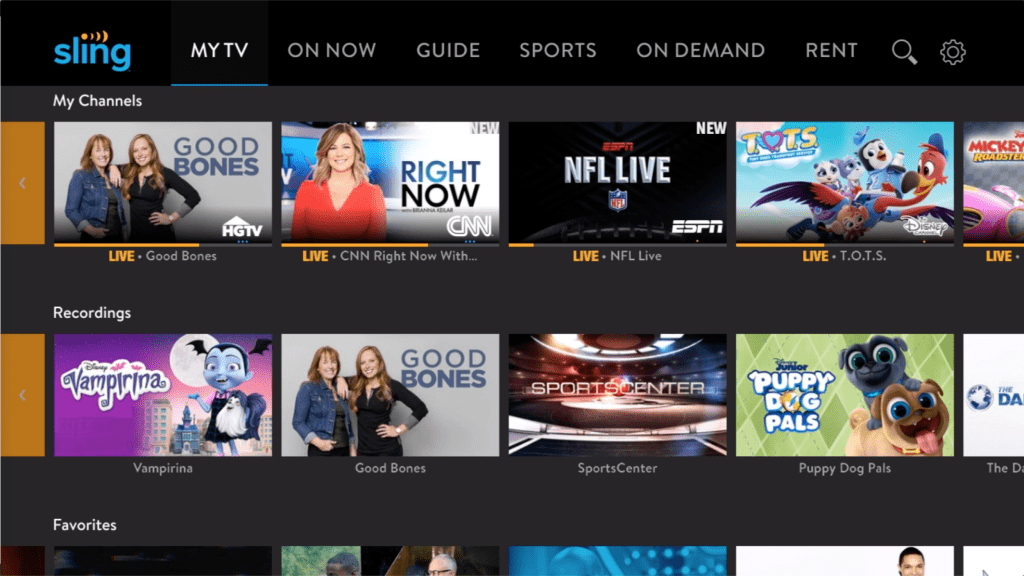
At its core, Sling TV is a live TV streaming service that delivers channels over the internet. Viewers pick a base plan and can add “extras” (sports, news, lifestyle, kids, etc.) if they actually need them.
What it does well: live channel browsing, channel-guide viewing habits, and “pay only for what matters.”
What it doesn’t try to be: a single subscription that magically includes every show, every network, and every live event.
The best way to think about it: this is a cable-style experience, but lighter and more customizable.
How it works in a real home
In most homes, the service becomes the “open it first” option when someone wants to watch something live. The common flow looks like this:
- Open the app
- Scan the live guide
- Jump into a channel
- Record the important stuff (if DVR is enabled)
- Add or remove extras depending on what the household is watching this month
It’s a good fit for families who want quick, channel-based viewing again—without paying for a huge bundle that includes channels nobody touches.
Key features that actually matter
Most viewers don’t care about fancy buzzwords. They care about the basics working smoothly.
Live Guide + channel flipping
The channel guide is the heartbeat. If the guide is clean and easy to navigate, the whole experience feels “TV-like” again.
Cloud DVR options
Recording matters most for sports fans and households that can’t watch live. Cloud DVR support is one of the strongest reasons people stick around—especially if they regularly record games, episodes, or news shows.
Add-ons (“Extras”)
This is where the service can be powerful or a trap. Extras allow customization, but stacking too many is how people accidentally rebuild expensive cable.
On-demand support (limited, network-dependent)
Some networks include on-demand episodes. It’s useful as a bonus, but it’s not the main reason to subscribe.
Multiple devices and flexibility
This kind of live streaming works best when it’s available on the household’s main screens and easy to pick up on mobile when traveling.
Plans and pricing: the smart way to think about cost
Prices change. The winning strategy isn’t memorizing numbers—it’s understanding how costs grow.
The typical cost structure looks like this:
- Base plan (the core channel set)
- Extras (optional packs)
- DVR upgrades (optional, but important for certain users)
A simple rule keeps things under control:
Only pay for extras that solve a real problem.
If a pack doesn’t improve what the household watches weekly, it’s just noise on the bill.
Another smart approach: treat extras as seasonal. Add them during sports seasons, big tournaments, or a specific show run—then remove them.
Channels and content: what to expect
Channel value depends on what the viewer wants and what’s available in their region/plan.
In practice, viewers usually fall into three categories:
1) Sports-led households
They care about specific sports networks, live reliability, and recording. If the plan and extras match their leagues, it can be a strong deal.
2) News-led households
They want live news channels, morning routines, and quick access. This is where live-TV streaming tends to feel most “worth it” without spending a lot.
3) Mixed entertainment households
They want a blend of shows, reality, lifestyle, and occasional sports. This can work well, but only if the household keeps the package intentional.
The key point: people who know what they watch get the most value. People who want “everything just in case” tend to overspend.
Streaming quality and reliability
Live TV is less forgiving than on-demand. If the internet is unstable, buffering shows up more quickly—especially during big live events.
What improves stability fast
- Using a newer streaming device (old hardware can feel sluggish)
- Reducing Wi-Fi congestion (too many devices at once)
- Moving the streaming device closer to the router or using Ethernet
When the setup is right, picture quality is typically solid and consistent for everyday viewing.
Who this is best for
This service isn’t for every viewer. It’s for a specific habit style.
Best fit
- People who watch live sports or news regularly
- Viewers who prefer a channel guide over endless scrolling
- Households that want control over what they pay for
- People who don’t mind spending 10 minutes setting things up properly
Okay fit
- Mixed households that watch a bit of everything, as long as they don’t stack extras forever
- Seasonal viewers who subscribe during peak months and cancel later
Not a great fit
- People who only watch on-demand shows and never touch live channels
- Viewers who want one subscription that includes every network with zero planning
- Households that hate managing plans, extras, and settings
Advantages
Flexible setup
The biggest win is control. Viewers can build a package that matches their habits instead of paying for fluff.
Live-TV feel without contracts
The guide + channel browsing scratches the cable itch without the cable commitment.
Strong value when kept lean
When the base plan matches what viewers watch, the overall cost can stay reasonable.
Good for seasonal usage
Some households treat it like a “sports season tool,” which can be a smart way to keep costs lower across the year.
Disadvantages
Easy to overspend with extras
This is the #1 complaint style: the base feels affordable, then extras pile up.
The best experience requires setup
If someone expects perfection out of the box, they might be annoyed at first. Cleaning up channels and trimming extras makes a big difference.
Live TV depends on internet stability
During major live events, any network weakness becomes obvious.
Not a full replacement for on-demand libraries
Many households still keep at least one on-demand service for binge watching and originals.
Safety and account tips
Even mainstream streaming apps can cause headaches in shared households if the account isn’t managed carefully.
Simple safety habits
- Use a strong password (don’t reuse old ones)
- Keep payment methods protected if multiple people use the TV
- If kids use the TV, separate viewing habits where possible
- Review subscription add-ons occasionally to avoid silent overspending
The goal is simple: prevent accidental purchases and keep the bill predictable.
Alternatives worth considering
Not everyone wants the “build-your-own” approach. Alternatives usually fall into a few categories:
- All-in-one live TV bundles (often more expensive, but less thinking)
- Free ad-supported TV apps (good for casual live channels, weaker for premium sports)
- Sports-first subscriptions (best if the household only cares about leagues/events)
- Pure on-demand services (best if live channels don’t matter)
Choosing an alternative is mostly about one question: does the household want live channels or on-demand libraries?
FAQ
1) What is this service mainly used for?
It’s mainly used for watching live channels like sports, news, and entertainment without traditional cable.
2) Is it the same thing as cable?
No. It streams over the internet and is usually more flexible than cable contracts.
3) Does it include local channels?
Sometimes, depending on location and plan options. Availability can vary.
4) Is it good for sports fans?
It can be a great fit if the chosen plan and add-ons match the leagues and networks the viewer actually watches.
5) Does it have a DVR?
Yes, cloud DVR options are available, and DVR upgrades can be worth it for people who record often.
6) Can it replace Netflix-style streaming?
Not fully. Live-channel services and on-demand libraries serve different habits, so many households keep both.
7) Is it easy for beginners?
It can be, but the best experience usually comes after trimming channels and avoiding unnecessary add-ons.
8) Why do people say it gets expensive?
Because extras stack. The bill grows when viewers add packs “just in case” and never remove them.
9) Is it good for families?
Yes—especially if the household agrees on what’s worth paying for and avoids random add-on creep.
10) Can it be used on multiple devices?
Yes. Most households use it on TVs, phones, tablets, and web browsers depending on their routine.
11) What’s the fastest way to improve the experience?
Use a modern streaming device, stabilize Wi-Fi (or use Ethernet), and keep the package lean.
12) Who should skip it?
Anyone who never watches live channels and only streams on-demand shows will likely get better value elsewhere.
13) Is it worth it for seasonal viewers?
Often, yes. Subscribing during sports seasons and canceling later can make the value feel much stronger.
14) What’s the biggest mistake people make?
Treating extras as permanent. Most packs should be temporary upgrades tied to real viewing habits.
Final verdict
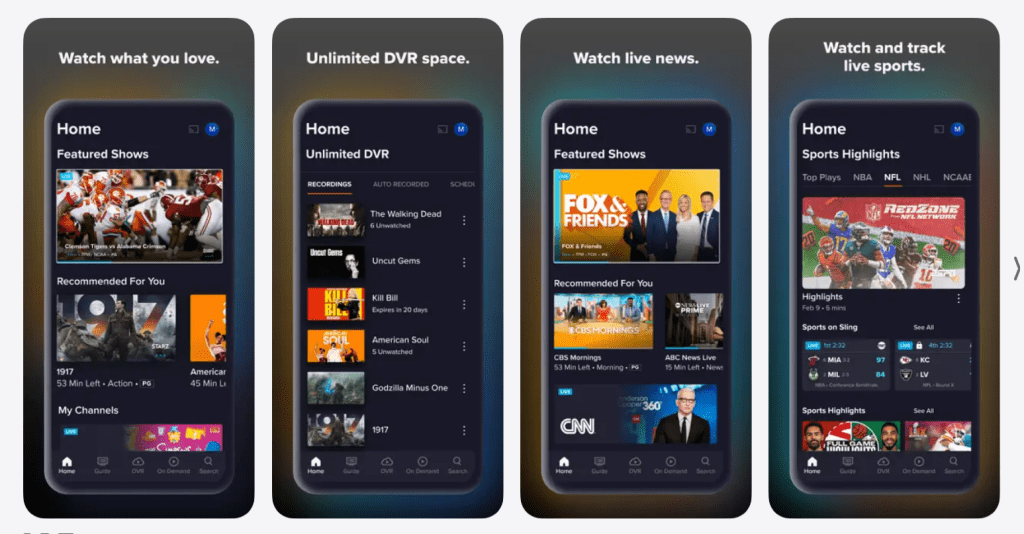
Sling TV works best when it’s treated like a customizable tool, not a forever-bundle. People who watch live sports, live news, or channel-based TV habits can get real value—especially if they keep extras controlled and set up DVR only when it genuinely helps.
If the household wants live channels without cable contracts, Sling TV can be a strong choice. If the household only wants on-demand binge watching, Sling TV will feel like an unnecessary layer.