

The CW App is built for viewers who want quick, low-friction access to TV-style entertainment without committing to another paid subscription. It’s not trying to be the “one app to replace everything.” It’s more like a simple front door into CW-branded programming and a rotating mix of extra content, delivered in an ad-supported format.
That positioning matters because expectations decide whether people love it or bounce off it. If a viewer expects a massive premium library like Netflix, disappointment comes fast. If the goal is “something decent to watch now, for free, on the big screen,” The CW App tends to land much better.
In real homes, this kind of app becomes a “gap filler” and a “comfort pick.” It’s what people open when they don’t want to think too hard, don’t want to pay more this month, and still want a familiar TV experience.
Content library: What viewers can watch on The CW App
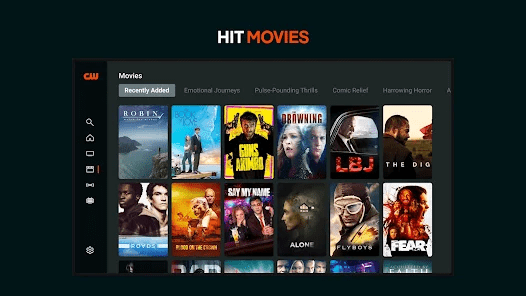
The best way to understand The CW App is to think in content buckets:
- CW network shows: episodes and series tied to The CW brand.
- Lifestyle and reality-style programming: content that plays well in the background and doesn’t demand full attention.
- Acquired shows and rotating titles: extra series or specials that expand the offering beyond core CW identity (availability can shift over time).
- Sports or event programming (where applicable): depending on region and rights, some users may see additional live or near-live coverage.
This is where app can surprise people. Some weeks, it feels tightly focused on CW programming. Other times, it feels broader, like it’s trying to become a free entertainment hub with more variety.
The smart mindset: treat the library as “what’s available right now,” not as a permanent vault.
Key features: What matters most in day-to-day use
A streaming service can have a great catalog and still feel annoying if the interface fights the user. The CW App usually succeeds when it keeps things simple.
Here are the features that actually change the experience:
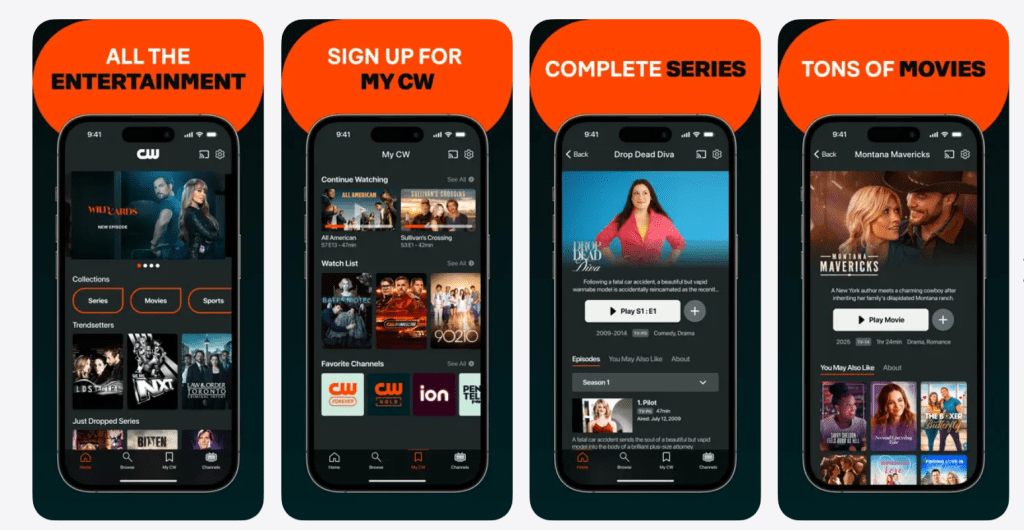
- Fast browsing: fewer layers between opening the app and hitting play.
- Clear show pages: straightforward episode lists and easy continuation.
- Search and discovery (basic but useful): enough to find a show quickly without getting lost.
- Ad-supported playback: the trade-off that keeps the cost low, but impacts pacing.
- Resume/continue watching: when it works smoothly, it makes the app feel “sticky.”
The standout value isn’t fancy personalization. It’s the low effort required to start watching.
Pricing: What The CW App costs
The CW App typically costs nothing upfront to use, with viewing supported by ads instead of a monthly fee. That’s the core deal: the viewer pays with attention rather than money.
A useful way to frame it for readers:
- No monthly subscription required for most users.
- Ads are part of the experience, so the “true cost” is interruptions.
- Some content availability can vary by region, device, or licensing.
For budget-focused households, that’s a strong pitch. For viewers who hate interruptions, it’s the main reason to look elsewhere.
User experience: What it feels like in real households
Most people don’t review apps like critics—they judge them in tiny moments:
- “Did it load quickly?”
- “Did it remember where the episode ended?”
- “Can the family figure it out without help?”
- “Are the ads bearable?”
The CW App works best as a low-pressure app. It’s the “put something on” option. It’s also the kind of app that can rotate in and out of someone’s weekly habits, depending on what shows are currently interesting.
Where it feels strong
- When the viewer wants something familiar and easy.
- When the home wants free content on a smart TV.
- When someone wants a “secondary app” to complement paid services.
Where it can feel weak
- When a viewer expects premium depth.
- When someone is ultra-sensitive to ad breaks.
- When someone wants advanced watchlist features and deep personalization.
Supported devices: Where The CW App usually works
Most viewers use The CW App in one of two ways:
- On a phone/tablet for quick, personal viewing
- On a TV device for lean-back watching
The typical expectation is that it’s available across common platforms (mobile and popular TV streaming devices). The exact list can shift with updates, so it’s best framed as: “available on major mobile platforms and many smart TV/streaming device ecosystems.”
This matters because free apps live or die by convenience. If the platform is easy to install on the living-room device, usage goes up immediately.
Best use cases: Who The CW App is for
This review gets sharper when it stops trying to please everyone. The CW App is a better fit for these audiences:
- Budget-first viewers who want entertainment without another monthly charge
- Casual watchers who like simple TV-style browsing
- Households with multiple services that still want a free “backup” option
- People who enjoy CW-style programming and want a direct path to it
And it’s usually a weaker fit for:
- Viewers who demand ad-free viewing
- People who want a massive, stable library
- Users who obsess over high-end personalization and premium UI polish
Advantages: Why people keep The CW App installed
The CW App’s advantages are simple, practical, and easy to feel:
- Cost-friendly access: free entry point for entertainment
- Low commitment: install, watch, leave—no subscription guilt
- Quick time-to-play: less friction than many “big” apps
- A solid secondary option: complements paid subscriptions nicely
The app wins when it’s treated as a convenient free channel, not a premium replacement.
Disadvantages: The trade-offs that annoy viewers
To keep the review honest, the negatives need to be clear:
- Ads interrupt pacing: especially in tense or emotional scenes
- Library consistency can shift: content availability isn’t always permanent
- Not built for power users: fewer advanced features than premium rivals
- Some users want more control: deeper watchlists, tighter personalization, more settings
If a viewer is already paying for multiple services, the ads can feel extra irritating. If a viewer is saving money, the ads are often an acceptable trade.
Safety and privacy: What viewers should set up
Even if The CW App doesn’t require a subscription for many users, modern streaming still involves tracking, recommendations, and shared devices. A few practical steps improve safety and comfort:
- Use separate profiles where available so recommendations don’t get scrambled
- Keep kids on kid-appropriate viewing paths (or separate devices) to avoid mixed suggestions
- Review device-level privacy settings on the TV/streaming stick, not just inside the app
- Be cautious with shared accounts/devices in households with many viewers
Safety isn’t just about “danger.” It’s also about keeping the living-room experience predictable.
How to get the best experience fast
If a reader installs The CW App today, these steps usually improve the experience in the first 10 minutes:
- Install it on the primary TV device first (that’s where usage becomes habit)
- Test playback with one episode to understand ad rhythm
- Use search to pin down a show quickly instead of browsing endlessly
- Treat it as a “secondary app” and keep expectations aligned
- Rotate in and out based on what’s currently appealing
A streaming app doesn’t need to be perfect to be useful. It needs to be easy.
Alternatives: What to use if The CW App isn’t the right fit
If app doesn’t match a viewer’s style, the best alternative depends on the reason.
If the issue is ads:
- Consider a paid service that prioritizes ad-free viewing (or an ad-free tier where available).
If the issue is library depth:
- Larger subscription platforms tend to win on breadth and “always-there” catalogs.
If the issue is free content variety:
- Other free, ad-supported apps can feel broader, especially those focused on big rotating catalogs and live-style channels.
If the issue is simplicity:
- Some TV platforms focus heavily on minimal clutter and straightforward navigation.
The point isn’t that The CW App is “better.” It’s that it’s built for a specific job: free entertainment with a CW flavor, delivered with minimal friction.
FAQs
- Is The CW App free to use?
Yes, The CW App is generally free, with viewing supported by ads rather than a monthly subscription. - Is The CW App the same as a paid streaming service?
No. The CW App is typically positioned as a free, ad-supported viewing option rather than a premium subscription library. - Does The CW App have ads during shows?
Yes. Ads are a standard part of The CW App experience, and they are the main trade-off for free access. - Can it be used on a smart TV?
In many setups, yes—The CW App is commonly used on TVs through smart TV platforms or streaming devices. - Does The CW App let viewers pick episodes and seasons?
Usually, yes. The CW App experience commonly includes show pages with episode lists, making it easy to start from the beginning or continue. - Is The CW App good for casual watching?
Yes. The CW App often works best for casual viewing because it’s quick to open and easy to start playing something. - Does The CW App replace Netflix or Disney+?
Not really. The CW App is better viewed as a free companion app, not a full replacement for paid platforms. - What’s the biggest reason people uninstall The CW App?
For most viewers, it’s either the ad interruptions or a mismatch in expectations about how large the library is. - Is The CW App good for families?
It can be, but families get the best results when viewing habits are separated (kids vs adults) and household device settings are managed properly. - Does The CW App work well for binge-watching?
It can, but ad breaks can make long binge sessions feel slower compared to ad-free services. - Can the content on The CW App change over time?
Yes. Like many streaming apps, The CW App content availability can shift as licensing and programming priorities change. - Is it worth installing if someone already pays for other services?
Often, yes. The CW App can still be useful as a free backup option—especially when the viewer wants something quick without adding another bill. - How can viewers improve the experience quickly?
Use The CW App search to find a specific show, test one episode to understand ad pacing, and treat the app as a secondary option rather than a premium “everything” service. - Who should skip it?
Anyone who strongly prefers ad-free viewing or wants a massive, stable premium library may not enjoy The CW App as much.
Final verdict: Is The CW App worth it?
The CW App is worth installing for viewers who want free, easy entertainment and don’t mind ads as the trade-off. It shines as a secondary streaming option—simple, accessible, and useful when the household wants something to watch without paying more.
For the right audience, the platform feels like a practical win: open it, pick something fast, press play, and move on with the night.