
The CW App is built for viewers who want quick, low-friction access to television-style entertainment without committing to another paid subscription. It is not trying to be the single app that replaces everything. Instead, it functions as a simple, ad-supported front door into CW-branded programming, live sports, and a rotating mix of acquired content.
That positioning matters because expectations determine whether people love it or delete it. If a viewer expects a massive premium library on the scale of global giants, disappointment comes fast. But if the goal is simply finding good TV shows to watch for free on the big screen, The CW App tends to land perfectly.
In real homes, this app becomes a gap filler and a comfort pick. It is exactly what people open when they do not want to think too hard, do not want to increase their monthly streaming budget, but still want a highly familiar television experience.
Content library: What viewers can watch on The CW App
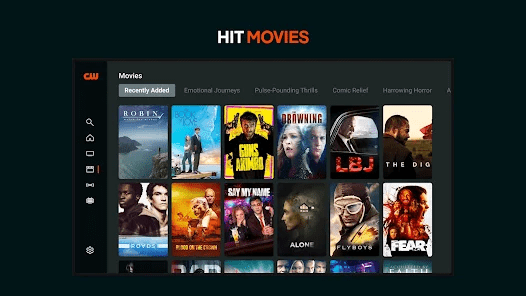
The best way to understand The CW App is to think in specific content buckets:
- CW network shows: Episodes and full series directly tied to The CW brand, often available the day after they broadcast.
- Lifestyle and unscripted programming: Perfect for viewers searching for the best reality TV shows that can play comfortably in the background.
- Live Sports: Since Nexstar’s acquisition, The CW has transformed into a heavy hitter for live athletics. For 2026, the app provides access to ACC, Mountain West, and Pac-12 college football, NASCAR practice and qualifying races, and serves as the exclusive home if you want to watch pro wrestling via WWE NXT.
- Acquired shows and rotating titles: Extra series or specials that expand the offering beyond the core CW identity.
This is where the app can surprise people. Some weeks, it feels tightly focused on classic teen dramas. Other times, it feels much broader, acting as a live sports and entertainment hub. The smart mindset is to treat the library as what is available right now, not as a permanent vault.
Key Features: What Matters Most Day-to-Day
A streaming service can have a great catalog and still fail if the interface fights the user. The CW App succeeds largely because it keeps things simple and barrier-free.
Here are the features that actually define the experience:
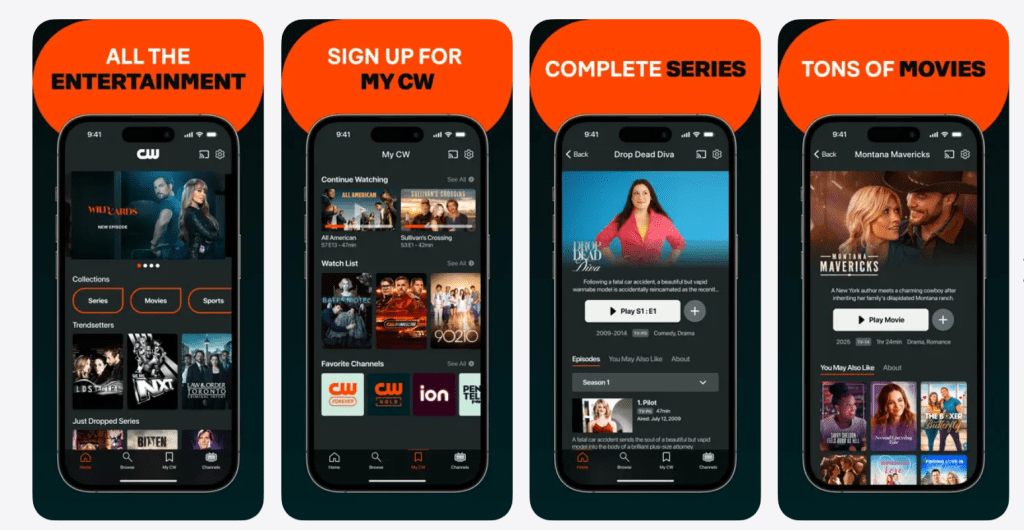
- No-login entry: You do not need to create an account or hand over a credit card just to start browsing.
- Fast browsing: There are very few layers between opening the app and hitting play.
- Live channels: For viewers who just want to watch live TV, the app includes 24/7 programmed streams to mimic traditional channel surfing.
- Clear show pages: Straightforward episode lists make it easy to figure out where you left off.
- Ad-supported playback: This is the core trade-off that keeps the cost at zero, though it directly impacts the pacing of dramatic episodes.
The standout value here isn’t fancy, algorithm-driven personalization. It is the incredibly low effort required to start watching.
Pricing: What It Actually Costs
The CW App costs absolutely nothing upfront, with viewing supported entirely by commercial breaks instead of a monthly fee. The core deal is that the viewer pays with their attention rather than their wallet.
- No monthly subscription is required.
- Ads are an unskippable part of the experience, meaning the true cost is the interruptions.
- Because it is heavily tied to US broadcast rights, international availability is heavily restricted.
For budget-focused households, a free entry point is a massive selling point. For viewers who absolutely hate interruptions, it is the primary reason to look elsewhere.
User Experience: How It Feels in Real Households
Most people do not review free apps like critics—they judge them in tiny, practical moments: Did it load quickly? Are the commercial breaks bearable? Can the family figure it out without asking for help?
The CW App works best as a low-pressure utility. It is the ultimate “put something on” option.
Where it feels strong:
- When a viewer just wants something familiar and easy.
- When a household wants legally free content installed directly on a smart TV.
- When sports fans need a direct pipeline to weekend college football or NASCAR qualifiers.
Where it can feel weak:
- When a viewer expects premium depth or massive blockbuster movies.
- When someone is ultra-sensitive to ad breaks breaking the tension of action TV shows.
- When users want advanced watchlist features and deep, multi-profile personalization.
Supported Devices
Because free apps live or die by absolute convenience, The CW App is widely available across major mobile platforms, streaming sticks (like Roku and Fire TV), and smart TV ecosystems.
Most viewers use it in one of two ways:
- On a phone or tablet for quick, personal viewing the day after an episode airs.
- On a living-room television for lean-back sports viewing and channel surfing.
Advantages: Why People Keep It Installed
- Cost-friendly access: A completely free entry point for premium broadcast entertainment.
- Zero commitment: Install, watch, and leave without any subscription guilt or cancellation menus.
- Sports expansion: With over 800 hours of live sports programming added for the 2026 season, it has become a necessary app for college football and racing fans.
- Quick time-to-play: It features significantly less friction than many of the massive subscription platforms.
Disadvantages: The Trade-Offs
To keep the review honest, the negatives need to be clear:
- Ads interrupt pacing: This is especially noticeable during tense, emotional scenes in dramas.
- Library consistency: Content availability is not permanent; older seasons often expire.
- Not built for power users: It offers far fewer advanced features than premium rivals.
If a viewer is already paying for multiple services, the ads can feel extra irritating. If a viewer is actively trying to save money, the ads are a perfectly acceptable trade.
Alternatives That Make Sense
If this app doesn’t perfectly match a viewer’s style, the best alternative depends entirely on what they are trying to fix.
If the viewer wants network TV with fewer boundaries: A Peacock review will show a similar blend of live sports (like NFL and Premier League) and next-day broadcast television, but with the option to upgrade to an ad-free premium tier.he CW App is “better.” It’s that it’s built for a specific job: free entertainment with a CW flavor, delivered with minimal friction.
If the issue is free content variety: Checking a Tubi review or a Pluto TV Review makes sense. Both are entirely free, ad-supported platforms, but they offer massively larger libraries of on-demand movies and hundreds of distinct live channels.
If the issue is library depth and ad-free viewing: Netflix or Prime Video easily win on sheer breadth and offer “always-there” catalogs that justify their monthly fees.
FAQs
Is The CW App free to use?
Yes, the application remains completely free for all viewers to download and use. The network relies entirely on an ad-supported broadcasting model rather than charging a monthly subscription fee. You never have to enter credit card details or navigate complex billing screens. Fans simply install the software and instantly start streaming their favorite programs.
Is The CW App the same as a paid streaming service?
No, the platform operates completely differently from premium subscription libraries. You do not pay a monthly fee, but you also do not get an overwhelming, endless catalog of international content. The network positions this application strictly as a free, ad-supported viewing option. Viewers researching CW Seed will find that this modern successor carries the exact same frictionless philosophy. It serves as a focused network hub rather than a massive global entertainment vault.
Does The CW App have ads during shows?
Yes, commercial interruptions represent a mandatory part of the viewing experience. Advertisements serve as the primary financial trade-off that allows the network to offer content without a paywall. You will experience regular ad breaks strategically placed throughout every episode. These commercial blocks directly fund the platform and keep the service entirely free for the audience.
Can it be used on a smart TV?
You can easily install the application across a massive variety of living room setups. The software runs natively on almost all major smart television platforms and dedicated streaming devices. Viewers frequently download the app on Roku, Amazon Fire TV, Apple TV, and modern Android TV systems. This broad compatibility ensures you can enjoy a full-screen broadcast experience rather than watching exclusively on a mobile device.
Does The CW App let viewers pick episodes and seasons?
Yes, the platform functions exactly like a standard video-on-demand service. The interface organizes programs into dedicated show pages featuring complete episode lists. This structured layout makes it incredibly easy to start a series from the pilot episode or continue from where you left off. You retain full control over your viewing choices, unlike passive, linear television channels.
Is The CW App good for casual watching?
The application excels specifically at delivering a casual, low-pressure viewing experience. It opens quickly and allows you to start playing something immediately without navigating complex login screens. If you want to watch TV shows online quickly, this lightweight approach works perfectly. You can drop in, watch a single episode during a lunch break, and close the app seamlessly.
Does The CW App replace Netflix or Disney+?
This platform absolutely does not serve as a full replacement for massive premium services. You should view it strictly as a supplementary, free companion application. Premium giants invest billions in original global content and maintain massive historical movie vaults. The network designed this specific app to fill gaps in your entertainment schedule, not to act as your only streaming destination.
What’s the biggest reason people uninstall The CW App?
Frustrated viewers typically abandon the application for two highly specific reasons. First, the repetitive nature and high frequency of the commercial interruptions can heavily disrupt the narrative flow. Second, many users expect a massive, endless library and feel disappointed by the focused, network-specific catalog. When fans expect the sheer volume detailed in a massive Netflix Review, they quickly realize this free app serves a much narrower purpose.
Is The CW App good for families?
The platform offers plenty of appropriate content, but parents must manage the viewing experience carefully. The application lacks robust, password-protected child profiles that premium services normally provide. Families achieve the best results when they physically separate viewing habits between children and adults. You must actively manage your household device settings to ensure younger viewers stick to appropriate animated programming.
Does The CW App work well for binge-watching?
You can certainly stream multiple episodes back-to-back, but the experience carries significant friction. Mandatory ad breaks make long binge sessions feel significantly slower compared to watching ad-free premium services. The commercial interruptions can easily break your immersion during highly dramatic, serialized storylines. Dedicated fans often push through the ads, but casual viewers might experience severe ad fatigue after three episodes.
Can the content on The CW App change over time?
Yes, the available content library shifts constantly based on backend licensing agreements. The network regularly rotates programs in and out depending on their current broadcasting priorities. You might find a complete classic series available one month, only to see it vanish the next. This rotating availability remains a standard practice across almost all free streaming applications.
Is it worth installing if someone already pays for other services?
The application absolutely remains worth installing as a reliable, free backup option. Even if you pay for premium bundles, you might suddenly want to catch up on specific popular TV shows exclusive to this network. Having a zero-cost secondary option on your television never hurts your monthly budget. It provides immediate entertainment when you simply want something quick without adding another costly bill.
How can viewers improve the experience quickly?
You can drastically improve your daily usability by utilizing the direct search function rather than endlessly scrolling the home screen. Test a single episode first to fully understand the current commercial pacing and ad load. Most importantly, consciously treat the application as a highly focused secondary option. Do not approach it expecting a premium, everything-included streaming giant, and your satisfaction will increase significantly.
Who should skip it?
Anyone who strongly despises commercial interruptions should completely avoid this platform. If you aggressively prefer pristine, ad-free viewing environments, the constant breaks will deeply annoy you. Additionally, viewers demanding a massive, stable premium library will absolutely not enjoy this targeted network app. You must accept the advertising trade-off, or the application will simply frustrate you.
Final verdict: Is The CW App worth it?
The CW App is worth installing for viewers who want free, easy entertainment and don’t mind ads as the trade-off. It shines as a secondary streaming option—simple, accessible, and useful when the household wants something to watch without paying more.
For the right audience, the platform feels like a practical win: open it, pick something fast, press play, and move on with the night.