
Streaming has fundamentally changed how we watch television, but one habit hasn’t disappeared: the comfort of turning on live channels and letting something play. DSTV Stream is built exactly for that habit. It delivers a familiar, scheduled channel line-up over the internet, and then backs it up with an extensive on-demand library for when viewers want to binge instead of surf.
Unlike many on-demand-only apps, DSTV Stream feels much closer to traditional broadcasting. The primary value lies in live sport, live news, and a daily updated schedule. For households that still gather to watch live football or major events in real time, it is one of the most practical bridges between old-school TV and modern app-based viewing.
What DSTV Stream is (and what it isn’t)
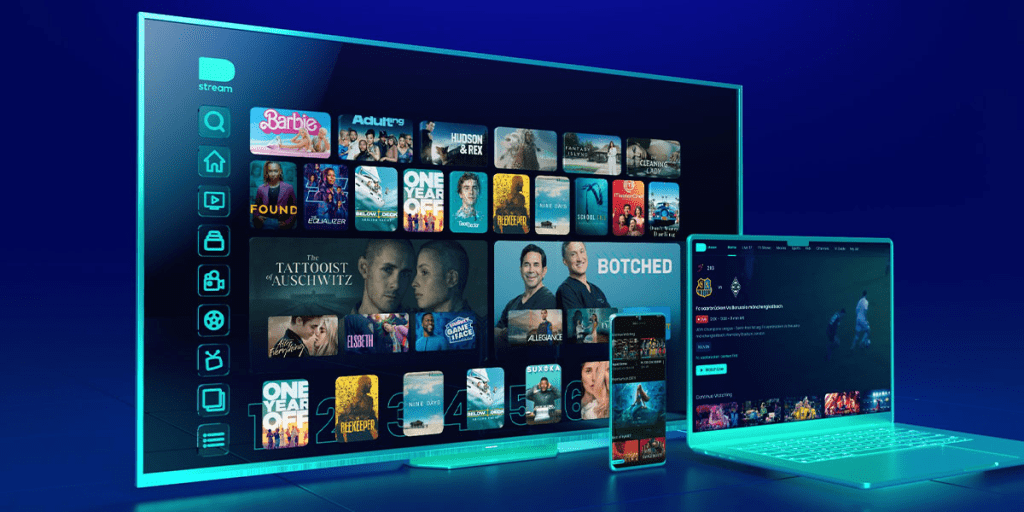
DSTV Stream is the official streaming branch of DStv, focusing primarily on:
- Live channels spanning sport, news, entertainment, kids, and lifestyle.
- A curated on-demand library that complements the live programming.
- Viewing across multiple device types through dedicated apps and a web player.
It is vital to understand that DSTV Stream is not a pirate IPTV substitute, nor is it a loophole to access global channels for free. The experience is fully licensed, account-based, and designed to work reliably as long as the home internet connection is stable.
Key Features That Matter in Real Life
Most viewers do not care about endless spec sheets. They care about whether the basics work smoothly on the screens they already own.
Device flexibility
DSTV Stream runs efficiently on common mobile platforms and supports mainstream streaming devices like Apple TV and Play Protect-certified Android TV boxes. It also supports smart TVs on major platforms and works seamlessly in a web browser.
Live-first experience
Live sport and live news are exactly where DSTV Stream earns its monthly price. Many households keep a subscription exclusively for live viewing, and the platform is structured entirely around that priority.
Stream rules for households
A household’s experience depends heavily on how many people are watching at the same time. While a base DSTV Stream package usually allows streaming on one or two devices concurrently, the service now allows users to add up to two extra mobile streams for an additional monthly fee. This is a critical detail because it dictates whether the lounge smart TV and a mobile phone can run together without triggering a “streaming limit reached” error.
Familiar navigation
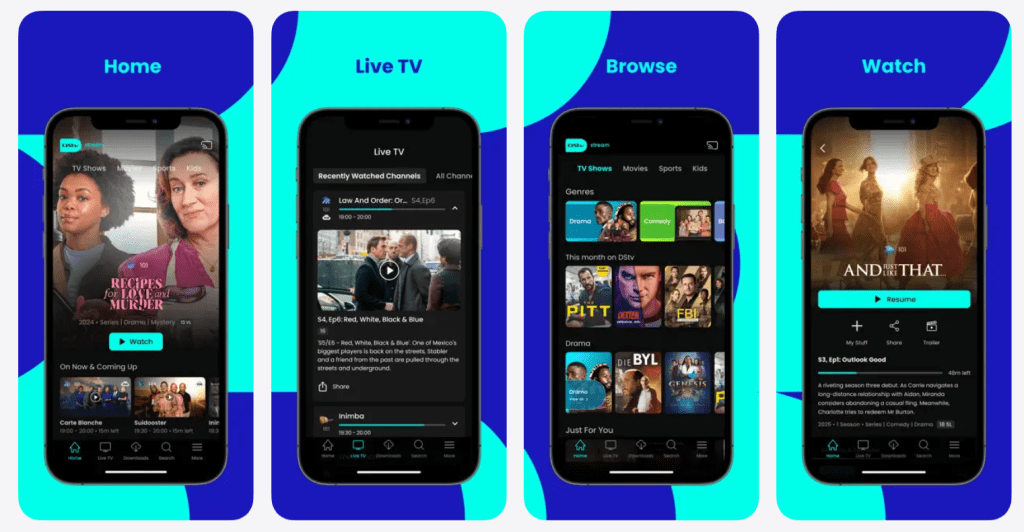
Channel lists, guides, and “what’s on” discovery menus make DSTV Stream incredibly easy for long-time viewers to navigate. Instead of endless algorithmic scrolling, new users get clear structure. Consistency across devices means viewers can move from the lounge TV to a phone without having to re-learn the interface.
Compatibility, Setup, and the Fastest Way to Start
Getting started with DSTV Stream is simple when the setup is treated like a quick checklist.
- Create a new account or sign in to an existing one.
- Choose a subscription tier that includes streaming.
- Install the DSTV Stream app on the main television device and a smartphone.
- Log in, confirm the device is officially registered to the account, and test a live channel.
Before a major match night, it is highly recommended to adjust the video quality settings and confirm that the household understands the device limits. If a smart TV app feels sluggish, connecting a dedicated streaming stick often drastically improves DSTV Stream performance.
Internet Requirements and Why Stability Beats Speed
Streaming quality is not just about raw connection speed; it is about how steady that connection stays during peak internet hours.
DSTV Stream can work on a moderate broadband connection, but live sports demand absolute consistency. A stable fibre line at a lower speed will always feel better than a faster line that drops packets or spikes in latency. When buffering happens during a live moment, it hurts much more than it does during a pre-recorded movie.
Data usage is another major factor. Because DSTV Stream can consume significant data at higher resolutions, households that stream frequently need uncapped fibre. Mobile streaming on DSTV Stream should generally be treated as a convenience layer rather than the primary viewing method, unless you have a massive mobile data plan.
Pricing and Packages (How to Judge Value)
Pricing is where DSTV Stream can feel more layered than global streamers because the service is tied to specific channel bouquets. Moving into 2026, the company continues to focus on budget-friendly upgrades—such as adding new channels to the entry-level Access tier—while maintaining premium pricing for top-tier sports access.
Sport-first households
If sports are the main reason for subscribing, the right package is the one carrying the specific SuperSport channels for the events you actually watch. If you need to know where to watch Premier League matches every weekend, you will need a higher-tier package like Compact or Premium. Value is strongest here when live sports are consumed weekly.
Entertainment-first households
If live sports are only occasional, it is smarter to focus on packages that cover premium series, movies, and the best reality TV shows. For many viewers, pairing a mid-tier DSTV Stream package with a single on-demand platform is a highly cost-effective strategy.
Budget-focused viewers
If the goal is to have background live channels and local relevance, the entry-level DSTV Stream packages provide excellent value. If the household uses DSTV Stream almost daily, the overall cost per hour remains highly competitive.
Who DSTV Stream Is Best For
DSTV Stream tends to land best with:
- Sports fans who want matches on a large TV at home and on a mobile phone when traveling.
- News viewers who prefer scheduled broadcasts over searching for clips online.
- Families who understand the simultaneous stream limits and coordinate their viewing.
- Cord-cutters who still want a classic channel guide without paying for satellite dish installation.
For viewers who rarely watch live programming and only want to watch documentaries or older movies on demand, paying for this service can feel like buying a capability that is rarely used.
Advantages
- Fast start with no installation: A household can subscribe to DSTV Stream and start watching immediately, without waiting for satellite hardware or a technician.
- Made for live events: DSTV Stream excels at delivering live sports and breaking news—the exact moments that push audiences back toward scheduled television.
- Broad device coverage: Seamlessly moving between a TV, phone, and laptop is a practical daily advantage.
- Local relevance: For many regional households, the specific mix of local programming and familiar network television is the definitive reason to choose DSTV Stream.
Disadvantages
- Internet dependency: If the home connection is unreliable, DSTV Stream will buffer—which is especially frustrating during live sports.
- Strict stream limits: Households assuming unlimited simultaneous screens will hit hard restrictions unless they pay to bolt on extra mobile streams.
- Complex pricing: Navigating the various DSTV Stream packages, add-ons, and stream upgrade fees is much more complicated than paying a single flat rate.
Safety, Legitimacy, and Account Hygiene
DSTV Stream is a fully licensed and legitimate platform. The main “safety” issue is simply account protection.
Best practices include:
- Using a strong password and avoiding sharing logins outside the immediate household.
- Watching out for phishing emails pretending to be official billing support.
- Removing old devices from the DSTV Stream account settings if a phone is sold or replaced.
When account sharing becomes widespread, the most common consequence is not a permanent ban, but rather constant stream conflicts, device headaches, and being repeatedly logged out.
Alternatives
DSTV Stream does not compete directly with every app in the same way. It competes primarily on the strength of its live channels and sports access.
Showmax
Showmax is often the perfect companion app for binge-viewing, especially for households that lean heavily into series and local movies rather than live broadcasts.
Netflix or Prime Video
These platforms offer more predictable pricing and massive on-demand libraries. However, they are generally weaker alternatives if your priority is local live sports or a traditional daily channel guide.
Free ad-supported platforms
If you are looking for free sites to watch TV shows casually, ad-supported platforms like Pluto TV or local broadcaster apps are useful, but they simply cannot replace premium live events.
Satellite-based DStv
Traditional satellite remains highly relevant in areas where broadband is unstable, or for users who prefer the absolute hardware reliability of a decoder over internet app convenience.
Still relevant where broadband is unstable, or for users who prefer hardware reliability over app convenience.
FAQ
Is DSTV Stream available without a decoder?
Yes. DSTV Stream can be used with streaming-only options, so a decoder is not required.
Can DSTV Stream be watched on a laptop?
Yes. It can be used through a web player in a browser on a laptop or PC.
Does DSTV Stream work on smart TVs?
It works on supported smart TV platforms and streaming devices. If the TV app is slow, a dedicated streaming device can help.
How many people can watch at the same time?
DSTV Stream typically includes a primary stream plus a mobile-only stream, and extra mobile streams can be added (with mobile restrictions for add-ons).
Is DSTV Stream good for live sport?
Yes—when the internet connection is stable. Live sport is one of the strongest reasons to subscribe.
Does DSTV Stream use a lot of data?
It can at higher quality. Lowering quality settings reduces data use significantly.
Can it be used while traveling?
Availability and rights can vary by region. Checking the account’s travel rules is the safest approach.
What makes it different from Netflix?
Netflix is on-demand first. DSTV Stream is live TV and channel line-up first.
What should first-time users do before a big event?
Log in early, test a live channel, confirm quality settings, and make sure the household understands who is watching on which device.
Final verdict
DSTV Stream works best when it is treated as “live TV made modern,” not as a pure binge library. For sport and news households, it can be a strong, convenient way to watch without hardware and without being tied to one screen. For viewers who rarely watch live channels, the smarter move may be a smaller package or a different on-demand stack—but for the right audience, DSTV Stream delivers the experience it promises.e that live for live sport, news, and local schedules on DSTV Stream.