
Tubi is one of the fastest ways to turn a “nothing to watch” night into an actual movie night without adding another monthly bill. It’s built around a simple tradeoff: viewers get a surprisingly large mix of movies and shows for free, and the platform earns money through ads.
That model changes how it should be judged. This isn’t a premium subscription that promises the newest releases. It’s one of the more useful movie streaming sites for viewers who want convenience, variety, and low commitment. For a lot of households, that’s exactly the missing piece in a streaming lineup.
This review breaks down what Tubi is best for, how the free model works in real life, what to expect from the library, which features matter, where it wins, where it can frustrate people, how to stay safe while using it, and which alternatives make sense depending on what a viewer wants.
What Tubi Is Best For
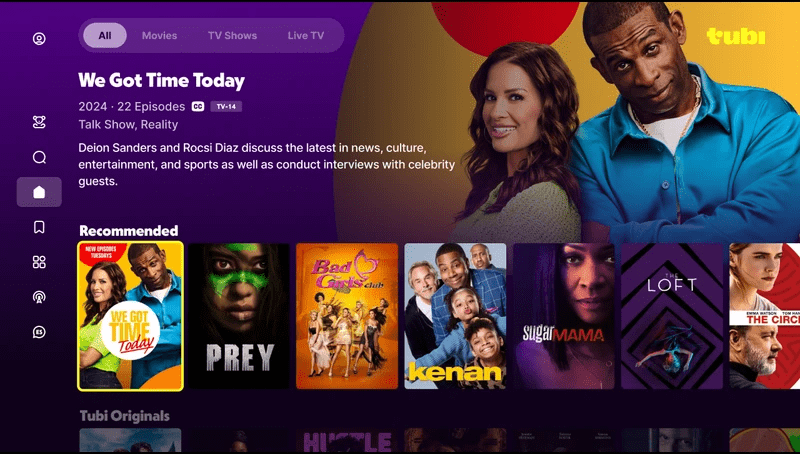
Tubi tends to work best for viewers who care more about “something good right now” than “the newest title on the internet.”
It’s a strong fit for:
- Viewers who want free streaming without subscription fatigue.
- Households that rotate paid services and want a permanent backup option.
- People who enjoy browsing older gems, cult classic movies, and comfort titles.
- Anyone building a budget-friendly lineup for a second TV, dorm, or guest room.
- Viewers who don’t mind ads if the price is zero.
It can be less ideal for:
- People who only watch brand-new, premium releases.
- Viewers who hate ads with a passion.
- Households that want one single app to cover every niche and franchise.
- Anyone who expects a permanent “this title will always be here” library.
A simple rule: if the household is happy trading ads for free entertainment, Tubi usually earns a spot in the lineup.
How the Free Model Actually Works
The platform is powered by ads. That’s the deal. There’s no monthly fee, so the cost is interruptions during viewing.
What this means in practice:
- Ads can appear during both movies and episodes.
- The ad experience can vary by device, title, and viewing session.
- The platform works best for casual, relaxed viewing rather than ultra-serious no-interruption movie nights.
The smartest way to enjoy it is to set expectations correctly:
- Free streaming is about convenience and variety.
- Paid streaming is about premium experiences and specific must-watch titles.
- Both can coexist in the same household without conflict.
For a site like ForeverWatch, this angle is valuable because it helps readers understand why free platforms still matter, even when someone also subscribes to premium services.
Content Library
Tubi’s library usually feels like a giant, constantly changing bargain bin in a good way. It’s the kind of platform where viewers can stumble into something unexpectedly entertaining because the browsing pressure is lower. If something isn’t perfect, it didn’t cost anything.
A practical way to understand the catalog is to think in lanes:
Lane 1: Recognizable Titles
There are often movies people have heard of, older favorites, and familiar faces that make browsing easier.
This is where Tubi can work well for viewers who still enjoy revisiting 90s movies, 2000s movies, and older comfort picks without paying for another subscription.
Lane 2: Hidden Gems and Cult Picks
This is where the platform becomes fun. Viewers who enjoy discovery tend to get the most value here.
Tubi is especially useful when someone is open to weird, overlooked, older, or offbeat titles. That makes it a natural fit for people browsing black and white movies, low-budget thrillers, forgotten action films, and niche genre discoveries.
Lane 3: Comfort and Background Viewing
Even when someone isn’t in the mood to focus, there’s usually something watchable that works while cooking, working, or winding down.
This is where Tubi can quietly become useful for feel good movies, sitcom-style comfort, casual family viewing, or easy weekend background entertainment.
Lane 4: Rotating Availability
Titles can come and go. That’s normal. The best approach is to treat the catalog like a flowing river, not a permanent shelf.
That means viewers should not assume one movie will always be there. If a specific title is the whole reason for watching, they may still need to check where to watch movies before planning the night around it.
The Best Way to Browse Without Wasting Time
Many people open a free app and scroll until they’re annoyed. A better method:
- Pick a category, such as action, thriller, comedy, family, or horror.
- Decide on a time limit, such as under 90 minutes or under two hours.
- Save 5–10 options to a list.
- Choose one and press play without debating the perfect pick.
This turns browsing into a system, not a struggle.
Features That Actually Matter
Free platforms don’t need fancy extras to be useful. The features that matter are the ones that make it easier to find and enjoy content.
Search That Saves Time
Search is underrated on TV. People scroll because typing feels annoying, then they waste time. The better approach is to search by actor, genre, or mood.
Example: instead of only searching “comedy,” a viewer can search “dark comedy,” “buddy comedy,” or “rom-com.” Results tend to feel more specific and less random.
This also helps genre fans. Someone who wants horror movies should search deeper than just “horror” if they want slashers, supernatural titles, monster films, or psychological thrillers.
Watchlists and Saved Titles
A watchlist is a decision-fatigue killer, especially for free platforms where the catalog rotates.
The best approach:
- Keep the list short, around 10–20 titles max.
- Remove anything that no longer excites.
- Use it as a choose-from-here queue, not storage.
- Add titles when browsing casually, not only when everyone is already waiting.
A short watchlist makes free streaming feel more organized.
Category Browsing That Supports Discovery
Tubi is built for discovery. People who treat it like a premium service and expect only the newest hits often miss the point. It shines when viewers browse like explorers.
Useful categories can include:
- Action.
- Comedy.
- Thriller.
- Horror.
- Family.
- Drama.
- Documentaries.
- Older movies.
- Niche genre shelves.
This is also where families can find kids movies or lighter options without immediately paying for another family-focused subscription.
Multi-Device Convenience
The platform feels most valuable when it works on:
- The living-room TV for real movie nights.
- A phone or tablet for casual viewing.
- A laptop for background entertainment.
- A second TV, guest room, dorm room, or kitchen setup.
The more devices it fits, the more it becomes a default option.
Pricing Approach
Tubi is free. That’s the headline.
But a good review still needs to explain the real pricing decision: time and tolerance for ads.
Here’s a clean way to frame the value:
- If a household watches free content often, it reduces the pressure to keep multiple paid subscriptions active.
- If a household mainly watches premium originals, it still works as a filler platform while waiting for the next big season drop elsewhere.
- If ads feel unbearable, the platform can still be used strategically for background viewing, short episodes, or casual nights.
A Simple Step-by-Step Value Test
Use this process before deciding whether Tubi deserves a permanent spot:
- Use it for one week as a backup streamer
Try it during low-pressure moments, not only during serious movie nights. - Notice when ads feel fine versus annoying
Ads may be acceptable for casual viewing but irritating during focused films. - Decide the role
Is it a background TV app, discovery platform, budget movie night option, or second-TV solution? - Keep it installed if it fills a real gap
A free app does not need to be used every day to be useful.
When the role is clear, the platform stops feeling random and starts feeling practical.
User Base and Who Enjoys It Long-Term
Tubi tends to stick with viewers who like value, variety, and low commitment.
Common long-term users:
- Budget-first households: people who don’t want subscription creep.
- Rotation strategists: viewers who pause paid services and still want entertainment.
- Background viewers: people who prefer something on rather than silence.
- Discovery lovers: viewers who enjoy stumbling into unexpected picks.
- Families needing extras: households that want more viewing options without paying for another service.
The viewers who struggle most are usually:
- People who want the newest releases included.
- Viewers who hate interruptions during movies.
- Households that only watch a tight list of specific titles and don’t browse.
Advantages
Here’s where Tubi consistently wins in real life:
- Zero Subscription Pressure
It’s easy to install, easy to keep, and easy to use without feeling trapped. - Huge Something-to-Watch Value
Even on boring nights, it usually offers a few decent options quickly. - Great for Rotation Streaming Strategies
When someone pauses paid subscriptions, entertainment doesn’t disappear. - Discovery Feels Fun Because the Stakes Are Low
Free browsing feels lighter. Viewers experiment more. - Perfect for Secondary TVs and Casual Setups
Guest rooms, dorms, older TVs, and kitchen TV setups get a big upgrade.
Disadvantages
The downsides are mostly tied to the free model and expectations.
- Ads Are the Price
For some viewers, that’s a dealbreaker, especially during intense movies. - Not Designed for Must-Watch Newest Release Nights
Premium services and rental stores usually win for brand-new titles. - Catalog Rotation Can Frustrate Title-Chasers
If someone expects a title to be there forever, they’ll be disappointed sometimes. - Discovery Quality Depends on Patience
Viewers who refuse to browse beyond the homepage may feel like the catalog is all the same. - Not Every Region or Device Experience Feels Identical
Availability and presentation can vary depending on where a viewer lives and what device they use.
None of these flaws kill the value. They just define what the platform is and what it isn’t.
Safety, Privacy, and Account Security
Free streaming is generally safe when viewers stick to official apps and keep basic device hygiene.
Practical safety checklist:
- Install the app from official app stores on the device.
- Avoid free streaming websites that look like clones or unofficial copies.
- Don’t enter personal details unless the app clearly requires it.
- Keep the device updated because updates matter more than people think.
- For families, supervise kids viewing and use appropriate categories.
Family Safety Tip That Actually Works
The biggest risk with free platforms isn’t hacking. It’s unexpected content showing up in a living-room setting.
The best fix is simple: kids should watch with guidance and kid-appropriate browsing habits. If the household wants hands-off kids streaming, a dedicated kids-first service may feel easier.
Comparisons That Help Viewers Choose
Most people don’t choose free streaming in isolation. They choose it as part of a lineup.
Tubi vs Netflix
Netflix is premium, subscription-based, and often driven by originals and trending releases. Tubi is free, discovery-driven, and built to keep entertainment flowing without a bill.
While it is occasionally possible to watch movies for free on Netflix through rare promotional trials or specific carrier bundles, the vast majority of its premium catalog requires a strict monthly payment. In contrast, Tubi provides free variety supported by ads. A household may keep Netflix for exclusive series and new originals, while using Tubi for older movies, casual browsing, and reliable free backup viewing.
Tubi vs Pluto TV
Pluto TV often shines with a live-channel, guide-based vibe. Tubi is usually stronger as a free on-demand library. Viewers who like channel surfing often prefer Pluto TV. Viewers who want to pick a movie on demand often lean Tubi.
A simple split works well: Pluto TV for channel-style viewing, Tubi for free on-demand movie browsing.
Tubi vs Freevee
Freevee is another free, ad-supported option that can feel more curated in certain areas, depending on region and device. The best choice usually comes down to which library feels better to the viewer that week.
A household can use both without overthinking it because neither adds a monthly subscription.
Tubi vs Prime Video Rentals
Prime Video rentals are for “I want this exact title tonight.” Tubi is for “give me something decent for free.”
They solve different problems and can coexist easily. Prime Video helps with best movies to watch on Amazon Prime and specific rentals, while Tubi covers free discovery nights.
Tubi vs Rakuten TV
Rakuten TV can be stronger when the viewer wants free streaming plus the option to rent or buy in one place. Tubi is cleaner when the viewer mainly wants free on-demand browsing without thinking about purchases.
A household that rents often may compare Rakuten TV with Tubi. A household that wants free-only entertainment may keep Tubi as the simpler choice.
Alternatives to Tubi
The best alternative depends on what the viewer is trying to accomplish.
If the goal is free on-demand streaming, alternatives often include:
- Freevee.
- Pluto TV, especially if live channels matter.
- Popcornflix.
- Crackle.
- Other free streaming apps available in the viewer’s region.
If the goal is premium originals and deep libraries, alternatives often include:
- Netflix.
- Prime Video.
- Disney Plus.
- Max.
- Hulu.
- Paramount Plus.
If the goal is watching a specific new movie tonight, a rental store is often the cleanest solution:
- Prime Video rentals.
- Rakuten TV.
- Google TV.
- YouTube Movies.
- Vudu.
- Other rental platforms with strong device support.
A smart household lineup often looks like this:
- One free on-demand app for casual viewing.
- One paid service for premium originals.
- One rotation service swapped based on what’s trending.
- One rental option for specific movie nights.
Tubi works best when the household lets it be what it is: free, flexible, ad-supported entertainment for casual discovery. It does not need to replace premium platforms. It just needs to reduce boredom without adding another bill.
Alternatives to Tubi
The best alternative depends on what the viewer is trying to accomplish.
If the goal is free on-demand streaming, alternatives often include:
- Freevee
- Pluto TV (especially if live channels matter)
- Other free streaming apps available in the viewer’s region
If the goal is premium originals and deep libraries, alternatives often include:
- Netflix
- Prime Video
- Disney Plus
- Max
If the goal is watching a specific new movie tonight, a rental store is often the cleanest solution.
A smart household lineup often looks like this:
- One free on-demand app for casual viewing
- One paid service for premium originals
- One rotation service swapped based on what’s trending
FAQs
1) Is Tubi really free?
Yes. It’s free to watch, and ads support the service.
2) Do viewers need a credit card to use it?
Usually no for basic viewing. The experience is designed to be accessible without a subscription.
3) Why are there ads during movies and shows?
Ads are how free streaming platforms pay for licensing and operations.
4) Is it good for movie nights?
It can be, especially for casual movie nights. Viewers who want an ad-free premium experience may prefer paid services.
5) Does the library stay the same all the time?
No. Titles can rotate due to licensing windows and availability changes.
6) Is it better than paid streaming services?
It depends on the goal. It’s better for free variety. Paid services are usually better for brand-new releases and premium originals.
7) Is it good for background TV?
Yes. It’s a strong option for casual, low-effort viewing while doing other things.
8) How can viewers find better titles faster?
Use search, browse by specific genres, and keep a short watchlist so good finds don’t get lost.
9) Is it safe to use?
Yes, when installed from official app stores and used on updated devices.
10) Can kids use it safely?
Kids viewing should be supervised, and households should guide browsing toward age-appropriate categories.
11) Why does the quality of titles feel inconsistent?
Free libraries aim for variety and availability. The value comes from range and discovery, not only premium hits.
12) Does it work on smart TVs?
In many cases, yes, depending on the TV platform and region.
13) Are ads the same amount for every viewer?
Ad load can vary by device, title, and session. Free platforms don’t always feel identical day to day.
14) What’s the smartest way to use it long-term?
Keep it installed as a permanent free option, use it for discovery and casual nights, and rely on paid services for must-watch premium content.
15) Who should skip it?
Viewers who demand ad-free viewing and only want the newest releases included may prefer subscription services or rental stores.
Final Verdict
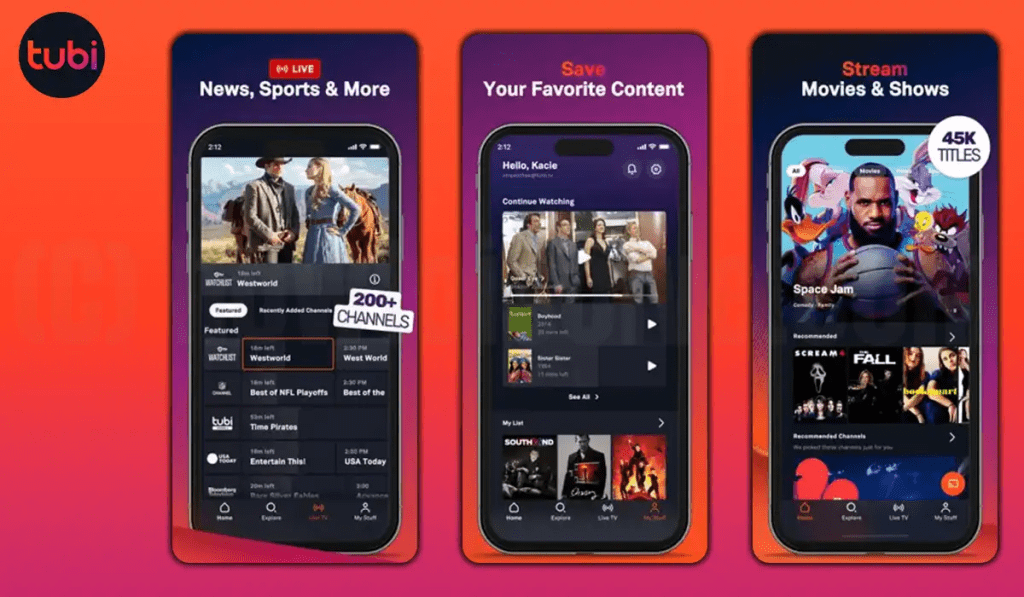
Tubi earns its place by making streaming feel easy again: free movies and shows, quick discovery, and zero subscription pressure. It won’t replace premium services for must-watch originals or brand-new releases, but it doesn’t need to. Its real strength is keeping entertainment available at all times—especially when budgets are tight, subscriptions rotate, or nobody wants to spend 30 minutes choosing.
For ForeverWatch readers building a practical streaming lineup, Tubi works best as the always-installed free option: reliable, surprisingly fun, and ready to fill the gaps when the paid services aren’t hitting the mood.