Kanopy is the streaming service that flips the usual model on its head: instead of paying with a subscription or paying with ads, viewers typically pay with library access. That’s why it feels so different from the rest of the streaming services world. It’s often ad-free, it leans educational and thoughtful, and it’s powered through public libraries and universities rather than direct monthly plans.
This is also why people get confused. Some expect a normal signup flow with a credit card. Others expect a giant catalog of new mainstream releases. Kanopy usually isn’t that. It’s more like a digital extension of a library’s mission: films, watch documentaries style content, and series that feel curated, useful, or culturally valuable, delivered through a clean streaming interface.
This review breaks down what Kanopy actually is, how it works in real households, how the monthly credits system typically behaves, what features matter most, where it shines, where it can frustrate viewers, how to use it safely, and which alternatives make sense if access isn’t available.
How Kanopy Works
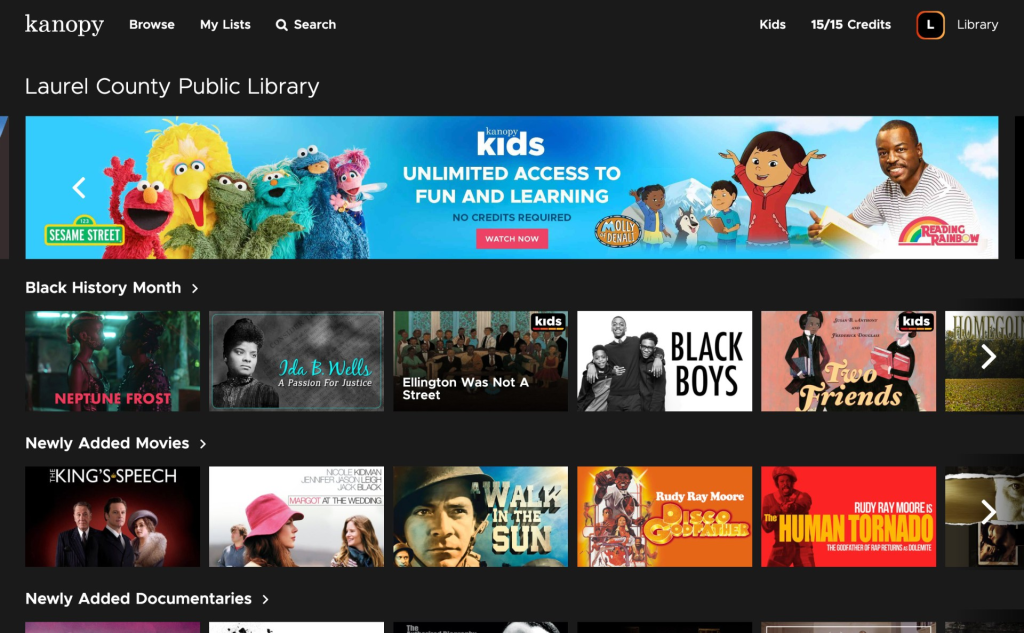
How Kanopy Works
Kanopy usually works through one of two access routes:
- Public library access: viewers connect with a library card, and sometimes a PIN.
- University access: students or staff log in through their institution.
There’s one key reality that shapes everything: availability depends on whether a library or university participates. If the institution doesn’t offer it, there’s often no simple way to just subscribe like a normal service.
The Monthly Credits Idea
Many libraries use a ticket or credit system. Instead of unlimited streaming, viewers receive a set number of credits per month, and a movie might cost one or more credits when playback starts.
The exact number of credits varies by institution, and credits commonly reset monthly.
That’s not a weakness. It’s a design choice tied to how libraries fund access. Kanopy can feel premium and ad-free because the institution covers usage costs, and the credit system helps control budget.
What This Feels Like at Home
A household uses Kanopy best when it treats it like a film-night or learning-night platform:
- Choose intentionally.
- Use credits on titles that feel worth it.
- Save casual browsing for other apps.
- Keep Kanopy as the zero-ad, high-quality option in the streaming lineup.
That makes it different from free ad-supported apps. Kanopy is not built for endless background noise. It works better when viewers actually want to sit down and watch something with value.
Content Library and Catalog Expectations
Kanopy tends to lean toward:
- Documentaries.
- Classic cinema.
- Independent film.
- International movies.
- Educational series.
- Thoughtful, award-oriented picks.
For some viewers, that’s perfect. For others, it feels too serious. But that’s the point. Kanopy often fills the gap that mainstream services don’t prioritize.
A practical expectation to set: this platform is rarely about day-one blockbusters. It’s about depth, discovery, and quality titles that libraries actually want to provide.
Documentary and Learning Value
Kanopy’s strongest lane is often nonfiction and educational viewing. This is where it can become genuinely useful for students, adults, families, and curious viewers who want more than casual entertainment.
It fits especially well for people who want to watch documentaries without ads, especially when the catalog includes subjects like history documentaries, science documentaries, political documentaries, or cultural stories that feel more educational than disposable.
That gives Kanopy a very clear role: it is not trying to be the loudest streaming app. It is trying to be one of the more thoughtful ones.
Educational Series and TV-Style Learning
Because Kanopy can include educational series, this is also where TV-style anchors make sense. We’re not forcing normal entertainment TV here. The fit is documentary TV, learning series, and factual viewing.
For viewers who prefer structured episodes instead of one long film, Kanopy can work well as a place to explore best docuseries and best documentary TV shows style viewing, depending on what their library provides.
That matters because some households learn better in shorter episode-based sessions. Not every useful title needs to be a two-hour film.
Family and Kids Viewing
Kanopy Kids is one of the platform’s best household features. It can make the service feel more valuable than expected because families get a safer, more focused viewing area without the usual ad-supported chaos.
This is where Kanopy can support parents looking for movies to watch with kids, educational shorts, gentle animated picks, and good family movies to watch without turning the living-room TV into a random recommendation mess.
The key advantage is not just that kids content exists. It’s that the kids area can be separated, controlled, and used with more confidence.
Classic and Cultural Film Value
Kanopy can also work well for viewers who want older, thoughtful, or culturally important films without digging through random catalogs.
That makes it a natural fit for viewers interested in historical movies, classic cinema, educational film collections, and titles that feel more connected to culture, history, or study than pure entertainment.
This is not the same as opening a mainstream service and picking whatever is trending. Kanopy feels more like borrowing from a digital film shelf with purpose.
Key Features That Matter
Kanopy doesn’t need a hundred flashy features to be valuable. The features that matter are the ones that make the service easy, family-friendly, and worth using within the monthly credit limits.
Ad-Free Viewing
This is the emotional hook.
No ad breaks. No free-tier interruptions. No random mid-roll ads cutting into a serious documentary or quiet film moment.
That makes Kanopy feel premium even when viewers are not paying a normal monthly subscription. For people tired of ads, this alone can make the service feel special.
Credits and Ticket Dashboard Clarity
A good user experience should show:
- How many credits remain.
- When credits reset.
- Whether a title uses credits.
- Whether kids content is treated differently.
- Whether a title can be watched again after starting.
That single detail changes how people plan viewing.
Kanopy becomes easier to enjoy when viewers stop treating credits like a surprise and start treating them like a monthly watch budget.
Kanopy Kids
Kanopy Kids is a standout feature for families, especially because it typically acts like a protected area with age-appropriate content.
In many setups, kids content doesn’t drain monthly credits the same way regular titles do. That can make it a real value multiplier for households with children.
For younger viewers, Kanopy can support educational cartoons, story-based learning, gentle films, and best animated movies style discovery when the library’s kids catalog is strong enough.
Parental Controls With a PIN
Parents can lock the experience so kids stay inside the kids collection unless an adult enters a PIN.
That’s the difference between kid-safe in theory and kid-safe in real life.
A good setup should include:
- A kids-safe viewing area.
- PIN protection.
- Adult control over what children access.
- Regular checks of viewing habits.
- Clear household rules around credits and screen time.
This matters because even thoughtful platforms need proper setup in shared homes.
Multi-Device Support
Kanopy is built to be used on TVs, phones, tablets, and web browsers. That matters because library streaming is only valuable if it’s convenient.
A strong Kanopy setup should work for:
- Living-room documentary nights.
- Tablet viewing for students.
- Laptop viewing for research.
- Family viewing on the main TV.
- Quiet solo watching when someone wants something thoughtful.
The fewer device problems, the more likely viewers are to actually use the credits before they reset.
Pricing and Access
Kanopy is typically free to the viewer when their library or university provides it. That is the entire advantage.
But free comes with structure.
Here’s the evergreen way to understand the cost model:
- Viewers generally don’t pay a monthly subscription fee.
- Institutions cover costs.
- Many libraries limit monthly viewing through credits or tickets.
- Access depends on participating libraries or universities.
- The catalog can vary based on institution and region.
That makes Kanopy feel different from normal streaming. It is not a direct-to-consumer app in the usual sense. It is library-backed access.
How to Judge Value Quickly
A simple step-by-step test:
- Check access first
See whether the local library or university offers Kanopy. - Check the monthly credit system
Look at how many credits are included and when they reset. - Browse for ten minutes
Do not judge the service from the idea alone. Check the actual catalog. - Pick three titles
If three titles genuinely feel worth watching this month, Kanopy is already useful. - Decide the role
Is it for documentaries, family learning, classic film, educational series, or occasional movie nights?
If the catalog doesn’t match the household’s taste, it may still be useful as a documentary or classic film backup, but not as a main service.
Who Uses Kanopy Most
Kanopy tends to attract viewers who care about good picks more than endless picks.
Common long-term users:
- Students and researchers: documentaries, educational series, film studies, and academic support.
- Parents: Kanopy Kids, PIN controls, and ad-free viewing.
- Film lovers: classics, indie films, and world cinema.
- Budget-focused viewers: zero monthly cost beats subscription stacking.
- Ad-sensitive viewers: people tired of interruptions who still want free access.
- Curious households: families that want one platform with more learning value.
Viewers who often don’t stick with it:
- Households that only want mainstream franchise entertainment.
- People who dislike any kind of monthly limit.
- Viewers who want one service that covers everything.
- Sports-first viewers.
- People who only want the newest releases.
A quick summary: Kanopy is a quality-first service, not a quantity-first service.
Advantages
Here’s where Kanopy usually wins:
- It Can Be Genuinely Free for Viewers
In a world where every app wants another monthly payment, Kanopy feels refreshing. - Often Ad-Free
That single feature makes it feel premium even though it’s library-backed. - Strong Educational and Documentary Catalog
For many viewers, it becomes one of the best places to find serious documentaries without paying extra. - Great for Families Who Want Controlled Kids Viewing
Kanopy Kids plus a PIN is simple, but powerful. - Encourages Intentional Watching
Credits create a natural filter. People stop doom-scrolling and start choosing more carefully.
Disadvantages
Kanopy also has real limitations:
- Availability Isn’t Guaranteed
If a library or university doesn’t participate, access may not exist for that viewer. - Monthly Credits Can Feel Limiting
Some viewers dislike any ticket system. They want unlimited access. - Not Built for Trending Mainstream Entertainment
If a household’s taste is mostly blockbuster franchises, it may feel underpowered. - The Catalog Can Feel Niche Depending on the Region
Library collections and licensing vary. Some institutions have stronger selections than others. - Not Ideal as the Only Service for Most Households
It’s often best as a powerful second or third service: the ad-free, thoughtful option.
Safety and Best Practices
Kanopy is generally safe when used the normal way: through official apps and legitimate institution access.
The main safety risks are the same ones as any streaming account.
Practical safety checklist:
- Use strong passwords for streaming accounts and email accounts.
- Avoid sharing logins widely, especially with strangers.
- Keep devices updated.
- Use built-in parental controls if kids share the TV.
- Install only from official app stores or the official website.
- Sign out on public or shared devices.
- Keep library or university login details private.
A Note on Workarounds
If a title is unavailable because of institution access or regional licensing, the safest route is to use legitimate options: other library resources, rentals, or subscriptions.
That keeps the experience clean and avoids account issues.
Kanopy should be treated like a legitimate library-backed service, not something to game or bypass.
Best Alternatives to Kanopy
Kanopy should not mainly be compared with mass-market entertainment apps. Its real alternatives are platforms that serve a similar job: thoughtful films, documentaries, educational content, classic cinema, or library-style access.
Kanopy vs MUBI
MUBI is more cinema-club focused, with curated international and indie films chosen for taste and discovery. Kanopy feels more library-backed, educational, and access-dependent.
MUBI is better when the viewer wants a paid curated cinema habit. Kanopy is better when the viewer has library access and wants ad-free thoughtful viewing without another subscription.
Kanopy vs Criterion Channel
Criterion Channel is a stronger comparison for classic cinema, film history, director collections, and carefully programmed film culture. Kanopy can overlap with that audience, but its access model and educational angle make it feel more library-driven.
Criterion Channel may suit viewers who want deep film history as a paid subscription. Kanopy suits viewers who want library-backed access to thoughtful films and documentaries.
Kanopy vs GuideDoc
GuideDoc is a better comparison when the viewer mainly wants curated documentaries. Kanopy can include documentaries, classic films, international movies, and educational series, so it feels broader than a documentary-only service.
GuideDoc may fit viewers who want documentary curation first. Kanopy fits viewers who want documentaries plus library-backed film variety.
Kanopy vs Docsville
Docsville is another strong documentary-focused alternative. It makes sense for viewers who want factual storytelling and true-story programming in a more direct documentary lane.
Kanopy can be better for households that also want classic cinema, educational series, and kids-safe viewing alongside documentaries.
Kanopy vs Curiosity Stream
Curiosity Stream is usually a better fit when the viewer wants science, history, nature, technology, and factual learning as the main event.
Kanopy can also support learning, but it is more mixed: documentaries, educational series, film history, international cinema, and library-backed access. Curiosity Stream is more specialized around factual programming.
Kanopy vs Library and University Digital Resources
Some viewers may not need another app at all. Their library or university may already offer other digital services, databases, film collections, or educational video platforms.
That is worth checking because Kanopy is part of a bigger idea: libraries can be streaming gateways too.
Alternatives to Kanopy by Viewing Need
If the goal is ad-free, library-backed viewing, check:
- Kanopy through a public library.
- Kanopy through a university.
- Other library video services available locally.
If the goal is curated cinema, compare:
- MUBI.
- Criterion Channel.
- Fandor.
- Sundance Now.
If the goal is documentary-first viewing, compare:
- GuideDoc.
- Docsville.
- Curiosity Stream.
- Documentary sections inside broader services.
If the goal is family-safe learning, compare:
- Kanopy Kids.
- Educational kids platforms available through the library.
- Public broadcaster kids sections where available.
If the goal is classic films, educational films, and thoughtful documentaries, Kanopy should be one of the first services to check before adding another paid subscription.
Final Takeaway
Kanopy works best when viewers understand the mission. It is not trying to be the biggest streaming service, the loudest entertainment app, or the newest-release machine. It is a library-backed platform for thoughtful viewing: documentaries, classic cinema, educational series, international films, and family-safe kids content.
For households with access, it can be one of the smartest free streaming options available because it often removes ads, supports better choices, and gives viewers something more useful than another endless homepage.
The best role for Kanopy is clear: use it when the household wants ad-free, thoughtful, intentional viewing without adding another monthly bill.’s always a fallback option when subscriptions feel stale.
FAQs
- What is Kanopy?
Kanopy is a streaming service typically offered through public libraries and universities, often providing ad-free movies, documentaries, and educational content. - Is Kanopy free to use?
Kanopy is usually free for viewers if their library or university provides access. - Why does Kanopy require a library card or university login?
Because participating institutions sponsor access. The service is often funded through libraries and universities rather than direct subscriptions. - Does Kanopy have ads?
Many library-backed setups are ad-free, which is one of the biggest reasons people love it. - What are credits or tickets on Kanopy?
Many libraries give users a set number of monthly credits. Playing a title may use one or more credits depending on the library’s rules. - Do credits roll over to the next month?
In many cases, monthly credits reset and unused credits don’t carry over. The exact rules depend on the institution. - What is Kanopy Kids?
Kanopy Kids is a kid-friendly section with age-appropriate titles and strong parental control options. - Can parents lock Kanopy Kids?
Yes. Parental controls commonly allow a PIN so children can’t exit the kids section without permission. - Can Kanopy replace Netflix or Prime Video?
Usually not. It’s better as a complement—especially for documentaries, classics, and thoughtful films. - Is Kanopy available worldwide?
Availability depends on institution participation and licensing. Some regions have strong access through universities, while others may have limited options. - Can viewers download titles for offline watching?
Offline features depend on device and service rules. Many viewers primarily stream rather than download. - Is Kanopy good for students?
Yes. It often includes educational series and documentaries that fit academic viewing, research, and film studies. - What should viewers do if their library doesn’t offer access?
Check nearby library systems, university access (if applicable), or use alternatives like Tubi, Pluto TV, or rentals for specific titles. - Is Kanopy safe for families?
Yes, especially when parental controls and PIN settings are enabled and kids use the kids section. - Who should skip Kanopy?
Viewers who want unlimited mainstream blockbusters or dislike any monthly viewing limits may prefer traditional subscription platforms.
Final Verdict
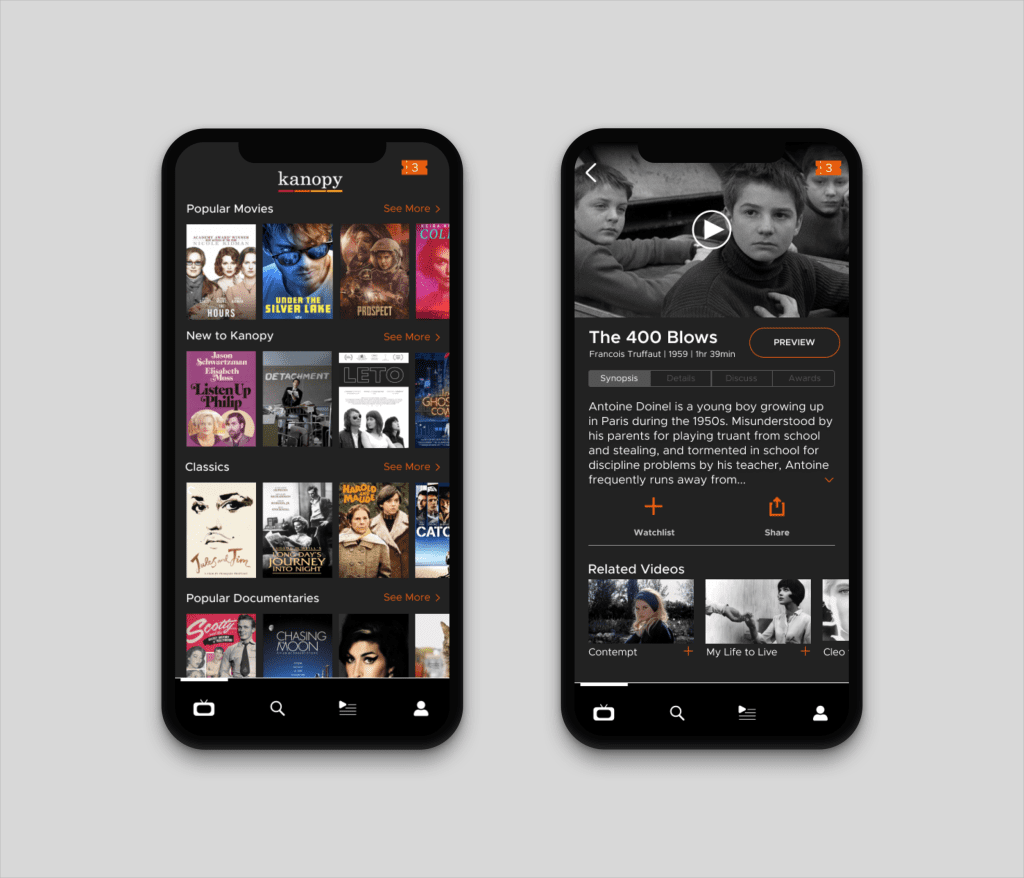
Kanopy is one of the smartest “free” streaming options because it often delivers ad-free, high-quality films through the credibility of libraries and universities, not through aggressive upsells. It won’t replace mainstream subscription platforms for blockbuster entertainment, but it can easily become the most valuable supporting app in a household lineup—especially for documentaries, classics, family-safe kids viewing, and intentional film nights. For ForeverWatch readers who want more depth without more monthly payments, Kanopy is a strong, low-risk install that can quietly become a favorite.